################################################################################
################### ~ All-cause child mortality full code ~ ####################
################################################################################
### Step -----------------------------------------------------------------------
#### Step 1.1: Install or load required packages -------------------------------
# install or load required packages
pacman::p_load(
  here,       # for handling relative file paths
  haven,      # for reading DHS .dta files and labelled data
  dplyr,      # for data wrangling
  stringr,    # for filtering U5MR rows using regex
  tibble,     # for rownames_to_column
  ggplot2,    # for visualizing U5MR maps
  sf,         # for working with shapefiles
  rio,        # for saving outputs in .csv and .rds formats
  DHS.rates   # for calculating under-five mortality rates
)

#' Check DHS Indicator List from API
#'
#' @param countryIds DHS country code(s), e.g., "EG"
#' @param indicatorIds Specific indicator ID(s)
#' @param surveyIds Survey ID(s)
#' @param surveyYear Exact year
#' @param surveyYearStart Start of year range
#' @param surveyYearEnd End of year range
#' @param surveyType DHS survey type (e.g., "DHS", "MIS")
#' @param surveyCharacteristicIds Filter by survey characteristic ID
#' @param tagIds Filter by tag ID
#' @param returnFields Fields to return
#'   (default: IndicatorId, Label, Definition)
#' @param perPage Max results per page (default = 500)
#' @param page Specific page to return (default = 1)
#' @param f Format (default = "json")
#'
#' @return A data.frame of indicators
#' @export
check_dhs_indicators <- function(
  countryIds = NULL,
  indicatorIds = NULL,
  surveyIds = NULL,
  surveyYear = NULL,
  surveyYearStart = NULL,
  surveyYearEnd = NULL,
  surveyType = NULL,
  surveyCharacteristicIds = NULL,
  tagIds = NULL,
  returnFields = c(
    "IndicatorId", "Label", "Definition", "MeasurementType"
  ),
  perPage = NULL,
  page = NULL,
  f = "json"
) {
  # base URL
  base_url <- "https://api.dhsprogram.com/rest/dhs/indicators?"

  # build query string
  params <- list(
    countryIds = countryIds,
    indicatorIds = indicatorIds,
    surveyIds = surveyIds,
    surveyYear = surveyYear,
    surveyYearStart = surveyYearStart,
    surveyYearEnd = surveyYearEnd,
    surveyType = surveyType,
    surveyCharacteristicIds = surveyCharacteristicIds,
    tagIds = tagIds,
    returnFields = paste(returnFields, collapse = ","),
    perPage = perPage,
    page = page,
    f = f
  )

  # drop NULLs and encode
  query <- paste(
    purrr::compact(params) |>
      purrr::imap_chr(
        ~ paste0(
          .y, "=", URLencode(as.character(.x), reserved = TRUE)
        )
      ),
    collapse = "&"
  )

  # full URL
  full_url <- paste0(base_url, query)

  # fetch with progress bar
  response <- httr::GET(full_url, httr::progress())
  jsonlite::fromJSON(httr::content(
    response,
    as = "text",
    encoding = "UTF-8"
  ))$Data
}

#' Query DHS API Directly via URL Parameters
#'
#' Builds and queries DHS API for indicator data using URL-based access
#' instead of rdhs package.
#'
#' @param countryIds Comma-separated DHS country code(s), e.g., "SL"
#' @param indicatorIds Comma-separated DHS indicator ID(s),
#'   e.g., "CM_ECMR_C_U5M"
#' @param surveyIds Optional comma-separated survey ID(s), e.g., "SL2016DHS"
#' @param surveyYear Optional exact survey year, e.g., "2016"
#' @param surveyYearStart Optional survey year range start
#' @param surveyYearEnd Optional survey year range end
#' @param breakdown One of: "national", "subnational", "background", "all"
#' @param f Format to return (default is "json")
#'
#' @return A data.frame containing the `Data` portion of the API response.
#' @export
download_dhs_indicators <- function(
  countryIds,
  indicatorIds,
  surveyIds = NULL,
  surveyYear = NULL,
  surveyYearStart = NULL,
  surveyYearEnd = NULL,
  breakdown = "subnational",
  f = "json"
) {
  # base URL
  base_url <- "https://api.dhsprogram.com/rest/dhs/data?"

  # assemble query string
  query <- paste0(
    "breakdown=",
    breakdown,
    "&indicatorIds=",
    indicatorIds,
    "&countryIds=",
    countryIds,
    if (!is.null(surveyIds)) paste0("&surveyIds=", surveyIds),
    if (!is.null(surveyYear)) paste0("&surveyYear=", surveyYear),
    if (!is.null(surveyYearStart)) {
      paste0("&surveyYearStart=", surveyYearStart)
    },
    if (!is.null(surveyYearEnd)) {
      paste0("&surveyYearEnd=", surveyYearEnd)
    },
    "&lang=en&f=",
    f
  )

  full_url <- paste0(base_url, query)

  cli::cli_alert_info("Downloading DHS data...")

  response <- httr::GET(full_url, httr::progress())

  if (httr::http_error(response)) {
    stop("API request failed: ", httr::status_code(response))
  }

  content_raw <- httr::content(response, as = "text", encoding = "UTF-8")
  data <- jsonlite::fromJSON(content_raw)$Data

  cli::cli_alert_success(
    "Download complete: {nrow(data)} records retrieved."
  )
  return(data)
}
#### Step 1.2: Download the relevant indicators --------------------------------
# get mean under-five mortality rate at subnational level
u5mr_mean_dhs_ind <- download_dhs_indicators(
  countryIds = "SL",
  surveyYear = 2019,
  indicatorIds = "CM_ECMR_C_U5M",
  breakdown = "subnational"
) |>
  dplyr::mutate(
    dhs_indicator_id = "CM_ECMR_C_U5M",
    indicator = "under-five mortality rate"
  ) |>
  dplyr::select(
    dhs_indicator_id,
    indicator,
    adm2_code = RegionId,
    mean_u5mr = Value
  )

# get lower interval under-five mortality rate at subnational level
u5mr_low_dhs_ind <- download_dhs_indicators(
  countryIds = "SL",
  surveyYear = 2019,
  indicatorIds = "CM_ECMR_C_U5L",
  breakdown = "subnational"
) |>
  dplyr::mutate(
    dhs_indicator_id = "CM_ECMR_C_U5L",
    indicator = "under-five mortality rate"
  ) |>
  dplyr::select(
    adm2_code = RegionId,
    low_u5mr = Value
  )

# get upper interval under-five mortality rate at subnational level
u5mr_upp_dhs_ind <- download_dhs_indicators(
  countryIds = "SL",
  surveyYear = 2019,
  indicatorIds = "CM_ECMR_C_U5U",
  breakdown = "subnational"
) |>
  dplyr::mutate(
    dhs_indicator_id = "CM_ECMR_C_U5U",
    indicator = "under-five mortality rate"
  ) |>
  dplyr::select(
    adm2_code = RegionId,
    upp_u5mr = Value
  )
#### Step 1.3: Join indicators with shapefile ----------------------------------
# get the DHS adm2 shapefile
sle_dhs_shp2 <- sf::read_sf(
  here::here(
    "01_foundational/1a_administrative_boundaries",
    "1ai_adm2",
    "sdr_subnational_boundaries_adm2.shp"
  )
) |>
  dplyr::select(
    adm1 = OTHREGNA,
    adm2 = DHSREGEN,
    adm2_code = REG_ID
  ) |>
  # make adm1 and adm2 to upper case
  dplyr::mutate(
    adm1 = toupper(adm1),
    adm2 = toupper(adm2)
  )

# join the mean, confidence intervals U5MR estimates
dhs_api_indi <- u5mr_mean_dhs_ind |>
  dplyr::left_join(u5mr_low_dhs_ind, by = "adm2_code") |>
  dplyr::left_join(u5mr_upp_dhs_ind, by = "adm2_code") |>
  # join adm2 DHS shapefile to data only keeping adm2 indicators
  dplyr::inner_join(sle_dhs_shp2, by = "adm2_code") |>
  # select only relevant columns
  dplyr::select(
    dhs_indicator_id,
    indicator,
    adm1,
    adm2,
    mean_u5mr,
    low_u5mr,
    upp_u5mr,
    geometry
  ) |>
  sf::st_as_sf()

# check indicators
sf::st_drop_geometry(dhs_api_indi)
#### Step 1.4: Visualize subnational indicator data ----------------------------
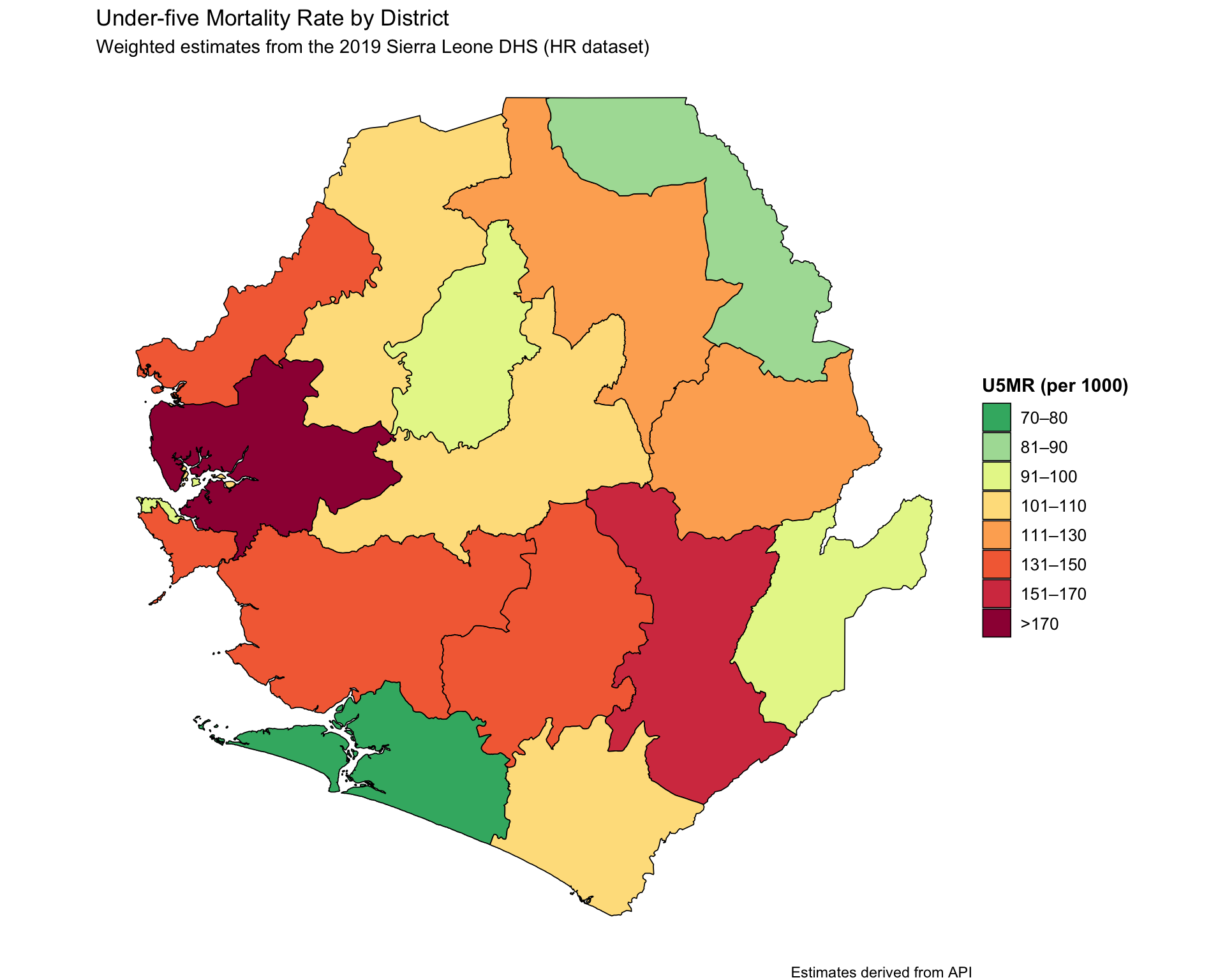
u5mr_final_api <- dhs_api_indi |>
  dplyr::mutate(
    prop_cat = cut(
      mean_u5mr,
      breaks = c(
        0, 80, 90, 100, 110, 130, 150, 170, Inf
      ),
      labels = c(
        "70–80",
        "81–90",
        "91–100",
        "101–110",
        "111–130",
        "131–150",
        "151–170",
        ">170"
      ),
      include.lowest = TRUE,
      right = FALSE
    )
  )

# visualise the U5MR results
map_u5mr <- u5mr_final_api |>
  ggplot2::ggplot() +
  ggplot2::geom_sf(
    ggplot2::aes(fill = prop_cat, geometry = geometry),
    color = "black",
    size = 0.3,
    show.legend = TRUE
  ) +
  ggplot2::scale_fill_manual(
    name = "U5MR (per 1000)",
    values = c(
      ">170" = "#9E0142",
      "151–170" = "#D53E4F",
      "131–150" = "#F46D43",
      "111–130" = "#FDAE61",
      "101–110" = "#FEE08B",
      "91–100" = "#E6F598",
      "81–90" = "#ABDDA4",
      "70–80" = "#3CB371"
    ),
    drop = FALSE
  ) +
  ggplot2::labs(
    title = "Under-five Mortality Rate by District",
    subtitle = paste(
      "Weighted estimates from the 2019 Sierra Leone DHS",
      "(HR dataset)"
    ),
    caption = "Estimates derived from API"
  ) +
  ggplot2::theme_void() +
  ggplot2::theme(
    legend.title = ggplot2::element_text(face = "bold"),
    legend.text = ggplot2::element_text(size = 10)
  )

map_u5mr
# save u5mr plot
ggplot2::ggsave(
  plot = map_u5mr,
  filename = here::here(
    "03_output/3a_figures/u5mr_sle_adm2.png"
  ),
  width = 12, height = 9, dpi = 300
)
#### Step 1.5: Save processed U5MR ---------------------------------------------
# define save directory
save_path <- here::here("1.6_health_systems/1.6a_dhs")

# save final joined U5MR data
rio::export(
  sle_dhs_shp2 |> sf::st_drop_geometry(),
  here::here(
    save_path, "processed", "final_u5mr_sle_adm2.csv"
  )
)

# save final joined U5MR data with spatial data
rio::export(
  sle_dhs_shp2,
  here::here(
    save_path, "processed", "final_u5mr_sle_adm2.rds"
  )
#### Step 2.1: Load the relevant DHS data --------------------------------------
# import the KR (children's) data
sle_dhs_kr <- readRDS(
  here::here(
    "1.6_health_systems/1.6a_dhs/raw/SLKR7AFL.rds"
  )
) |>
  # make location column
  dplyr::mutate(
    adm1 = haven::as_factor(v024) |>
      toupper(),
    adm2 = haven::as_factor(sdist) |>
      toupper(),
    location = paste0(adm1, ", ", adm2)
  )
#### Step 2.2: Calculate U5MR at district level --------------------------------
# calculate five-year under-five mortality rates
mort_sl <- sle_dhs_kr |>
  DHS.rates::chmort(
    JK = "Yes",                 # For getting confidence intervals
    Strata = "v022",            # Strata variable for complex survey design
    Cluster = "v021",           # Cluster (PSU) identifier
    Weight = "v005",            # Sampling weight
    Date_of_interview = "v008", # Date of interview (CMC format)
    Date_of_birth = "b3",       # Child’s date of birth (CMC format)
    Class = "location"          # Grouping variable (e.g., region, district)
  )

  mort_sl
#### Step 2.3: Prepare subnational U5MR for plotting ---------------------------
# extract U5MR and join with location-level metadata
mort_sl2 <- mort_sl |>
  tibble::rownames_to_column(var = "type") |>
    # convert rownames to a column
  dplyr::filter(stringr::str_detect(type, "U5MR")) |>
    # keep only U5MR rows
  dplyr::left_join(
    # attach admin names from original dataset
    dplyr::distinct(sle_dhs_kr, location, adm1, adm2),
    by = c("Class" = "location")
  ) |>
  # keep only the relevant columns
  dplyr::select(
    adm1,
    adm2,
    mean_u5mr = R,
    low_u5mr = LCI,
    upp_u5mr = UCI
  )

mort_sl2
#### Step 2.4: Plot U5MR at district level -------------------------------------
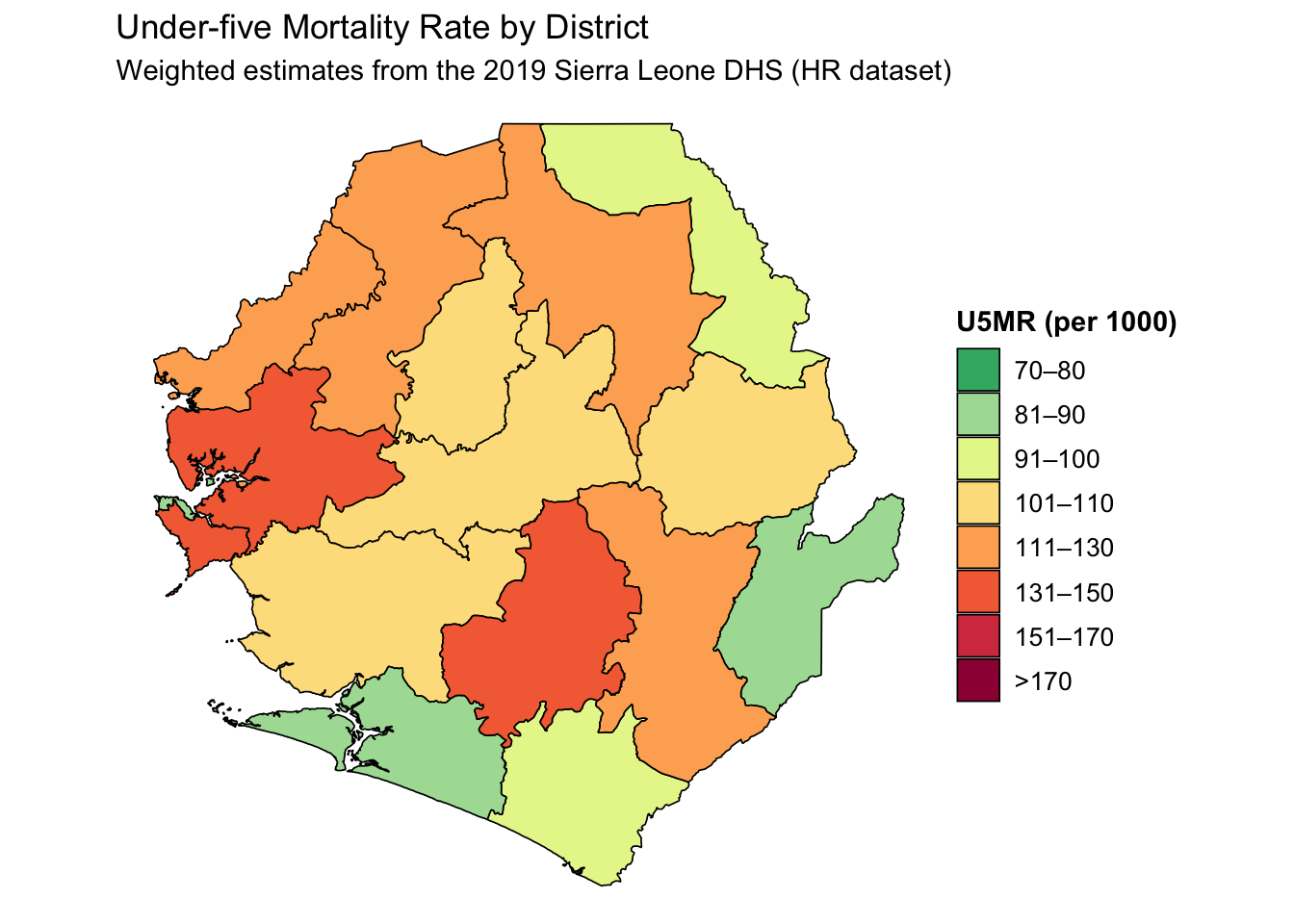
u5mr_final <- mort_sl2 |>
  dplyr::left_join(
    dplyr::select(sle_dhs_shp2, adm1, adm2),
    by = c("adm1", "adm2")
  ) |>
  dplyr::mutate(
    prop_cat = cut(
      mean_u5mr,
      breaks = c(
        0, 80, 90, 100, 110, 130, 150, 170, Inf
      ),
      labels = c(
        "70–80",
        "81–90",
        "91–100",
        "101–110",
        "111–130",
        "131–150",
        "151–170",
        ">170"
      ),
      include.lowest = TRUE,
      right = FALSE
    )
  )

# visualise the U5MR results
map_u5mr <- u5mr_final |>
  ggplot2::ggplot() +
  ggplot2::geom_sf(
    ggplot2::aes(fill = prop_cat, geometry = geometry),
    color = "black",
    size = 0.3,
    show.legend = TRUE
  ) +
  ggplot2::scale_fill_manual(
    name = "U5MR (per 1000)",
    values = c(
      ">170" = "#9E0142",
      "151–170" = "#D53E4F",
      "131–150" = "#F46D43",
      "111–130" = "#FDAE61",
      "101–110" = "#FEE08B",
      "91–100" = "#E6F598",
      "81–90" = "#ABDDA4",
      "70–80" = "#3CB371"
    ),
    drop = FALSE
  ) +
  ggplot2::labs(
    title = "Under-five Mortality Rate by District",
    subtitle = "Weighted estimates from the 2019 Sierra Leone DHS (HR dataset)"
  ) +
  ggplot2::theme_void() +
  ggplot2::theme(
    legend.title = ggplot2::element_text(face = "bold"),
    legend.text = ggplot2::element_text(size = 10)
  )

map_u5mr
# save u5mr plot
ggplot2::ggsave(
  plot = map_u5mr,
  filename = here::here(
    "03_output/3a_figures/u5mr_sle_adm2.png"
  ),
  width = 12, height = 9, dpi = 300
)
#### Step 2.5: Save processed U5MR ---------------------------------------------
# define save directory
save_path <- here::here("1.6_health_systems/1.6a_dhs")

# save final joined U5MR data
rio::export(
  sle_dhs_shp2 |> sf::st_drop_geometry(),
  here::here(
    save_path, "processed", "final_u5mr_sle_adm2.csv"
  )
)

# save final joined U5MR data with spatial data
rio::export(
  sle_dhs_shp2,
  here::here(
    save_path, "processed", "final_u5mr_sle_adm2.rds"
  ))