Dev Site — You are viewing the development build. Go to Main Site

  • English
  • Français
  1. 2. Data Assembly and Management
  2. 2.6 National Household Survey Data
  3. ITN ownership, access, and usage
  • Code library for subnational tailoring
    English version
  • 1. Getting Started
    • 1.1 About and Contact Information
    • 1.2 For Everyone
    • 1.3 For the SNT Team
    • 1.4 For Analysts
    • 1.5 Producing High-Quality Outputs
  • 2. Data Assembly and Management
    • 2.1 Working with Shapefiles
      • Spatial data overview
      • Basic shapefile use and visualization
      • Shapefile management and customization
      • Merging shapefiles with tabular data
    • 2.2 Health Facilities Data
      • Fuzzy matching of names across datasets
      • Health facility coordinates and point data
    • 2.3 Routine Surveillance Data
      • Routine data extraction
      • DHIS2 data preprocessing
      • Determining active and inactive status
      • Contextual considerations
      • Missing data detection methods
      • Health facility reporting rate
      • Data coherency checks
      • Outlier detection methods
      • Imputation methods
      • Final database
    • 2.4 Stock Data
      • LMIS
    • 2.5 Population Data
      • National population data
      • WorldPop population raster
    • 2.6 National Household Survey Data
      • DHS data overview and preparation
      • Prevalence of malaria infection
      • All-cause child mortality
      • Treatment-seeking rates
      • ITN ownership, access, and usage
      • Wealth quintiles analysis
    • 2.7 Entomological Data
      • Entomological data
    • 2.8 Climate and Environmental Data
      • Climate and environment data extraction from raster
    • 2.9 Modeled Data
      • Generating spatial modeled estimates
      • Working with geospatial model estimates
      • Modeled estimates of malaria mortality and proxies
      • Modeled estimates of entomological indicators
  • 3. Stratification
    • 3.1 Epidemiological Stratification
      • Incidence overview and crude incidence
      • Incidence adjustment 1: incomplete testing
      • Incidence adjustment 2: incomplete reporting
      • Incidence adjustment 3: treatment-seeking
      • Incidence stratification
      • Prevalence and mortality stratification
      • Combined risk categorization
      • Risk categorization REMOVE?
      • Risk categorization REMOVE?
    • 3.2 Stratification of Determinants of Malaria Transmission
      • Seasonality
      • Access to Care
  • 4. Review of Past Interventions
    • 4.1 Case Management
    • 4.2 Routine Interventions
    • 4.3 Campaign Interventions
    • 4.4 Other Interventions
  • 5. Targeting of Interventions
  • 6. Retrospective Analysis
    • 6.1: Trend analysis
  • 7. Urban Microstratification

On this page

  • Overview
  • Understanding and Preparing DHS Data for ITN Analysis
    • Core Indicators for ITN Analysis
    • Limitations to Keep in Mind When Interpreting ITN Survey Data
  • Step-by-Step
    • Option 1 (DHS Indicators Download):
      • Step 1: Install or load required packages
      • Step 2: Download the relevant indicators
      • Step 3: Join indicators with shapefile
      • Step 4: Visualize subnational indicator data
    • Option 2 (DHS Indicators Built from Raw Data)
      • Step 1: Set-up and download DHS data
      • Step 2: Extract DHS data
        • Step 2.1: Import DHS data
        • Step 2.2: Extract household records data
        • Step 2.3: Merge household and individual records for ITN indicators
      • Step 3: Weighting ITN indicators
        • Step 3.1: Household ITN ownership at the adm2 level
        • Step 3.2: Individual ITN access at the adm2 level
        • Step 3.3: Individual ITN usage at the adm2 level
        • Step 3.4: Usage among those with access at the adm2 level
        • Step 3.5: Household ITN sufficiency at the adm2 level
      • Step 4: Stratified ITN indicators (e.g., by pregnancy)
      • Step 5: Visualize household ITN ownership and usage
        • Step 5.1: Combine all ITN data sets
        • Step 5.2: Generate district-level ITN indicator maps
        • Step 5.3: Combine ITN indicator maps into a multi-panel layout
      • Step 6: Save processed ITN indicators
  • Summary
  • Full code
  1. 2. Data Assembly and Management
  2. 2.6 National Household Survey Data
  3. ITN ownership, access, and usage

ITN ownership, access, and usage

Beginner

Overview

National household survey data from Demographic and Health Surveys (DHS), Malaria Indicator Surveys (MIS), and Multiple Indicator Cluster Surveys (MICS) can be helpful in SNT to complement other data sources such as routine surveillance and routine intervention implementation data.

For insecticide-treated nets (ITNs), coverage measured in household surveys reflects the implementation quality of ITN distributions and population behavioral practices. ITN coverage is an important determinant of malaria transmission and is often examined during situation reviews and impact assessment of historical interventions. Along with other entomological indicators such as vector behavior and insecticide resistance, a subnational understanding of ITN indicators subnationally can inform the SNT team where key ITN gaps remain geographically, demographically, and behaviorally, and where additional resources should be focused or where ITNs may be having less impact.

This page focuses on ownership, access, and use of ITNs, as reported in DHS/MIS surveys.

Objectives
  • Access household survey data at the adm1 level on ITN ownership, access, and use
  • Inspect, visualize, and validate ITN indicators
  • Extract ITN usage by age groups across different adm1 levels
  • Compile and save clean, subnational summaries of ITN indicators for integration into the SNT workflow

Understanding and Preparing DHS Data for ITN Analysis

For general background on accessing and working with data from DHS (and MIS) surveys, please visit the DHS data overview page, or the official DHS program website.

Core Indicators for ITN Analysis

Within the SNT process, five core ITN indicators are usually extracted to help distinguish between issues of distribution and behavioral uptake. These metrics support the SNT team in assessing past vector control efforts and tailoring future strategies more precisely.

  • Household ITN Ownership: The proportion of households with at least one ITN. This is a basic metric of distribution reach, drawn from the HR file using variables like hml1 - number of ITNs. (View Statistics Guide)

  • Household ITN Sufficiency: The proportion of households where all members could sleep under an ITN, assuming one ITN covers two household members. (View Statistics Guide)

  • Individual ITN Access: The proportion of the population that could sleep under an ITN, assuming one net covers two people. Calculated by comparing ITN count to household size (hv013), then capped and aggregated at the individual level. (View Statistics Guide)

  • Individual ITN Usage: The proportion of the de facto household population (those present the night before the survey) who slept under an ITN (hml12 == 1 or 2). This reflects actual use, not just access. (DHS Statistics Guide)

  • Usage among Those with Access: The proportion of people with access who used an ITN. This helps separate supply-side gaps (ownership/access) from behavioral gaps (non-use despite access). Low use among those with access indicates potential need for behavior change communication or other demand-side interventions. (View Statistics Guide)

Net Type: ITNs vs. Untreated Nets

While ITN usage is correctly restricted using hml12 ( type of mosquito net person slept under last night), household ownership and access estimates are based on all nets (hml10_*), regardless of net treatment status. If your dataset includes hml20_* (net type) or hml21_* (net treatment status), you can optionally filter these to restrict ownership indicators to treated nets only. This distinction is important when interpreting access and sufficiency metrics in areas where untreated nets are still in use.

In addition to tracking national trends, SNT exercises can also benefit from analysis of disaggregated ITN indicators by administrative unit (e.g., adm1), residence (urban vs rural), and key demographic groups such as children under five, school-aged children, or pregnant women. These breakdowns are essential for identifying localized gaps and tailoring responses accordingly. However, to ensure these disaggregated estimates are meaningful and representative, it’s important to apply survey weights (i.e. household sample weights). See DHS Data Overview and Preparation page for guidance on applying survey weights.

Limitations to Keep in Mind When Interpreting ITN Survey Data

While DHS and MIS provide standardized, population-based estimates of ITN indicators, there are several limitations analysts should consider when interpreting the data.

Usage data are typically based on de facto household members (those present the night before the survey), which may not fully reflect the actual household population, especially in mobile or seasonal communities. In addition, ITN usage responses are self-reported and may be subject to social desirability bias, with respondents overstating use to align with expected behaviors.

Sparse geographical survey coverage can also introduce bias. If survey cluster coordinates are not accessible or incomplete, it becomes difficult to assess whether certain areas (such as zones affected by conflict or inaccessible terrain) were systematically excluded. Certain populations, such as those living in displaced persons camps, may also be undersampled. Insufficient geographical representation may skew both ownership and usage estimates.

District-level estimates can also be imprecise due to small sample sizes. In most countries, household surveys are not powered to produce mortality estimates at adm-2. Confidence intervals can be wide, and results in less-populated or harder-to-reach districts should be viewed as indicative, not definitive. Even when statistical techniques are applied, they can only partially account for the underlying uncertainty.

Survey timing matters. ITN use can fluctuate seasonally, with higher usage during rainfall seasons. Surveys conducted during low-transmission periods may underestimate ITN use, as people may not feel at risk during that time and thus dont sleep as regularly under a bed net compared to high-transmission periods of the year.

These limitations don’t invalidate the data, but they should be kept in mind when using ITN indicators for situational analysis or strategic planning in SNT.

Step-by-Step

In working with DHS/MIS data, in this section we apply Option 1 (pull pre-built indicators) and Option 2 (build from raw survey data), as discussed and presented on the DHS Data Overview and Preparation page. While Option 1 is the quickest approach, it has limitations: only predefined indicators are available, with no control over aggregation or customization. To address this, we also offer Option 2 which provides full flexibility by using the rdhs package to access survey data files and construct indicators directly.

To skip the step-by-step explanation, jump to the full code at the end of this page.

Option 1 (DHS Indicators Download):

This approach uses the DHS API to download already-calculated indicator values (e.g. household ITN ownership, ITN access) at subnational levels. It is useful for quick summaries and exploratory comparisons. However, if you need more flexibility to disaggregate by custom variables or redefine ITN indicator logic, please continue to Option 2.

In Option 1, we download subnational indicator data using the specified DHS Indicator IDs. We then join these indicators with our shapefile of interest (either admin-1 or admin-2), which determines the geographic level of analysis. This merged dataset forms the basis for plotting results and conducting subnational analysis.

Step 1: Install or load required packages

We start by loading the required packages and setting up for the full section. For Option 1, we use two custom functions: check_dhs_indicators() and download_dhs_indicators().

  • R
  • Python
Show full set-up code
# install or load required packages
pacman::p_load(
  rdhs, # DHS API access and dataset management
  here, # safe relative file paths across machines/projects
  glue, # string interpolation for filenames, labels, etc.
  tidyverse, # includes dplyr, tidyr, readr, ggplot2 for data wrangling & viz
  labelled, # manage and preserve variable labels from DHS .dta files
  haven, # read Stata files and work with labelled data
  survey, # apply DHS weights and compute design-based statistics
  sf, # handle shapefiles and geospatial operations
  forcats, # factor manipulation and releveling
  ggplot2, # plotting
  viridis, # colorblind-friendly palettes for maps
  rio, # import/export to multiple file formats
  cowplot # for combining multiple plots
)

#' Check DHS Indicator List from API
#'
#' @param countryIds DHS country code(s), e.g., "EG"
#' @param indicatorIds Specific indicator ID(s)
#' @param surveyIds Survey ID(s)
#' @param surveyYear Exact year
#' @param surveyYearStart Start of year range
#' @param surveyYearEnd End of year range
#' @param surveyType DHS survey type (e.g., "DHS", "MIS")
#' @param surveyCharacteristicIds Filter by survey characteristic ID
#' @param tagIds Filter by tag ID
#' @param returnFields Fields to return
#'   (default: IndicatorId, Label, Definition)
#' @param perPage Max results per page (default = 500)
#' @param page Specific page to return (default = 1)
#' @param f Format (default = "json")
#'
#' @return A data.frame of indicators
#' @export
check_dhs_indicators <- function(
  countryIds = NULL,
  indicatorIds = NULL,
  surveyIds = NULL,
  surveyYear = NULL,
  surveyYearStart = NULL,
  surveyYearEnd = NULL,
  surveyType = NULL,
  surveyCharacteristicIds = NULL,
  tagIds = NULL,
  returnFields = c("IndicatorId", "Label", "Definition", "MeasurementType"),
  perPage = NULL,
  page = NULL,
  f = "json"
) {
  # Base URL
  base_url <- "https://api.dhsprogram.com/rest/dhs/indicators?"

  # Build query string
  params <- list(
    countryIds = countryIds,
    indicatorIds = indicatorIds,
    surveyIds = surveyIds,
    surveyYear = surveyYear,
    surveyYearStart = surveyYearStart,
    surveyYearEnd = surveyYearEnd,
    surveyType = surveyType,
    surveyCharacteristicIds = surveyCharacteristicIds,
    tagIds = tagIds,
    returnFields = paste(returnFields, collapse = ","),
    perPage = perPage,
    page = page,
    f = f
  )

  # Drop NULLs and encode
  query <- paste(
    purrr::compact(params) |>
      purrr::imap_chr(
        ~ paste0(.y, "=", URLencode(as.character(.x), reserved = TRUE))
      ),
    collapse = "&"
  )

  # Full URL
  full_url <- paste0(base_url, query)

  # Fetch with progress bar
  response <- httr::GET(full_url, httr::progress())
  jsonlite::fromJSON(httr::content(
    response,
    as = "text",
    encoding = "UTF-8"
  ))$Data
}

#' Query DHS API Directly via URL Parameters
#'
#' Builds and queries DHS API for indicator data using URL-based access
#' instead of rdhs package.
#'
#' @param countryIds Comma-separated DHS country code(s), e.g., "SL"
#' @param indicatorIds Comma-separated DHS indicator ID(s),
#'   e.g., "CM_ECMR_C_U5M"
#' @param surveyIds Optional comma-separated survey ID(s), e.g., "SL2016DHS"
#' @param surveyYear Optional exact survey year, e.g., "2016"
#' @param surveyYearStart Optional survey year range start
#' @param surveyYearEnd Optional survey year range end
#' @param breakdown One of: "national", "subnational", "background", "all"
#' @param f Format to return (default is "json")
#'
#' @return A data.frame containing the `Data` portion of the API response.
#' @export
download_dhs_indicators <- function(
  countryIds,
  indicatorIds,
  surveyIds = NULL,
  surveyYear = NULL,
  surveyYearStart = NULL,
  surveyYearEnd = NULL,
  breakdown = "subnational",
  f = "json"
) {
  # Base URL
  base_url <- "https://api.dhsprogram.com/rest/dhs/data?"

  # Assemble query string
  query <- paste0(
    "breakdown=",
    breakdown,
    "&indicatorIds=",
    indicatorIds,
    "&countryIds=",
    countryIds,
    if (!is.null(surveyIds)) paste0("&surveyIds=", surveyIds),
    if (!is.null(surveyYear)) paste0("&surveyYear=", surveyYear),
    if (!is.null(surveyYearStart)) paste0(
      "&surveyYearStart=", surveyYearStart
    ),
    if (!is.null(surveyYearEnd)) paste0("&surveyYearEnd=", surveyYearEnd),
    "&lang=en&f=",
    f
  )

  full_url <- paste0(base_url, query)

  cli::cli_alert_info("Downloading DHS data...")

  response <- httr::GET(full_url, httr::progress())

  if (httr::http_error(response)) {
    stop("API request failed: ", httr::status_code(response))
  }

  content_raw <- httr::content(response, as = "text", encoding = "UTF-8")
  data <- jsonlite::fromJSON(content_raw)$Data

  cli::cli_alert_success("Download complete: {nrow(data)} records retrieved.")
  return(data)
}

Step 2: Download the relevant indicators

As shown in Step 1.2 of Option 1 in the DHS Data Overview and Preparation page, we use the check_dhs_indicators() function to explore available indicators and ensure that we are pulling the correct DHS indicator IDs for the 2019 Sierra Leone DHS. These correspond to household ITN ownership and individual ITN access, respectively — the two indicators we focus on in this section.

The relevant indicator IDs are:

  • ML_NETP_H_ITN: Households with at least one insecticide-treated mosquito net (ITN)
  • ML_ITNA_P_ACC: Persons with access to an insecticide-treated mosquito net (ITN)

Now that we have the IDs for our indicators of interest, we use the download_dhs_indicators() function to download them.

  • R
  • Python
# Get ITN ownership data at subnational level
hh_own_dhs_ind <- download_dhs_indicators(
  countryIds = "SL",
  surveyYear = 2019,
  indicatorIds = "ML_NETP_H_ITN",
  breakdown = "subnational"
) |>
  dplyr::mutate(
    dhs_indicator_id = "ML_NETP_H_ITN",
    indicator = "Household ITN Ownership"
  ) |>
  dplyr::select(
    dhs_indicator_id, indicator,
    adm2_code = RegionId, pct = Value
  )

# Get ITN access data at subnational level
indiv_access_dhs_ind <- download_dhs_indicators(
  countryIds = "SL",
  surveyYear = 2019,
  indicatorIds = "ML_ITNA_P_ACC",
  breakdown = "subnational"
) |>
  dplyr::mutate(
    dhs_indicator_id = "ML_ITNA_P_ACC",
    indicator = "Individual ITN Access in all Population"
  ) |>
  dplyr::select(
    dhs_indicator_id, indicator,
    adm2_code = RegionId, pct = Value
  )

To adapt the code:

  • Lines 3, 19: Replace SL with your country’s DHS code (e.g., NG for Nigeria, BF for Burkina Faso).
  • Lines 4, 20: Optional. Set to a specific year if you want to restrict to one round (e.g., 2019).
  • Lines 5, 21: Use the specific IndicatorId relevant to your analysis (e.g., ML_CORT_P_ALL for care-seeking or ML_IPTP_D_PCT for IPTp).
  • Lines 6, 22: Keep subnational to get region-level data (adm1); use national for country-wide aggregates.

Step 3: Join indicators with shapefile

After downloading the indicators, we need to ensure they are correctly matched to the appropriate administrative units. To do this, we also download the country-specific shapefile for the 2019 Sierra Leone DHS directly from the DHS Spatial Data Repository. This shapefile corresponds to the survey year and administrative level of the extracted indicators and is required for data cleaning and visualization.

The indicators include results for both admin-1 and admin-2 levels. In this example, we focus on admin-2 and use the corresponding shapefile. After downloading both indicators, we combine them into a single dataset and join them to the shapefile using the region codes. This prepares a clean, subnational dataset for mapping and analysis.

If working at the admin-1 level, the same process applies: download the admin-1 shapefile from the DHS Spatial Data Repository and join it using the appropriate region code. This approach allows flexible use of either administrative level, depending on your analysis needs.

  • R
  • Python
# Get the DHS adm2 shapefile
sle_dhs_shp2 <- sf::read_sf(
  here::here(
    "01_foundational/1a_administrative_boundaries",
    "1ai_adm2",
    "sdr_subnational_boundaries_adm2.shp"
  )
) |>
  dplyr::select(
    adm1 = OTHREGNA,
    adm2 = DHSREGEN,
    adm2_code = REG_ID
  ) |>
  # Make adm1 and adm2 to upper case
  dplyr::mutate(
    adm1 = toupper(adm1),
    adm2 = toupper(adm2)
  )

# Bind indicators into one dataset
dhs_api_indi <- dplyr::bind_rows(hh_own_dhs_ind, indiv_access_dhs_ind) |>
  # Join adm2 DHS shapefile to data only keeping adm2 indicators
  dplyr::inner_join(sle_dhs_shp2, by = "adm2_code") |>
  # select only relevant columns
  dplyr::select(dhs_indicator_id, indicator, adm1, adm2, pct, geometry) |>
  sf::st_as_sf()

# check indicators
sf::st_drop_geometry(dhs_api_indi)
   dhs_indicator_id                               indicator          adm1
1     ML_NETP_H_ITN                 Household ITN Ownership       EASTERN
2     ML_NETP_H_ITN                 Household ITN Ownership       EASTERN
3     ML_NETP_H_ITN                 Household ITN Ownership       EASTERN
4     ML_NETP_H_ITN                 Household ITN Ownership      NORTHERN
5     ML_NETP_H_ITN                 Household ITN Ownership      NORTHERN
6     ML_NETP_H_ITN                 Household ITN Ownership      NORTHERN
7     ML_NETP_H_ITN                 Household ITN Ownership      NORTHERN
8     ML_NETP_H_ITN                 Household ITN Ownership NORTH WESTERN
9     ML_NETP_H_ITN                 Household ITN Ownership NORTH WESTERN
10    ML_NETP_H_ITN                 Household ITN Ownership NORTH WESTERN
11    ML_NETP_H_ITN                 Household ITN Ownership      SOUTHERN
12    ML_NETP_H_ITN                 Household ITN Ownership      SOUTHERN
13    ML_NETP_H_ITN                 Household ITN Ownership      SOUTHERN
14    ML_NETP_H_ITN                 Household ITN Ownership      SOUTHERN
15    ML_NETP_H_ITN                 Household ITN Ownership       WESTERN
16    ML_NETP_H_ITN                 Household ITN Ownership       WESTERN
17    ML_ITNA_P_ACC Individual ITN Access in all Population       EASTERN
18    ML_ITNA_P_ACC Individual ITN Access in all Population       EASTERN
19    ML_ITNA_P_ACC Individual ITN Access in all Population       EASTERN
20    ML_ITNA_P_ACC Individual ITN Access in all Population      NORTHERN
21    ML_ITNA_P_ACC Individual ITN Access in all Population      NORTHERN
22    ML_ITNA_P_ACC Individual ITN Access in all Population      NORTHERN
23    ML_ITNA_P_ACC Individual ITN Access in all Population      NORTHERN
24    ML_ITNA_P_ACC Individual ITN Access in all Population NORTH WESTERN
25    ML_ITNA_P_ACC Individual ITN Access in all Population NORTH WESTERN
26    ML_ITNA_P_ACC Individual ITN Access in all Population NORTH WESTERN
27    ML_ITNA_P_ACC Individual ITN Access in all Population      SOUTHERN
28    ML_ITNA_P_ACC Individual ITN Access in all Population      SOUTHERN
29    ML_ITNA_P_ACC Individual ITN Access in all Population      SOUTHERN
30    ML_ITNA_P_ACC Individual ITN Access in all Population      SOUTHERN
31    ML_ITNA_P_ACC Individual ITN Access in all Population       WESTERN
32    ML_ITNA_P_ACC Individual ITN Access in all Population       WESTERN
                 adm2  pct
1            KAILAHUN 81.6
2              KENEMA 79.7
3                KONO 75.3
4           KOINADUGU 74.4
5              FALABA 74.9
6             BOMBALI 72.5
7           TONKOLILI 73.5
8              KAMBIA 72.5
9              KARENE 71.4
10          PORT LOKO 57.9
11                 BO 68.3
12             BONTHE 94.8
13            MOYAMBA 69.3
14            PUJEHUN 79.8
15 WESTERN AREA RURAL 48.8
16 WESTERN AREA URBAN 49.6
17           KAILAHUN 57.6
18             KENEMA 53.5
19               KONO 50.5
20          KOINADUGU 54.0
21             FALABA 49.1
22            BOMBALI 49.6
23          TONKOLILI 51.0
24             KAMBIA 52.4
25             KARENE 48.9
26          PORT LOKO 38.5
27                 BO 43.9
28             BONTHE 75.4
29            MOYAMBA 43.9
30            PUJEHUN 59.1
31 WESTERN AREA RURAL 32.2
32 WESTERN AREA URBAN 32.7

To adapt the code:

  • Lines 3–7: If working at the admin-1 level, load the corresponding adm1 shapefile instead (e.g., 1ai_adm1). In that case, do not rename or select adm2 columns: keep only adm1 and the appropriate join code.
  • Lines 9–18: When using admin-1, you can skip any code referencing adm2 variables (e.g., adm2 = DHSREGEN or mutate(adm2 = ...)). Focus on cleaning and renaming just the admin-1 fields.
  • Line 21: Both hh_own_dhs_ind and indiv_access_dhs_ind contain results at both admin-1 and admin-2 levels. You do not need to filter them beforehand. Instead, your choice of shapefile and join key (e.g., adm2_code) will implicitly filter the indicator data to match only the relevant administrative level.
  • Line 23: Use inner_join() to retain only rows that match your shapefile’s geographic level. For admin-1, this would be by = "adm1_code"; for admin-2, use by = "adm2_code" as shown.

Step 4: Visualize subnational indicator data

Once the indicator data has been downloaded and joined with a shapefile, we can create a map to explore geographic variation in both indicators. In the example below, we categorize the indicator into 10% bins and visualize it using ggplot2.

  • R
  • Python
Show full code
# categorise the props
dhs_api_indi_final <- dhs_api_indi |>
  dplyr::mutate(
    prop_cat = cut(
      pct,
      breaks = c(0, 10, 20, 30, 40, 50, 60, 70, 80, 90, 100),
      labels = c(
        "<10",
        "10 to <20",
        "20 to <30",
        "30 to <40",
        "40 to <50",
        "50 to <60",
        "60 to <70",
        "70 to <80",
        "80 to <90",
        "90 to 100"
      ),
      include.lowest = TRUE,
      right = FALSE
    )
  )

# visualize the results
map1 <- dhs_api_indi_final |>
  dplyr::filter(indicator == "Household ITN Ownership") |>
  ggplot2::ggplot() +
  ggplot2::geom_sf(
    ggplot2::aes(fill = prop_cat),
    color = "black",
    size = 2,
    show.legend = TRUE
  ) +
  ggplot2::scale_fill_manual(
    name = "% Category",
    values = c(
      "<10" = "#9E0142",
      "10 to <20" = "#D53E4F",
      "20 to <30" = "#F46D43",
      "30 to <40" = "#FDAE61",
      "40 to <50" = "#FEE08B",
      "50 to <60" = "#E6F598",
      "60 to <70" = "#ABDDA4",
      "70 to <80" = "#66C2A5",
      "80 to <90" = "#3288BD",
      "90 to 100" = "#5E4FA2"
    ),
    drop = FALSE
  ) +
  ggplot2::labs(
    title = "Household ITN Ownership"
  ) +
  ggplot2::theme_void() +
  ggplot2::theme(
    legend.title = ggplot2::element_text(face = "bold"),
    legend.text = ggplot2::element_text(size = 10)
  )

# visualize the results
map2 <- dhs_api_indi_final |>
  dplyr::filter(indicator == "Individual ITN Access in All Population") |>
  ggplot2::ggplot() +
  ggplot2::geom_sf(
    ggplot2::aes(fill = prop_cat),
    color = "black",
    size = 2,
    show.legend = TRUE
  ) +
  ggplot2::scale_fill_manual(
    name = "% Category",
    values = c(
      "<10" = "#9E0142",
      "10 to <20" = "#D53E4F",
      "20 to <30" = "#F46D43",
      "30 to <40" = "#FDAE61",
      "40 to <50" = "#FEE08B",
      "50 to <60" = "#E6F598",
      "60 to <70" = "#ABDDA4",
      "70 to <80" = "#66C2A5",
      "80 to <90" = "#3288BD",
      "90 to 100" = "#5E4FA2"
    ),
    drop = FALSE
  ) +
  ggplot2::labs(
    title = "Individual ITN Access in all Population"
  ) +
  ggplot2::theme_void() +
  ggplot2::theme(
    legend.title = ggplot2::element_text(face = "bold"),
    legend.text = ggplot2::element_text(size = 10)
  )

# ensure legends are consistent for cowplot
common_legend <- cowplot::get_legend(
  map1
)

# remove legends from individual plots
plots_no_legend <- list(
  map1 +
    ggplot2::labs(subtitle = NULL, caption = NULL) +
    ggplot2::theme(legend.position = "none"),
  map2 +
    ggplot2::labs(subtitle = NULL, caption = NULL) +
    ggplot2::theme(legend.position = "none")
)

# combine maps in a grid (2 rows x 3 columns)
map_grid <- cowplot::plot_grid(
  plotlist = plots_no_legend,
  ncol = 2,
  align = "hv"
)

# add shared legend at the bottom
final_plot <- cowplot::plot_grid(
  map_grid,
  common_legend,
  nrow = 1,
  rel_widths = c(1, 0.2)
)

# print the final combined plot
final_plot

To adapt the code:

  • Lines 3–19: The current value breaks assume the indicator is a percentage (0–100). If your indicator is a count, rate, or uses a different scale, adjust the breaks and labels in cut() accordingly. You may also consider using content informed categories with manually-selected meaningful thresholds, quantile()-based bins, or continuous color scales.
  • Lines 29, 64: Replace prop_cat with the name of your categorized indicator column if using a different variable name in your dataset.
  • Lines 50, 85: Update the labs() section to reflect your specific indicator name, year, survey type (e.g., DHS, MIS), and geographic level (e.g., adm1, adm2).

Option 2 (DHS Indicators Built from Raw Data)

Step 1: Set-up and download DHS data

This section walks you through the technical setup required for computing ITN indicators from the raw DHS survey datasets.

🔗 Not yet prepared your DHS data?

This section assumes you already have a DHS account with access to the survey data. If not, then start with the DHS Data Overview and Preparation page, which provides a step-by-step guide to registering, downloading, and organizing DHS datasets for use in SNT workflows. If access to DHS data from the website (manually or via rdhs) is not possible, request them directly from the SNT support team, NMP partners, or shared institutional repositories for access of the raw data (Option 2b for DHS data access).

Step 2: Extract DHS data

This step prepares the necessary survey datasets for calculating ITN ownership, access, and use in the total population. We import and align two core DHS files: the household (HR) file and the person-level (PR) file. Each dataset is filtered and trimmed to retain only the essential columns for analysis. By the end of this step, we have aligned household, individual, and spatial data, each trimmed to include only what’s necessary for computing ITN indicators in Step 2.2.

Step 2.1: Import DHS data

We begin by loading the two key DHS datasets needed for ITN analysis:

  • The HR file holds household-level data. We retain households with at least one member and keep only relevant variables: unique household ID (hhid), cluster ID, survey weights, and ITN counts (via hml10_* variables). These indicate the number of ITNs in the household, which we will need for measuring ownership and measuring access.

  • The PR file includes information on individuals within households. We keep only de facto residents—those who slept in the household the previous night (hv103 == 1), and extract ITN usage (hml12). Survey weights are scaled appropriately.

  • R
  • Python
# import the HR (Household) data
sle_dhs_hr <- readRDS(
  here::here("1.6_health_systems/1.6a_dhs/raw/SLHR7AFL.rds")
)

# import the PR (Person) data
sle_dhs_pr <- readRDS(
  here::here("1.6_health_systems/1.6a_dhs/raw/SLPR7AFL.rds")
)

To adapt the code:

  • Lines 3, 8: Replace HR and PR file paths with those for your country’s DHS datasets (e.g., NGHR7AFL.rds for Nigeria). These are used in later steps to compute ITN metrics.

If using standard DHS naming, no other changes should be needed.

Step 2.2: Extract household records data

This standardized DHS extraction script processes DHS household records (HR data files) to prepare them for ITN ownership and access analysis. It is designed to be reusable across other DHS datasets that follow the same structure, making it easy to replicate for other countries or survey rounds.

In this step, we filter out households with no de facto members, calculate the number of ITNs, and generate derived indicators such as ITN sufficiency and potential users. We also recode household and demographic variables for downstream stratification by urbanicity, household size, education, and wealth. Finally, we join the data with geospatial identifiers (admin columns) to allow for mapping and stratified aggregation.

Key outputs from this step include the number of insecticide-treated nets (captured in num_of_itns), an indicator of ITN sufficiency (hh_sufficient_nets, defined as at least one net per two people), and the household-level ITN access ratio (itn_access_ratio). In addition, we join administrative names and codes at the cluster level, enabling spatial mapping and stratified aggregation. Note, the DHS pre-built ITN access indicator uses the number of persons who stayed in the household the night before the survey, not only the de facto population as a denominator, hence values might vary slighlty when compared at adm1 level.

Final output will later be joined with the individual-level PR dataset for calculating usage indicators.

  • R
  • Python
Show the code
# select variables
sle_dhs_hr_final <- sle_dhs_hr |>
  dplyr::mutate(
    dhs_clust_num = hv001,
    hh_size = hv013,
    # calculate number of ITNs in household
    num_of_itns = sle_dhs_hr |>
      dplyr::select(dplyr::starts_with("hml10_")) |>
      rowSums(na.rm = TRUE),
    # prepare admin columns
    adm1 = haven::as_factor(hv024) |>
        toupper(),
    adm2 = haven::as_factor(shdist) |>
        toupper()
  ) |>
  dplyr::mutate(
    # calculate household-level ITN indicators
    hh_has_itn = as.integer(num_of_itns > 0),
    numerator = hh_size / num_of_itns,
    ratio_hh_2 = as.integer(numerator <= 2),
    potential_users = num_of_itns * 2,
    hh_sufficient_nets = as.integer((num_of_itns * 2) >= hh_size),
    survey_weight = hv005 / 1000000
  ) |>
  # select variables
  dplyr::select(
    hhid,
    dhs_clust_num,
    cluster_id = hv021,
    stratum_id = hv022,
    survey_weight,
    adm1,
    adm2,
    hh_size,
    num_of_itns,
    hh_has_itn,
    ratio_hh_2,
    potential_users,
    hh_sufficient_nets
  )


# label HR final dataset
sle_dhs_hr_final <- sle_dhs_hr_final |>
  labelled::set_variable_labels(
    hhid = "Household ID",
    dhs_clust_num = "DHS Cluster Number",
    cluster_id = "DHS Cluster ID",
    stratum_id = "DHS Stratum ID",
    survey_weight = "DHS Survey Weights",
    adm1 = "Admin Level 1",
    adm2 = "Admin Level 2",
    hh_size = "Household Size",
    num_of_itns = "Total ITNs in Household",
    hh_has_itn = "Owns ≥1 ITN",
    potential_users = "Potential ITN Users (2×ITNs)",
    hh_sufficient_nets = "Has Sufficient ITNs (≤2 Persons per ITN)",
  )

To adapt the code:

  • Lines 7–9: Adjust ITN variable selection if hml10_* columns differ.
  • Lines 1–58: Check core DHS vars (hv001, hv021, hv013, etc.). Update if your dataset uses different names.

In most cases, this script will run as-is for any standardized DHS HR file, making it reusable across countries.

Understanding Key Household-Level ITN Variables
  • Household has ITN: The household owns at least one insecticide-treated net (ITN). This is captured by the variable hh_has_itn, which equals 1 if the number of ITNs (num_of_itns) is ≥ 1, and 0 otherwise.

  • Household has sufficient nets: The household owns enough ITNs to cover all members, based on the standard of one net for every two people. This is given by hh_sufficient_nets, which equals 1 if num_of_itns × 2 ≥ hh_size, and 0 otherwise.

Step 2.3: Merge household and individual records for ITN indicators

This sub-section merges individual (PR) and household (HR) data files to create a final dataset for analysis of ITN usage. It links each person to household-level context, allowing for calculation of ITN access, usage, and saturation. The script is reusable across countries using standard DHS structures.

This step calculates several key individual-level ITN indicators. It determines whether each person used an ITN (itn_used), whether they had access to one within the household (itn_access_ratio), and whether they used a net conditional on having access (used_itn_if_access). The resulting final output forms the basis for estimating ITN usage among those with access.

  • R
  • Python
Show the code
# merge with individual data and coordinate data
sle_pr_hr <- sle_dhs_hr_final |>
  dplyr::select(
    dhs_clust_num, hhid, hh_size,
    adm1, adm2, num_of_itns, hh_has_itn,
    ratio_hh_2, potential_users,
    hh_sufficient_nets) |>
  dplyr::right_join(sle_dhs_pr, by = "hhid")

# calculate individual-level indicators
sle_dhs_pr_hr_final <- sle_pr_hr |>
  dplyr::mutate(
    cluster_id = hv021,
    stratum_id = hv022,
    survey_weight = hv005 / 1000000,
    # sociodemographic factors
    age = hv105,
    age_group = cut(
      age,
      breaks = c(0, 5, 15, 30, 50, Inf),
      labels = c("0–4", "5–14", "15–29", "30–49", "50+"),
      right = FALSE
    ),
    sex = factor(
      hv104,
      levels = c(1, 2),
      labels = c("Male", "Female")
    ),
    is_pregnant_woman = factor(
      as.integer(hml18 == 1),
      levels = c(0, 1),
      labels = c("Not pregnant", "Pregnant")
    ),
    urban = dplyr::if_else(hv025 == 1, "urban", "rural"),
    wealth = dplyr::case_when(
      hv270 == 1 ~ "lowest",
      hv270 == 2 ~ "second",
      hv270 == 3 ~ "middle",
      hv270 == 4 ~ "fourth",
      hv270 == 5 ~ "highest"
    ),
    edu = dplyr::case_when(
      hv106 == 0 ~ "none",
      hv106 == 1 ~ "primary",
      hv106 %in% c(2, 3) ~ "high",
      hv106 == 8 ~ "unknown"
    ),
    potential_users = num_of_itns * 2,
    defacto_pop = hv013,
    used_itn_if_access = pmin(potential_users, defacto_pop),
    itn_access_ratio = used_itn_if_access / defacto_pop,
    itn_used = dplyr::if_else(hml12 %in% c(1, 2), 1L, 0L)
  ) |>
  # arrange individuals within each hh by ITN use (used first)
  dplyr::arrange(hhid, dplyr::desc(itn_used)) |>
  dplyr::group_by(hhid) |>
  dplyr::mutate(
    # assign person rank in household
    person_index = dplyr::row_number(),
    # assign individual access based on adjusted potential users
    net_access = dplyr::if_else(
      person_index <= used_itn_if_access, 1L, 0L),
    # used itn if individual had access
    used_itn_if_access = dplyr::if_else(
      net_access == 1L & itn_used == 1L, 1L, 0L)
  ) |>
  dplyr::ungroup() |>
  # select relevant vars
  dplyr::select(
    hhid, hvidx, hh_size, survey_weight, survey_weight,
    cluster_id, stratum_id, adm1, adm2, urban, sex, age,
    age_group, is_pregnant_woman, hh_has_itn, num_of_itns,
    hh_sufficient_nets, potential_users, itn_access_ratio,
    net_access, itn_used, used_itn_if_access,
    used_itn_if_access
  )

# label PR-HR final dataset
sle_dhs_pr_hr_final <-  sle_dhs_pr_hr_final |>
  labelled::set_variable_labels(
    hhid                           = "Household ID",
    hh_size                        = "Number of De Facto Household Members",
    survey_weight                  = "DHS Survey Weights",
    cluster_id                     = "DHS Cluster ID",
    stratum_id                     = "DHS Stratum ID",
    adm1                           = "Admin Level 1",
    adm2                           = "Admin Level 2",
    urban                          = "Urban/Rural Residence",
    sex                            = "Sex of Individual",
    age                            = "Age of Individual (Years)",
    age_group                      = "Age of Individual (Years, Categorised)",
    is_pregnant_woman              = "Individual is a Pregnant Woman",
    hh_has_itn                     = "Owns ≥1 ITN",
    num_of_itns                    = "Total ITNs in Household",
    hh_sufficient_nets             =
      "Has Sufficient ITNs (≤2 Persons per ITN)",
    potential_users                =
      "Potential ITN Users (2×Number of ITNs)",
    itn_access_ratio               =
      "Proportion of Household with Access to ITN",
    itn_used                       = "ITN Used Last Night (Binary)",
    used_itn_if_access             =
      "Standard Adjusted Potential Users (Capped)",
    used_itn_if_access             =
      "Used ITN Among Those with Standard Access"
  )

To adapt the code:

  • Lines 1–100: Check core DHS vars (hv001, hv021, hv013, etc.). Update if your dataset uses different names.
  • Line 8: Confirm hhid is consistently formatted in both HR and PR datasets before the join.

In most cases, **this code will run as-is for any standardized DHS HR and PR files, making it reusable across countries.

Calculating and Understanding Key Individual-Level ITN Variables
  • Household ITN access ratio: The proportion of individuals in the household who could theoretically access a net, assuming each net can serve two people, and nets remain in the same household.

    The variable itn_access_ratio is calculated as:

    • potential_users = num_of_itns × 2
    • used_itn_if_access = min(potential_users, hh_size)
    • itn_access_ratio = used_itn_if_access / hh_size
  • Individual used an ITN: The person reported sleeping under an insecticide-treated net (ITN) the night before the survey. This is captured by the variable itn_used, which equals 1 if the individual’s ITN usage code (hml12) is either 1 or 2, and 0 otherwise.

  • Individual had access to an ITN: The person is assumed to have had access to a net, based on household-level availability. This variable is used to calculate the next indicator, the ITN usage rate among those with access. It is different from the household ITN access ratio because it assigns access to specific individuals rather than counts the number of people in the household who have access.

    Two variants are available:

    • net_access: the standard approach, where access is assigned to only as many people as the household could theoretically cover.
    • Alternative reconciled version: which ensures all individuals who used a net are counted as having had access, avoiding misclassification.

    In both cases, individuals are arranged within their household so that ITN users appear first and assigned a person_index (1, 2, 3, …). Access is determined by comparing this index to the respective threshold (used_itn_if_access).

  • Individual used an ITN if they had access: The person both had access to a net and reported using it.

    This is calculated as:

    • used_itn_if_access for the standard access assignment.
    • In both cases, the value is 1 if net_access = 1 and itn_used = 1; otherwise 0.

Now we have fully processed both household and individual-level DHS records, calculated our indicators, and joined them with geospatial identifiers. This results in a cleaned, merged dataset where each individual is linked to household characteristics, ITN ownership, access and usage metrics, and administrative location. These variables are ready for stratified analysis and survey-weighted estimation, which we turn to next in Step 3.

Step 3: Weighting ITN indicators

This step now applies survey weights to the pre-calculated indicators in the above steps to produce representative estimates. Weighting, we ensure that each individual’s contribution, and each household’s contribution, reflects their population share—not just their presence in the dataset. This is critical for producing valid, generalizable estimates. See DHS Data Overview and Preparation page for a detailed explanation of why and how DHS survey weights are applied during indicator calculation.

From here, we proceed to substeps where each indicator (e.g., ITN usage, access, sufficiency) is calculated and weighted accordingly.

Step 3.1: Household ITN ownership at the adm2 level

The first indicator we calculate is the proportion of households that own at least one ITN. This reflects the reach of ITN distribution and is derived from the HR dataset using the binary variable hh_has_itn.

The DHS sampling strategy is designed to achieve population-representative estimates at the national and first administrative (ADM1) level.
Therefore, while applying survey weights produces valid national and ADM1-level estimates, results at lower geographic levels (e.g., ADM2) may not be fully representative.

  • R
  • Python

To produce population-representative estimates, we apply survey weights using the survey package. This package is specifically built for analyzing complex survey data like DHS. By defining a survey design object and applying the weights, we account for unequal probabilities of selection and ensure that each household or individual contributes in proportion to its share in the target population.

In the code below, we use svydesign() to define the survey design object, which specifies how to account for the sampling structure of the DHS.

We then use svyby() to calculate the weighted mean (i.e., proportion) of households with ≥1 ITN by adm2, along with 95% confidence intervals.

# define survey design object using DHS household weights
design_adm2_hr <- survey::svydesign(
  # defines the primary sampling unit (PSU):
  # typically the DHS cluster (hv021).
  ids = ~cluster_id,
  data = sle_dhs_hr_final,      # dhs dataset
  # specifies the stratification variable:
  # usually hv022 in DHS data.
  strata = ~stratum_id,
  # applies the household-level sampling weights,
  # derived as hv005/1,000,000.
  weights = ~survey_weight,
  # ensures that PSUs are nested within strata,
  # as per DHS sampling design.
  nest = TRUE
)

# calculate weighted proportion + 95% CI
pct_with_itn_by_adm2 <- survey::svyby(
  ~hh_has_itn,
  ~adm1 + adm2,
  design = design_adm2_hr,
  FUN = survey::svymean,
  vartype = c("ci"),  # add CI
  keep.names = F
) |>
  dplyr::mutate(
    pct = round(hh_has_itn * 100, 1),
    ci_low = round(ci_l * 100, 1),
    ci_upp = round(ci_u * 100, 1)
  ) |>
  dplyr::arrange(adm1) |>
  dplyr::select(adm1, adm2, pct, ci_low, ci_upp)

pct_with_itn_by_adm2
Output
            adm1               adm2  pct ci_low ci_upp
1        EASTERN           KAILAHUN 81.6   77.9   85.2
2        EASTERN             KENEMA 79.6   75.1   84.2
3        EASTERN               KONO 75.3   71.2   79.5
4  NORTH WESTERN             KAMBIA 72.5   66.6   78.3
5  NORTH WESTERN             KARENE 71.4   63.5   79.3
6  NORTH WESTERN          PORT LOKO 58.0   54.0   62.0
7       NORTHERN            BOMBALI 72.5   68.4   76.6
8       NORTHERN             FALABA 74.9   66.8   83.0
9       NORTHERN          KOINADUGU 74.4   65.6   83.3
10      NORTHERN          TONKOLILI 73.5   67.4   79.7
11      SOUTHERN                 BO 68.3   63.6   72.9
12      SOUTHERN             BONTHE 94.8   91.9   97.6
13      SOUTHERN            MOYAMBA 69.4   63.2   75.6
14      SOUTHERN            PUJEHUN 79.8   74.2   85.4
15       WESTERN WESTERN AREA RURAL 48.7   42.1   55.2
16       WESTERN WESTERN AREA URBAN 49.6   43.3   55.9

To adapt the code:

Modify only if relevant parameters were not created exactly as in earlier steps.

Example Interpretation: In Kailahun district in the Eastern region, 81.6% of households own at least one ITN. This estimate is statistically robust, with a 95% confidence interval ranging from 77.9% to 85.2%, indicating high ITN coverage.

Step 3.2: Individual ITN access at the adm2 level

This indicator estimates the proportion of individuals with access to an ITN, based on the assumption that each net can protect two people and that nets are not shared between households. The estimate is weighted by the survey weight of each household, using the new design_adm2_pr object.

  • R
  • Python
# define survey design object using DHS personal weights
design_adm2_pr <- survey::svydesign(
  ids = ~cluster_id,
  data = sle_dhs_pr_hr_final,
  strata = ~stratum_id,
  weights = ~survey_weight,
  nest = TRUE
)

# calculate weighted proportion + 95% CI
access_by_adm2 <- survey::svyby(
  ~itn_access_ratio,
  ~adm1 + adm2,
  design = design_adm2_pr,
  FUN = survey::svymean,
  vartype = c("ci"),
  keep.names = F
) |>
  dplyr::mutate(
    pct = round(itn_access_ratio * 100, 1),
    ci_low = round(ci_l * 100, 1),
    ci_upp = round(ci_u * 100, 1)
  ) |>
  dplyr::arrange(adm1) |>
  dplyr::select(adm1, adm2, pct, ci_low, ci_upp)

access_by_adm2
Output
            adm1               adm2  pct ci_low ci_upp
1        EASTERN           KAILAHUN 58.6   54.6   62.5
2        EASTERN             KENEMA 53.9   49.5   58.4
3        EASTERN               KONO 50.7   47.4   54.0
4  NORTH WESTERN             KAMBIA 52.6   47.5   57.6
5  NORTH WESTERN             KARENE 49.1   42.5   55.7
6  NORTH WESTERN          PORT LOKO 38.7   35.3   42.2
7       NORTHERN            BOMBALI 49.6   42.9   56.2
8       NORTHERN             FALABA 49.3   41.2   57.3
9       NORTHERN          KOINADUGU 54.3   47.1   61.5
10      NORTHERN          TONKOLILI 51.0   44.8   57.3
11      SOUTHERN                 BO 44.2   40.2   48.2
12      SOUTHERN             BONTHE 75.7   72.3   79.1
13      SOUTHERN            MOYAMBA 44.1   39.2   49.0
14      SOUTHERN            PUJEHUN 59.7   55.4   64.0
15       WESTERN WESTERN AREA RURAL 32.5   27.3   37.8
16       WESTERN WESTERN AREA URBAN 33.1   29.1   37.1

To adapt the code:

Modify only if relevant parameters were not created exactly as in earlier steps.

Example Interpretation: In Kailahun district in the Eastern region, 58.6% of individuals had access to an ITN (based on the assumption that each net protects two people), with the 95% confidence interval ranging from 54.6% to 62.5%.

Step 3.3: Individual ITN usage at the adm2 level

This indicator captures the proportion of the de facto population (those present the night before the survey) who slept under an ITN. Estimates are calculated using survey weights, which adjust for the sampling design so that results reflect the underlying population distribution.

  • R
  • Python

Survey weights are automatically applied via survey::svyb in the code below.

# calculate weighted proportion + 95% CI
itn_use_by_adm2 <- survey::svyby(
  ~itn_used,
  ~adm1 + adm2,
  design = design_adm2_pr,
  FUN = survey::svymean,
  vartype = c("ci"),
  keep.names = F
) |>
  dplyr::mutate(
    pct = round(itn_used * 100, 1),
    ci_low = round(ci_l * 100, 1),
    ci_upp = round(ci_u * 100, 1)
  ) |>
  dplyr::arrange(adm1) |>
  dplyr::select(adm1, adm2, pct, ci_low, ci_upp)

itn_use_by_adm2
Output
            adm1               adm2  pct ci_low ci_upp
1        EASTERN           KAILAHUN 62.0   58.2   65.9
2        EASTERN             KENEMA 59.4   54.2   64.6
3        EASTERN               KONO 59.8   55.3   64.2
4  NORTH WESTERN             KAMBIA 52.4   46.4   58.4
5  NORTH WESTERN             KARENE 55.4   47.6   63.3
6  NORTH WESTERN          PORT LOKO 39.8   35.5   44.1
7       NORTHERN            BOMBALI 55.4   50.3   60.5
8       NORTHERN             FALABA 53.5   47.8   59.2
9       NORTHERN          KOINADUGU 58.6   51.0   66.3
10      NORTHERN          TONKOLILI 56.2   49.8   62.6
11      SOUTHERN                 BO 49.2   44.4   54.0
12      SOUTHERN             BONTHE 77.7   73.1   82.3
13      SOUTHERN            MOYAMBA 48.9   43.6   54.2
14      SOUTHERN            PUJEHUN 66.7   62.0   71.4
15       WESTERN WESTERN AREA RURAL 30.8   25.2   36.3
16       WESTERN WESTERN AREA URBAN 27.0   22.9   31.1

To adapt the code:

Modify only if relevant parameters were not created exactly as in earlier steps.

Example Interpretation: In Kailahun district in the Eastern region, 62.0% of the de facto population slept under an ITN the night before the survey, with a 95% confidence interval ranging from 58.2% to 65.9%.

Step 3.4: Usage among those with access at the adm2 level

This indicator estimates the proportion of individuals with access to an ITN who slept under an ITN the previous night.

  • R
  • Python
# calculate usage among those with access by adm1
use_among_access_by_adm2 <- survey::svyby(
  ~used_itn_if_access,
  ~adm1 + adm2,
  design = design_adm2_pr,
  FUN = survey::svymean,
  vartype = c("ci"),
  keep.names = F
) |>
  dplyr::mutate(
    pct = round(used_itn_if_access * 100, 1),
    ci_low = round(ci_l * 100, 1),
    ci_upp = round(ci_u * 100, 1)
  ) |>
  dplyr::arrange(adm1) |>
  dplyr::select(adm1, adm2, pct, ci_low, ci_upp)

use_among_access_by_adm2
Output
            adm1               adm2  pct ci_low ci_upp
1        EASTERN           KAILAHUN 52.9   49.4   56.4
2        EASTERN             KENEMA 49.3   45.0   53.6
3        EASTERN               KONO 48.2   44.8   51.5
4  NORTH WESTERN             KAMBIA 47.2   41.9   52.5
5  NORTH WESTERN             KARENE 45.8   39.6   52.1
6  NORTH WESTERN          PORT LOKO 33.7   30.1   37.3
7       NORTHERN            BOMBALI 46.8   40.7   53.0
8       NORTHERN             FALABA 44.9   39.0   50.9
9       NORTHERN          KOINADUGU 49.9   43.1   56.6
10      NORTHERN          TONKOLILI 47.2   41.1   53.2
11      SOUTHERN                 BO 40.5   36.7   44.3
12      SOUTHERN             BONTHE 69.4   65.2   73.6
13      SOUTHERN            MOYAMBA 40.3   35.6   44.9
14      SOUTHERN            PUJEHUN 54.9   51.0   58.9
15       WESTERN WESTERN AREA RURAL 25.8   21.1   30.5
16       WESTERN WESTERN AREA URBAN 23.0   19.7   26.3

To adapt the code:

Modify only if relevant parameters were not created exactly as in earlier steps.

Example Interpretation: In Kailahun district in the Eastern region, 52.9% of individuals with access to an ITN used one the previous night. The 95% confidence interval ranges from 49.4% to 56.4%, indicating high usage among those with access.

Step 3.5: Household ITN sufficiency at the adm2 level

This indicator captures the proportion of households where all members could be covered by available ITNs, assuming one net can cover two people. It reflects whether households not only own nets but own enough for everyone in the home.

  • R
  • Python
# calculate weighted proportion + 95% CI
pct_sufficient_itns_by_adm2 <- survey::svyby(
  ~hh_sufficient_nets,
  ~adm1 + adm2,
  design = design_adm2_hr,
  FUN = survey::svymean,
  vartype = c("ci"),
  keep.names = F
) |>
  dplyr::mutate(
    pct = round(hh_sufficient_nets * 100, 1),
    ci_low = round(ci_l * 100, 1),
    ci_upp = round(ci_u * 100, 1)
  ) |>
  dplyr::arrange(adm1) |>
  dplyr::select(adm1, adm2, pct, ci_low, ci_upp)

pct_sufficient_itns_by_adm2
Output
            adm1               adm2  pct ci_low ci_upp
1        EASTERN           KAILAHUN 36.0   32.0   40.0
2        EASTERN             KENEMA 27.2   23.3   31.0
3        EASTERN               KONO 25.8   22.5   29.0
4  NORTH WESTERN             KAMBIA 28.5   24.2   32.8
5  NORTH WESTERN             KARENE 30.2   24.7   35.8
6  NORTH WESTERN          PORT LOKO 19.3   16.1   22.5
7       NORTHERN            BOMBALI 25.3   18.2   32.4
8       NORTHERN             FALABA 19.7   14.8   24.6
9       NORTHERN          KOINADUGU 25.2   20.5   30.0
10      NORTHERN          TONKOLILI 25.6   20.2   31.0
11      SOUTHERN                 BO 23.1   19.5   26.7
12      SOUTHERN             BONTHE 47.7   42.9   52.5
13      SOUTHERN            MOYAMBA 19.4   15.7   23.1
14      SOUTHERN            PUJEHUN 38.2   33.2   43.1
15       WESTERN WESTERN AREA RURAL 16.6   12.5   20.6
16       WESTERN WESTERN AREA URBAN 19.2   15.7   22.8

To adapt the code:

Modify only if relevant parameters were not created exactly as in earlier steps.

Example Interpretation: In Kailahun district in the Eastern region, 36.0% of households had sufficient ITNs to cover all members (assuming one ITN per two people), with a 95% confidence interval ranging from 31.9% to 40.1%. This suggests that over 60% of households may still face supply gaps.

Step 4: Stratified ITN indicators (e.g., by pregnancy)

To better understand ITN access within key subpopulations, we can calculate indicators stratified by multiple variables, such as district and pregnancy status. This helps identify whether certain groups (e.g., pregnant women, young children, older adults) are underserved, even if overall access appears adequate.

Below, we compute individual-level ITN access stratified by both adm2 and is_pregnant_woman, applying appropriate survey weights using the survey package. We specify ~adm1 + adm2 + is_pregnant_woman in the by argument to capture interactions across geography and pregnancy status.

You can extend this further. For example, use ~adm1 + adm2 + is_pregnant_woman + education_level to stratify across three dimensions. However, be mindful that increasing the number of stratification variables reduces the sample size within each group, which can limit the precision and stability of the resulting estimates.

Caveat: DHS is not designed to be representative at the adm2 level, and applying multiple filters can reduce the sample size substantially.
In some areas, this may make it impossible to produce reliable estimates.
It is therefore good practice to set a minimum denominator (e.g., at least 5 individuals) and return NA when this threshold is not met, or to include the sample size in the returned dataset for inspection.

  • R
  • Python
# calculate weighted proportion + 95% CI by adm1 × age group
access_by_adm2_preg <- survey::svyby(
  ~itn_access_ratio,
  ~adm1 + adm2 + is_pregnant_woman,
  design = design_adm2_pr,
  FUN = survey::svymean,
  vartype = c("ci"),
  keep.names = FALSE
) |>
  dplyr::mutate(
    pct = round(itn_access_ratio * 100, 1),
    ci_low = round(ci_l * 100, 1),
    ci_upp = round(ci_u * 100, 1)
  ) |>
  dplyr::filter(is_pregnant_woman == "Pregnant") |>
  dplyr::arrange(adm1, adm2) |>
  dplyr::select(adm1, adm2, pct, ci_low, ci_upp)

access_by_adm2_preg
Output
            adm1               adm2  pct ci_low ci_upp
1        EASTERN           KAILAHUN 60.3   49.6   71.0
2        EASTERN             KENEMA 64.3   59.3   69.3
3        EASTERN               KONO 54.9   47.3   62.4
4  NORTH WESTERN             KAMBIA 62.7   55.1   70.4
5  NORTH WESTERN             KARENE 45.4   33.8   57.1
6  NORTH WESTERN          PORT LOKO 50.6   42.1   59.1
7       NORTHERN            BOMBALI 46.5   36.4   56.6
8       NORTHERN             FALABA 45.6   18.1   73.1
9       NORTHERN          KOINADUGU 60.9   50.8   70.9
10      NORTHERN          TONKOLILI 45.2   33.5   57.0
11      SOUTHERN                 BO 43.9   37.5   50.3
12      SOUTHERN             BONTHE 76.4   68.6   84.2
13      SOUTHERN            MOYAMBA 50.9   41.1   60.7
14      SOUTHERN            PUJEHUN 55.2   44.7   65.8
15       WESTERN WESTERN AREA RURAL 33.7   20.5   47.0
16       WESTERN WESTERN AREA URBAN 38.4   27.9   48.9

To adapt the code:

  • Line 4: You can adapt this structure to explore other dimensions such as age group (age_group), sex (sex), urban/rural status (urban), wealth status (wealth_quintile), education level (education_level), or whether the household has children (has_children), by replacing is_pregnant_woman with the appropriate variable.
  • Lines 1–19: Ensure itn_access, adm1, and the new stratifier variable are all defined in your dataset, and that the survey design object includes them.
  • Ensure to check for the sample sizes when adapting and applying multiple filters.

Example Interpretation: In Kailahun District in the Eastern region, ITN access among pregnant women was high, with 60.3% having access to a net (95% CI: 49.6% to 71.0%).

Step 5: Visualize household ITN ownership and usage

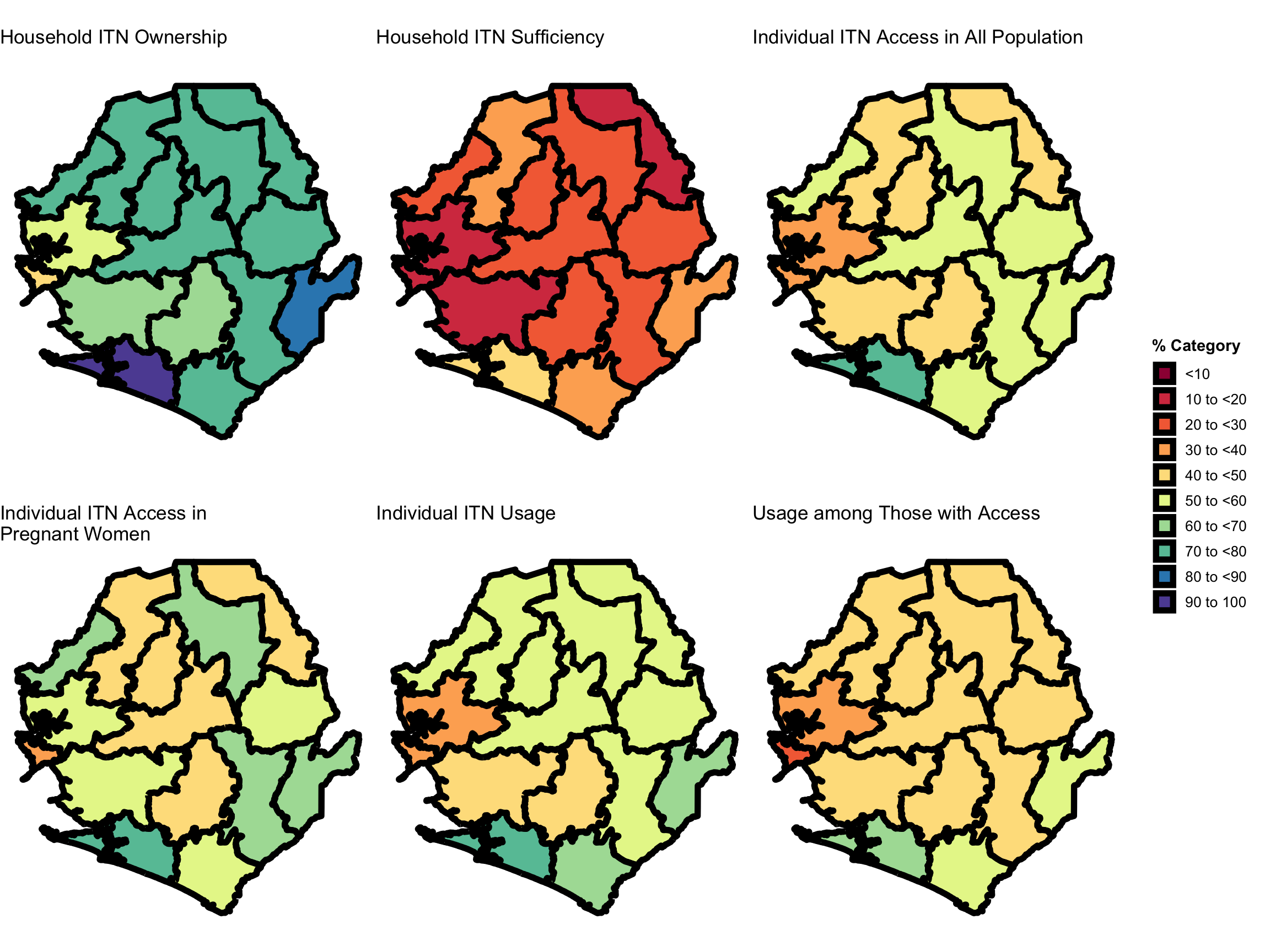
After calculating our weighted ITN indicators, it’s important to visualize regional patterns to check for consistency and highlight any unexpected gaps or outliers. Each step below focuses on one of the 5 core indicators we have calculated in Step 3.

Step 5.1: Combine all ITN data sets

We now combine all ITN-related indicators (ownership, access for all population and pregnant women, usage, usage among those with access, and household sufficiency) into a single dataset. This makes it easier to compare across indicators and districts and allows for visualization and further analysis in the future.

  • R
  • Python
joined_adm2_itn <- dplyr::bind_rows(
  pct_with_itn_by_adm2 |>
    dplyr::mutate(indicator = "Household ITN Ownership"),

  access_by_adm2 |>
    dplyr::mutate(indicator = "Individual ITN Access in All Population"),

  access_by_adm2_preg |>
    dplyr::mutate(indicator = "Individual ITN Access in Pregnant Women"),

  itn_use_by_adm2 |>
    dplyr::mutate(indicator = "Individual ITN Usage"),

  use_among_access_by_adm2 |>
    dplyr::mutate(indicator = "Usage among Those with Access"),

  pct_sufficient_itns_by_adm2 |>
    dplyr::mutate(indicator = "Household ITN Sufficiency")
) |>
  dplyr::relocate(indicator, .before = adm1)

head(joined_adm2_itn)
Output
                indicator          adm1      adm2  pct ci_low ci_upp
1 Household ITN Ownership       EASTERN  KAILAHUN 81.6   77.9   85.2
2 Household ITN Ownership       EASTERN    KENEMA 79.6   75.1   84.2
3 Household ITN Ownership       EASTERN      KONO 75.3   71.2   79.5
4 Household ITN Ownership NORTH WESTERN    KAMBIA 72.5   66.6   78.3
5 Household ITN Ownership NORTH WESTERN    KARENE 71.4   63.5   79.3
6 Household ITN Ownership NORTH WESTERN PORT LOKO 58.0   54.0   62.0

To adapt the code:

Modify only if relevant parameters were not created exactly as in earlier steps.

Step 5.2: Generate district-level ITN indicator maps

This section runs the full code to create individual district-level maps for each ITN indicator, including ownership, access, and usage.

To ensure our indicators are correctly matched to the appropriate administrative units, we use the previously imported 2019 Sierra Leone DHS admin-2 shapefile (sle_dhs_shp2), downloaded from the DHS Spatial Data Repository, as shown in Step 1.3 of Option 1.

  • R
  • Python
Show the code
# join spatial data to itn final data
joined_adm2_itn_final <- joined_adm2_itn |>
  dplyr::left_join(
    sle_dhs_shp2,
    by = c("adm1", "adm2")
  ) |>
  sf::st_as_sf()

# define all possible categories
categories <- c(0, 10, 20, 30, 40, 50, 60, 70, 80, 90, 100)
labels <- c(
  "<10",
  "10 to <20",
  "20 to <30",
  "30 to <40",
  "40 to <50",
  "50 to <60",
  "60 to <70",
  "70 to <80",
  "80 to <90",
  "90 to 100"
)

# categorise pct
joined_adm2_itn_final <- joined_adm2_itn_final |>
  dplyr::mutate(
    pct_cat = cut(
      pct,
      breaks = categories,
      labels = labels,
      include.lowest = TRUE,
      right = FALSE
    ),
    pct_cat = factor(pct_cat, levels = labels)
  )

# set colours for plotting
category_colors <- c(
  "<10" = "#9E0142",
  "10 to <20" = "#D53E4F",
  "20 to <30" = "#F46D43",
  "30 to <40" = "#FDAE61",
  "40 to <50" = "#FEE08B",
  "50 to <60" = "#E6F598",
  "60 to <70" = "#ABDDA4",
  "70 to <80" = "#66C2A5",
  "80 to <90" = "#3288BD",
  "90 to 100" = "#5E4FA2"
)

# Visualize Household ITN Ownership by District
house_itn_own <- joined_adm2_itn_final |>
  dplyr::filter(indicator == "Household ITN Ownership") |>
  ggplot2::ggplot() +
  ggplot2::geom_sf(
    ggplot2::aes(fill = pct_cat),
    color = "black",
    size = 2,
    show.legend = TRUE
  ) +
  ggplot2::scale_fill_manual(
    name = "% Category",
    values = category_colors,
    drop = FALSE
  ) +
  ggplot2::labs(
    title = "Household ITN Ownership",
    subtitle = "Weighted estimates from the 2019 Sierra Leone DHS (HR dataset)",
    caption = "\nIndicator is shown as the percentage of the relevant households."
  ) +
  ggplot2::theme_void() +
  ggplot2::theme(
    legend.title = ggplot2::element_text(face = "bold"),
    legend.text = ggplot2::element_text(size = 10)
  )

# Visualize Individual ITN Access in all Population by District
indiv_itn_access <- joined_adm2_itn_final |>
  dplyr::filter(indicator == "Individual ITN Access in All Population") |>
  ggplot2::ggplot() +
  ggplot2::geom_sf(
    ggplot2::aes(fill = pct_cat),
    color = "black",
    size = 2,
    show.legend = TRUE
  ) +
  ggplot2::scale_fill_manual(
    name = "% Category",
    values = category_colors,
    drop = FALSE
  ) +
  ggplot2::labs(
    title = "Individual ITN Access in All Population",
    subtitle = "Weighted estimates from the 2019 Sierra Leone DHS (HR dataset)",
    caption = "\nIndicator is shown as the percentage of the relevant households."
  ) +
  ggplot2::theme_void() +
  ggplot2::theme(
    legend.title = ggplot2::element_text(face = "bold"),
    legend.text = ggplot2::element_text(size = 10)
  )

# Visualize Individual ITN Access in Pregnant Women by District
indiv_itn_access_preg <- joined_adm2_itn_final |>
  dplyr::filter(indicator == "Individual ITN Access in Pregnant Women") |>
  ggplot2::ggplot() +
  ggplot2::geom_sf(
    ggplot2::aes(fill = pct_cat),
    color = "black",
    size = 2,
    show.legend = TRUE
  ) +
  ggplot2::scale_fill_manual(
    name = "% Category",
    values = category_colors,
    drop = FALSE
  ) +
  ggplot2::labs(
    title = "Individual ITN Access in \nPregnant Women",
    subtitle = "Weighted estimates from the 2019 Sierra Leone DHS (HR dataset)",
    caption = "\nIndicator is shown as the percentage of the relevant households."
  ) +
  ggplot2::theme_void() +
  ggplot2::theme(
    legend.title = ggplot2::element_text(face = "bold"),
    legend.text = ggplot2::element_text(size = 10)
  )

# Visualize Individual ITN Usage by District
indiv_itn_usage <- joined_adm2_itn_final |>
  dplyr::filter(indicator == "Individual ITN Usage") |>
  ggplot2::ggplot() +
  ggplot2::geom_sf(
    ggplot2::aes(fill = pct_cat),
    color = "black",
    size = 2,
    show.legend = TRUE
  ) +
  ggplot2::scale_fill_manual(
    name = "% Category",
    values = category_colors,
    drop = FALSE
  ) +
  ggplot2::labs(
    title = "Individual ITN Usage",
    subtitle = "Weighted estimates from the 2019 Sierra Leone DHS (HR dataset)",
    caption = "\nIndicator is shown as the percentage of the relevant population"
  ) +
  ggplot2::theme_void() +
  ggplot2::theme(
    legend.title = ggplot2::element_text(face = "bold"),
    legend.text = ggplot2::element_text(size = 10)
  )

# Visualize Usage Among Those With Access by District

indiv_itn_usage_access <- joined_adm2_itn_final |>
  dplyr::filter(indicator == "Usage among Those with Access") |>
  ggplot2::ggplot() +
  ggplot2::geom_sf(
    ggplot2::aes(fill = pct_cat),
    color = "black",
    size = 2,
    show.legend = TRUE
  ) +
  ggplot2::scale_fill_manual(
    name = "% Category",
    values = category_colors,
    drop = FALSE
  ) +
  ggplot2::labs(
    title = "Usage among Those with Access",
    subtitle = "Weighted estimates from the 2019 Sierra Leone DHS (PR dataset)",
    caption = "\nIndicator is shown as the percentage of the relevant population"
  ) +
  ggplot2::theme_void() +
  ggplot2::theme(
    legend.title = ggplot2::element_text(face = "bold"),
    legend.text = ggplot2::element_text(size = 10)
  )

# Visualize Household ITN Sufficiency by District
house_suffic <- joined_adm2_itn_final |>
  dplyr::filter(indicator == "Household ITN Sufficiency") |>
  ggplot2::ggplot() +
  ggplot2::geom_sf(
    ggplot2::aes(fill = pct_cat),
    color = "black",
    size = 2,
    show.legend = TRUE
  ) +
  ggplot2::scale_fill_manual(
    name = "% Category",
    values = category_colors,
    drop = FALSE
  ) +
  ggplot2::labs(
    title = "Household ITN Sufficiency",
    subtitle = "Weighted estimates from the 2019 Sierra Leone DHS (HR dataset)",
    caption = "\nIndicator is shown as the percentage of the relevant households."
  ) +
  ggplot2::theme_void() +
  ggplot2::theme(
    legend.title = ggplot2::element_text(face = "bold"),
    legend.text = ggplot2::element_text(size = 10)
  )

To adapt the code:

Modify only if relevant parameters were not created exactly as in earlier steps.

Step 5.3: Combine ITN indicator maps into a multi-panel layout

This section assembles the generated maps into a single visual output using a grid layout, allowing side-by-side comparison of indicator patterns across districts.

  • R
  • Python
Show the code
# ensure legends are consistent for cowplot
common_legend <- cowplot::get_legend(
  house_itn_own
)

# remove legends from individual plots
plots_no_legend <- list(
  house_itn_own +
    ggplot2::labs(subtitle = NULL, caption = NULL) +
    ggplot2::theme(legend.position = "none"),
  house_suffic  +
    ggplot2::labs(subtitle = NULL, caption = NULL) +
    ggplot2::theme(legend.position = "none") ,
  indiv_itn_access +
    ggplot2::labs(subtitle = NULL, caption = NULL) +
    ggplot2::theme(legend.position = "none"),
  indiv_itn_access_preg +
    ggplot2::labs(subtitle = NULL, caption = NULL) +
    ggplot2::theme(legend.position = "none"),
  indiv_itn_usage +
    ggplot2::labs(subtitle = NULL, caption = NULL) +
    ggplot2::theme(legend.position = "none"),
  indiv_itn_usage_access +
    ggplot2::labs(subtitle = NULL, caption = NULL) +
    ggplot2::theme(legend.position = "none")
)

# combine maps in a grid (2 rows x 3 columns)
map_grid <- cowplot::plot_grid(
  plotlist = plots_no_legend,
  ncol = 3, align = "hv"
)

# add shared legend at the bottom
final_plot <- cowplot::plot_grid(
  map_grid,
  common_legend,
  nrow = 1,
  rel_widths = c(1, 0.125)
)

# print the final combined plot
final_plot
Output

To adapt the code:

Modify only if relevant parameters were not created exactly as in earlier steps.

Now let us save these plots for future reference.

Save all ITN indicator plots
# Save Household ITN Ownership map
ggplot2::ggsave(
  plot = house_itn_own,
  filename = here::here("03_output/3a_figures/itn_ownership_adm2.png"),
  width = 12, height = 9, dpi = 300
)

# Save Individual ITN Access map
ggplot2::ggsave(
  plot = indiv_itn_access,
  filename = here::here("03_output/3a_figures/itn_access_adm2.png"),
  width = 12, height = 9, dpi = 300
)

# Save Individual ITN Access map for pregnant women
ggplot2::ggsave(
  plot = indiv_itn_access_preg,
  filename = here::here("03_output/3a_figures/itn_access_preg_adm2.png"),
  width = 12, height = 9, dpi = 300
)

# Save Individual ITN Usage map
ggplot2::ggsave(
  plot = indiv_itn_usage,
  filename = here::here("03_output/3a_figures/itn_usage_adm2.png"),
  width = 12, height = 9, dpi = 300
)

# Save Usage Among Those With Access map
ggplot2::ggsave(
  plot = indiv_itn_usage_access,
  filename = here::here(
    "03_output/3a_figures/itn_usage_among_with_access_adm2.png"
  ),
  width = 12, height = 9, dpi = 300
)

# Save Household ITN Sufficiency map
ggplot2::ggsave(
  plot = house_suffic,
  filename = here::here("03_output/3a_figures/itn_sufficiency_adm2.png"),
  width = 12, height = 9, dpi = 300
)

# Save all combined maps
ggplot2::ggsave(
  plot = final_plot,
  filename = here::here("03_output/3a_figures/itn_combined_maps_adm2.png"),
  width = 12, height = 9, dpi = 300
)

Step 6: Save processed ITN indicators

We now save the processed ITN indicators and the underlying HR and PR datasets used to calculate them. These outputs will be reused in downstream analyses.

# Define save directory
save_path <- here::here("1.6_health_systems/1.6a_dhs")

# Save HR dataset (household indicators)
rio::export(sle_dhs_hr_final,
            here::here(save_path, "processed", "sle_dhs_hr_final.csv"))

rio::export(sle_dhs_hr_final,
            here::here(save_path, "processed", "sle_dhs_hr_final.rds"))

# Save PR dataset (individual indicators)
rio::export(sle_dhs_pr_hr_final,
            here::here(save_path, "processed", "sle_dhs_pr_final.csv"))

rio::export(sle_dhs_pr_hr_final,
            here::here(save_path, "processed", "sle_dhs_pr_final.rds"))

# Save final joined ITN indicators with spatial data
rio::export(joined_adm2_itn_final |> sf::st_drop_geometry(),
            here::here(
              save_path,
              "processed",
              "final_weighted_adm2_itn_indicators.csv"
            ))

rio::export(joined_adm2_itn_final,
            here::here(
              save_path,
              "processed",
              "final_weighted_adm2_itn_indicators.rds"
            ))

Summary

In this section, we conducted a full workflow to extract, analyze, and visualize ITN ownership, access, and usage indicators from the 2019 Sierra Leone DHS.

We presented two complementary approaches:

  • Option 1 pulls pre-built indicators from the DHS API (e.g., household ownership and individual access), which is useful when standard indicator IDs are available and no further stratification or custom logic is required.
  • Option 2 constructs indicators from raw DHS survey data (HR, PR files), offering full flexibility to redefine indicators, apply custom stratification of the surveyed population, and align calculations with the evolving needs of the SNT framework.

In Option 2, we extracted and merged household and individual records, derived key ITN indicators, applied appropriate DHS sampling weights, and joined outputs to administrative boundaries for mapping. In both options, we then visualized spatial patterns across districts to support interpretation and identify gaps.

Full code

Find the full code script for extracting, analyzing, and visualizing ITN coverage indicators from DHS data below.

  • R
  • Python
Show full code
################################################################################
################ ~ ITN ownership, access, and usage full code ~ ################
################################################################################

#### Step 1: Install or load required packages ---------------------------------

# install or load required packages
pacman::p_load(
  rdhs, # DHS API access and dataset management
  here, # safe relative file paths across machines/projects
  glue, # string interpolation for filenames, labels, etc.
  tidyverse, # includes dplyr, tidyr, readr, ggplot2 for data wrangling & viz
  labelled, # manage and preserve variable labels from DHS .dta files
  haven, # read Stata files and work with labelled data
  survey, # apply DHS weights and compute design-based statistics
  sf, # handle shapefiles and geospatial operations
  forcats, # factor manipulation and releveling
  ggplot2, # plotting
  viridis, # colorblind-friendly palettes for maps
  rio, # import/export to multiple file formats
  cowplot # for combining multiple plots
)

#' Check DHS Indicator List from API
#'
#' @param countryIds DHS country code(s), e.g., "EG"
#' @param indicatorIds Specific indicator ID(s)
#' @param surveyIds Survey ID(s)
#' @param surveyYear Exact year
#' @param surveyYearStart Start of year range
#' @param surveyYearEnd End of year range
#' @param surveyType DHS survey type (e.g., "DHS", "MIS")
#' @param surveyCharacteristicIds Filter by survey characteristic ID
#' @param tagIds Filter by tag ID
#' @param returnFields Fields to return
#'   (default: IndicatorId, Label, Definition)
#' @param perPage Max results per page (default = 500)
#' @param page Specific page to return (default = 1)
#' @param f Format (default = "json")
#'
#' @return A data.frame of indicators
#' @export
check_dhs_indicators <- function(
  countryIds = NULL,
  indicatorIds = NULL,
  surveyIds = NULL,
  surveyYear = NULL,
  surveyYearStart = NULL,
  surveyYearEnd = NULL,
  surveyType = NULL,
  surveyCharacteristicIds = NULL,
  tagIds = NULL,
  returnFields = c("IndicatorId", "Label", "Definition", "MeasurementType"),
  perPage = NULL,
  page = NULL,
  f = "json"
) {
  # Base URL
  base_url <- "https://api.dhsprogram.com/rest/dhs/indicators?"

  # Build query string
  params <- list(
    countryIds = countryIds,
    indicatorIds = indicatorIds,
    surveyIds = surveyIds,
    surveyYear = surveyYear,
    surveyYearStart = surveyYearStart,
    surveyYearEnd = surveyYearEnd,
    surveyType = surveyType,
    surveyCharacteristicIds = surveyCharacteristicIds,
    tagIds = tagIds,
    returnFields = paste(returnFields, collapse = ","),
    perPage = perPage,
    page = page,
    f = f
  )

  # Drop NULLs and encode
  query <- paste(
    purrr::compact(params) |>
      purrr::imap_chr(
        ~ paste0(.y, "=", URLencode(as.character(.x), reserved = TRUE))
      ),
    collapse = "&"
  )

  # Full URL
  full_url <- paste0(base_url, query)

  # Fetch with progress bar
  response <- httr::GET(full_url, httr::progress())
  jsonlite::fromJSON(httr::content(
    response,
    as = "text",
    encoding = "UTF-8"
  ))$Data
}

#' Query DHS API Directly via URL Parameters
#'
#' Builds and queries DHS API for indicator data using URL-based access
#' instead of rdhs package.
#'
#' @param countryIds Comma-separated DHS country code(s), e.g., "SL"
#' @param indicatorIds Comma-separated DHS indicator ID(s),
#'   e.g., "CM_ECMR_C_U5M"
#' @param surveyIds Optional comma-separated survey ID(s), e.g., "SL2016DHS"
#' @param surveyYear Optional exact survey year, e.g., "2016"
#' @param surveyYearStart Optional survey year range start
#' @param surveyYearEnd Optional survey year range end
#' @param breakdown One of: "national", "subnational", "background", "all"
#' @param f Format to return (default is "json")
#'
#' @return A data.frame containing the `Data` portion of the API response.
#' @export
download_dhs_indicators <- function(
  countryIds,
  indicatorIds,
  surveyIds = NULL,
  surveyYear = NULL,
  surveyYearStart = NULL,
  surveyYearEnd = NULL,
  breakdown = "subnational",
  f = "json"
) {
  # Base URL
  base_url <- "https://api.dhsprogram.com/rest/dhs/data?"

  # Assemble query string
  query <- paste0(
    "breakdown=",
    breakdown,
    "&indicatorIds=",
    indicatorIds,
    "&countryIds=",
    countryIds,
    if (!is.null(surveyIds)) paste0("&surveyIds=", surveyIds),
    if (!is.null(surveyYear)) paste0("&surveyYear=", surveyYear),
    if (!is.null(surveyYearStart)) paste0(
      "&surveyYearStart=", surveyYearStart
    ),
    if (!is.null(surveyYearEnd)) paste0("&surveyYearEnd=", surveyYearEnd),
    "&lang=en&f=",
    f
  )

  full_url <- paste0(base_url, query)

  cli::cli_alert_info("Downloading DHS data...")

  response <- httr::GET(full_url, httr::progress())

  if (httr::http_error(response)) {
    stop("API request failed: ", httr::status_code(response))
  }

  content_raw <- httr::content(response, as = "text", encoding = "UTF-8")
  data <- jsonlite::fromJSON(content_raw)$Data

  cli::cli_alert_success("Download complete: {nrow(data)} records retrieved.")
  return(data)
}

#### Step 2: Download the relevant indicators ----------------------------------

# Get ITN ownership data at subnational level
hh_own_dhs_ind <- download_dhs_indicators(
  countryIds = "SL",
  surveyYear = 2019,
  indicatorIds = "ML_NETP_H_ITN",
  breakdown = "subnational"
) |>
  dplyr::mutate(
    dhs_indicator_id = "ML_NETP_H_ITN",
    indicator = "Household ITN Ownership"
  ) |>
  dplyr::select(
    dhs_indicator_id, indicator,
    adm2_code = RegionId, pct = Value
  )

# Get ITN access data at subnational level
indiv_access_dhs_ind <- download_dhs_indicators(
  countryIds = "SL",
  surveyYear = 2019,
  indicatorIds = "ML_ITNA_P_ACC",
  breakdown = "subnational"
) |>
  dplyr::mutate(
    dhs_indicator_id = "ML_ITNA_P_ACC",
    indicator = "Individual ITN Access in all Population"
  ) |>
  dplyr::select(
    dhs_indicator_id, indicator,
    adm2_code = RegionId, pct = Value
  )

#### Step 3: Join indicators with shapefile ------------------------------------

# Get the DHS adm2 shapefile
sle_dhs_shp2 <- sf::read_sf(
  here::here(
    "01_foundational/1a_administrative_boundaries",
    "1ai_adm2",
    "sdr_subnational_boundaries_adm2.shp"
  )
) |>
  dplyr::select(
    adm1 = OTHREGNA,
    adm2 = DHSREGEN,
    adm2_code = REG_ID
  ) |>
  # Make adm1 and adm2 to upper case
  dplyr::mutate(
    adm1 = toupper(adm1),
    adm2 = toupper(adm2)
  )

# Bind indicators into one dataset
dhs_api_indi <- dplyr::bind_rows(hh_own_dhs_ind, indiv_access_dhs_ind) |>
  # Join adm2 DHS shapefile to data only keeping adm2 indicators
  dplyr::inner_join(sle_dhs_shp2, by = "adm2_code") |>
  # select only relevant columns
  dplyr::select(dhs_indicator_id, indicator, adm1, adm2, pct, geometry) |>
  sf::st_as_sf()

# check indicators
sf::st_drop_geometry(dhs_api_indi)

#### Step 4: Visualize subnational indicator data ------------------------------

# categorise the props
dhs_api_indi_final <- dhs_api_indi |>
  dplyr::mutate(
    prop_cat = cut(
      pct,
      breaks = c(0, 10, 20, 30, 40, 50, 60, 70, 80, 90, 100),
      labels = c(
        "<10",
        "10 to <20",
        "20 to <30",
        "30 to <40",
        "40 to <50",
        "50 to <60",
        "60 to <70",
        "70 to <80",
        "80 to <90",
        "90 to 100"
      ),
      include.lowest = TRUE,
      right = FALSE
    )
  )

# visualize the results
map1 <- dhs_api_indi_final |>
  dplyr::filter(indicator == "Household ITN Ownership") |>
  ggplot2::ggplot() +
  ggplot2::geom_sf(
    ggplot2::aes(fill = prop_cat),
    color = "black",
    size = 2,
    show.legend = TRUE
  ) +
  ggplot2::scale_fill_manual(
    name = "% Category",
    values = c(
      "<10" = "#9E0142",
      "10 to <20" = "#D53E4F",
      "20 to <30" = "#F46D43",
      "30 to <40" = "#FDAE61",
      "40 to <50" = "#FEE08B",
      "50 to <60" = "#E6F598",
      "60 to <70" = "#ABDDA4",
      "70 to <80" = "#66C2A5",
      "80 to <90" = "#3288BD",
      "90 to 100" = "#5E4FA2"
    ),
    drop = FALSE
  ) +
  ggplot2::labs(
    title = "Household ITN Ownership"
  ) +
  ggplot2::theme_void() +
  ggplot2::theme(
    legend.title = ggplot2::element_text(face = "bold"),
    legend.text = ggplot2::element_text(size = 10)
  )

# visualize the results
map2 <- dhs_api_indi_final |>
  dplyr::filter(indicator == "Individual ITN Access in All Population") |>
  ggplot2::ggplot() +
  ggplot2::geom_sf(
    ggplot2::aes(fill = prop_cat),
    color = "black",
    size = 2,
    show.legend = TRUE
  ) +
  ggplot2::scale_fill_manual(
    name = "% Category",
    values = c(
      "<10" = "#9E0142",
      "10 to <20" = "#D53E4F",
      "20 to <30" = "#F46D43",
      "30 to <40" = "#FDAE61",
      "40 to <50" = "#FEE08B",
      "50 to <60" = "#E6F598",
      "60 to <70" = "#ABDDA4",
      "70 to <80" = "#66C2A5",
      "80 to <90" = "#3288BD",
      "90 to 100" = "#5E4FA2"
    ),
    drop = FALSE
  ) +
  ggplot2::labs(
    title = "Individual ITN Access in all Population"
  ) +
  ggplot2::theme_void() +
  ggplot2::theme(
    legend.title = ggplot2::element_text(face = "bold"),
    legend.text = ggplot2::element_text(size = 10)
  )

# ensure legends are consistent for cowplot
common_legend <- cowplot::get_legend(
  map1
)

# remove legends from individual plots
plots_no_legend <- list(
  map1 +
    ggplot2::labs(subtitle = NULL, caption = NULL) +
    ggplot2::theme(legend.position = "none"),
  map2 +
    ggplot2::labs(subtitle = NULL, caption = NULL) +
    ggplot2::theme(legend.position = "none")
)

# combine maps in a grid (2 rows x 3 columns)
map_grid <- cowplot::plot_grid(
  plotlist = plots_no_legend,
  ncol = 2,
  align = "hv"
)

# add shared legend at the bottom
final_plot <- cowplot::plot_grid(
  map_grid,
  common_legend,
  nrow = 1,
  rel_widths = c(1, 0.2)
)

# print the final combined plot
final_plot

##### Step 2.1: Import DHS data ------------------------------------------------

# import the HR (Household) data
sle_dhs_hr <- readRDS(
  here::here("1.6_health_systems/1.6a_dhs/raw/SLHR7AFL.rds")
)

# import the PR (Person) data
sle_dhs_pr <- readRDS(
  here::here("1.6_health_systems/1.6a_dhs/raw/SLPR7AFL.rds")
)

##### Step 2.2: Extract household records data ---------------------------------

# select variables
sle_dhs_hr_final <- sle_dhs_hr |>
  dplyr::mutate(
    dhs_clust_num = hv001,
    hh_size = hv013,
    # calculate number of ITNs in household
    num_of_itns = sle_dhs_hr |>
      dplyr::select(dplyr::starts_with("hml10_")) |>
      rowSums(na.rm = TRUE),
    # prepare admin columns
    adm1 = haven::as_factor(hv024) |>
        toupper(),
    adm2 = haven::as_factor(shdist) |>
        toupper()
  ) |>
  dplyr::mutate(
    # calculate household-level ITN indicators
    hh_has_itn = as.integer(num_of_itns > 0),
    numerator = hh_size / num_of_itns,
    ratio_hh_2 = as.integer(numerator <= 2),
    potential_users = num_of_itns * 2,
    hh_sufficient_nets = as.integer((num_of_itns * 2) >= hh_size),
    survey_weight = hv005 / 1000000
  ) |>
  # select variables
  dplyr::select(
    hhid,
    dhs_clust_num,
    cluster_id = hv021,
    stratum_id = hv022,
    survey_weight,
    adm1,
    adm2,
    hh_size,
    num_of_itns,
    hh_has_itn,
    ratio_hh_2,
    potential_users,
    hh_sufficient_nets
  )

# label HR final dataset
sle_dhs_hr_final <- sle_dhs_hr_final |>
  labelled::set_variable_labels(
    hhid = "Household ID",
    dhs_clust_num = "DHS Cluster Number",
    cluster_id = "DHS Cluster ID",
    stratum_id = "DHS Stratum ID",
    survey_weight = "DHS Survey Weights",
    adm1 = "Admin Level 1",
    adm2 = "Admin Level 2",
    hh_size = "Household Size",
    num_of_itns = "Total ITNs in Household",
    hh_has_itn = "Owns ≥1 ITN",
    potential_users = "Potential ITN Users (2×ITNs)",
    hh_sufficient_nets = "Has Sufficient ITNs (≤2 Persons per ITN)",
  )

##### Step 2.3: Merge household and individual records for ITN indicators ------

# merge with individual data and coordinate data
sle_pr_hr <- sle_dhs_hr_final |>
  dplyr::select(
    dhs_clust_num, hhid, hh_size,
    adm1, adm2, num_of_itns, hh_has_itn,
    ratio_hh_2, potential_users,
    hh_sufficient_nets) |>
  dplyr::right_join(sle_dhs_pr, by = "hhid")

# calculate individual-level indicators
sle_dhs_pr_hr_final <- sle_pr_hr |>
  dplyr::mutate(
    cluster_id = hv021,
    stratum_id = hv022,
    survey_weight = hv005 / 1000000,
    # sociodemographic factors
    age = hv105,
    age_group = cut(
      age,
      breaks = c(0, 5, 15, 30, 50, Inf),
      labels = c("0–4", "5–14", "15–29", "30–49", "50+"),
      right = FALSE
    ),
    sex = factor(
      hv104,
      levels = c(1, 2),
      labels = c("Male", "Female")
    ),
    is_pregnant_woman = factor(
      as.integer(hml18 == 1),
      levels = c(0, 1),
      labels = c("Not pregnant", "Pregnant")
    ),
    urban = dplyr::if_else(hv025 == 1, "urban", "rural"),
    wealth = dplyr::case_when(
      hv270 == 1 ~ "lowest",
      hv270 == 2 ~ "second",
      hv270 == 3 ~ "middle",
      hv270 == 4 ~ "fourth",
      hv270 == 5 ~ "highest"
    ),
    edu = dplyr::case_when(
      hv106 == 0 ~ "none",
      hv106 == 1 ~ "primary",
      hv106 %in% c(2, 3) ~ "high",
      hv106 == 8 ~ "unknown"
    ),
    potential_users = num_of_itns * 2,
    defacto_pop = hv013,
    used_itn_if_access = pmin(potential_users, defacto_pop),
    itn_access_ratio = used_itn_if_access / defacto_pop,
    itn_used = dplyr::if_else(hml12 %in% c(1, 2), 1L, 0L)
  ) |>
  # arrange individuals within each hh by ITN use (used first)
  dplyr::arrange(hhid, dplyr::desc(itn_used)) |>
  dplyr::group_by(hhid) |>
  dplyr::mutate(
    # assign person rank in household
    person_index = dplyr::row_number(),
    # assign individual access based on adjusted potential users
    net_access = dplyr::if_else(
      person_index <= used_itn_if_access, 1L, 0L),
    # used itn if individual had access
    used_itn_if_access = dplyr::if_else(
      net_access == 1L & itn_used == 1L, 1L, 0L)
  ) |>
  dplyr::ungroup() |>
  # select relevant vars
  dplyr::select(
    hhid, hvidx, hh_size, survey_weight, survey_weight,
    cluster_id, stratum_id, adm1, adm2, urban, sex, age,
    age_group, is_pregnant_woman, hh_has_itn, num_of_itns,
    hh_sufficient_nets, potential_users, itn_access_ratio,
    net_access, itn_used, used_itn_if_access,
    used_itn_if_access
  )

# label PR-HR final dataset
sle_dhs_pr_hr_final <-  sle_dhs_pr_hr_final |>
  labelled::set_variable_labels(
    hhid                           = "Household ID",
    hh_size                        = "Number of De Facto Household Members",
    survey_weight                  = "DHS Survey Weights",
    cluster_id                     = "DHS Cluster ID",
    stratum_id                     = "DHS Stratum ID",
    adm1                           = "Admin Level 1",
    adm2                           = "Admin Level 2",
    urban                          = "Urban/Rural Residence",
    sex                            = "Sex of Individual",
    age                            = "Age of Individual (Years)",
    age_group                      = "Age of Individual (Years, Categorised)",
    is_pregnant_woman              = "Individual is a Pregnant Woman",
    hh_has_itn                     = "Owns ≥1 ITN",
    num_of_itns                    = "Total ITNs in Household",
    hh_sufficient_nets             =
      "Has Sufficient ITNs (≤2 Persons per ITN)",
    potential_users                =
      "Potential ITN Users (2×Number of ITNs)",
    itn_access_ratio               =
      "Proportion of Household with Access to ITN",
    itn_used                       = "ITN Used Last Night (Binary)",
    used_itn_if_access             =
      "Standard Adjusted Potential Users (Capped)",
    used_itn_if_access             =
      "Used ITN Among Those with Standard Access"
  )

##### Step 3.1: Household ITN ownership at the adm2 level ----------------------

# define survey design object using DHS household weights
design_adm2_hr <- survey::svydesign(
  # defines the primary sampling unit (PSU):
  # typically the DHS cluster (hv021).
  ids = ~cluster_id,
  data = sle_dhs_hr_final,      # dhs dataset
  # specifies the stratification variable:
  # usually hv022 in DHS data.
  strata = ~stratum_id,
  # applies the household-level sampling weights,
  # derived as hv005/1,000,000.
  weights = ~survey_weight,
  # ensures that PSUs are nested within strata,
  # as per DHS sampling design.
  nest = TRUE
)

# calculate weighted proportion + 95% CI
pct_with_itn_by_adm2 <- survey::svyby(
  ~hh_has_itn,
  ~adm1 + adm2,
  design = design_adm2_hr,
  FUN = survey::svymean,
  vartype = c("ci"),  # add CI
  keep.names = F
) |>
  dplyr::mutate(
    pct = round(hh_has_itn * 100, 1),
    ci_low = round(ci_l * 100, 1),
    ci_upp = round(ci_u * 100, 1)
  ) |>
  dplyr::arrange(adm1) |>
  dplyr::select(adm1, adm2, pct, ci_low, ci_upp)

pct_with_itn_by_adm2

##### Step 3.2: Individual ITN access at the adm2 level ------------------------

# define survey design object using DHS personal weights
design_adm2_pr <- survey::svydesign(
  ids = ~cluster_id,
  data = sle_dhs_pr_hr_final,
  strata = ~stratum_id,
  weights = ~survey_weight,
  nest = TRUE
)

# calculate weighted proportion + 95% CI
access_by_adm2 <- survey::svyby(
  ~itn_access_ratio,
  ~adm1 + adm2,
  design = design_adm2_pr,
  FUN = survey::svymean,
  vartype = c("ci"),
  keep.names = F
) |>
  dplyr::mutate(
    pct = round(itn_access_ratio * 100, 1),
    ci_low = round(ci_l * 100, 1),
    ci_upp = round(ci_u * 100, 1)
  ) |>
  dplyr::arrange(adm1) |>
  dplyr::select(adm1, adm2, pct, ci_low, ci_upp)

access_by_adm2

##### Step 3.3: Individual ITN usage at the adm2 level -------------------------

# calculate weighted proportion + 95% CI
itn_use_by_adm2 <- survey::svyby(
  ~itn_used,
  ~adm1 + adm2,
  design = design_adm2_pr,
  FUN = survey::svymean,
  vartype = c("ci"),
  keep.names = F
) |>
  dplyr::mutate(
    pct = round(itn_used * 100, 1),
    ci_low = round(ci_l * 100, 1),
    ci_upp = round(ci_u * 100, 1)
  ) |>
  dplyr::arrange(adm1) |>
  dplyr::select(adm1, adm2, pct, ci_low, ci_upp)

itn_use_by_adm2

##### Step 3.4: Usage among those with access at the adm2 level ----------------

# calculate usage among those with access by adm1
use_among_access_by_adm2 <- survey::svyby(
  ~used_itn_if_access,
  ~adm1 + adm2,
  design = design_adm2_pr,
  FUN = survey::svymean,
  vartype = c("ci"),
  keep.names = F
) |>
  dplyr::mutate(
    pct = round(used_itn_if_access * 100, 1),
    ci_low = round(ci_l * 100, 1),
    ci_upp = round(ci_u * 100, 1)
  ) |>
  dplyr::arrange(adm1) |>
  dplyr::select(adm1, adm2, pct, ci_low, ci_upp)

use_among_access_by_adm2

##### Step 3.5: Household ITN sufficiency at the adm2 level --------------------

# calculate weighted proportion + 95% CI
pct_sufficient_itns_by_adm2 <- survey::svyby(
  ~hh_sufficient_nets,
  ~adm1 + adm2,
  design = design_adm2_hr,
  FUN = survey::svymean,
  vartype = c("ci"),
  keep.names = F
) |>
  dplyr::mutate(
    pct = round(hh_sufficient_nets * 100, 1),
    ci_low = round(ci_l * 100, 1),
    ci_upp = round(ci_u * 100, 1)
  ) |>
  dplyr::arrange(adm1) |>
  dplyr::select(adm1, adm2, pct, ci_low, ci_upp)

pct_sufficient_itns_by_adm2

#### Step 4: Stratified ITN indicators (e.g., by pregnancy) --------------------

# calculate weighted proportion + 95% CI by adm1 × age group
access_by_adm2_preg <- survey::svyby(
  ~itn_access_ratio,
  ~adm1 + adm2 + is_pregnant_woman,
  design = design_adm2_pr,
  FUN = survey::svymean,
  vartype = c("ci"),
  keep.names = FALSE
) |>
  dplyr::mutate(
    pct = round(itn_access_ratio * 100, 1),
    ci_low = round(ci_l * 100, 1),
    ci_upp = round(ci_u * 100, 1)
  ) |>
  dplyr::filter(is_pregnant_woman == "Pregnant") |>
  dplyr::arrange(adm1, adm2) |>
  dplyr::select(adm1, adm2, pct, ci_low, ci_upp)

access_by_adm2_preg

##### Step 5.1: Combine all ITN data sets --------------------------------------

joined_adm2_itn <- dplyr::bind_rows(
  pct_with_itn_by_adm2 |>
    dplyr::mutate(indicator = "Household ITN Ownership"),

  access_by_adm2 |>
    dplyr::mutate(indicator = "Individual ITN Access in All Population"),

  access_by_adm2_preg |>
    dplyr::mutate(indicator = "Individual ITN Access in Pregnant Women"),

  itn_use_by_adm2 |>
    dplyr::mutate(indicator = "Individual ITN Usage"),

  use_among_access_by_adm2 |>
    dplyr::mutate(indicator = "Usage among Those with Access"),

  pct_sufficient_itns_by_adm2 |>
    dplyr::mutate(indicator = "Household ITN Sufficiency")
) |>
  dplyr::relocate(indicator, .before = adm1)

head(joined_adm2_itn)

##### Step 5.2: Generate district-level ITN indicator maps ---------------------

# join spatial data to itn final data
joined_adm2_itn_final <- joined_adm2_itn |>
  dplyr::left_join(
    sle_dhs_shp2,
    by = c("adm1", "adm2")
  ) |>
  sf::st_as_sf()

# define all possible categories
categories <- c(0, 10, 20, 30, 40, 50, 60, 70, 80, 90, 100)
labels <- c(
  "<10",
  "10 to <20",
  "20 to <30",
  "30 to <40",
  "40 to <50",
  "50 to <60",
  "60 to <70",
  "70 to <80",
  "80 to <90",
  "90 to 100"
)

# categorise pct
joined_adm2_itn_final <- joined_adm2_itn_final |>
  dplyr::mutate(
    pct_cat = cut(
      pct,
      breaks = categories,
      labels = labels,
      include.lowest = TRUE,
      right = FALSE
    ),
    pct_cat = factor(pct_cat, levels = labels)
  )

# set colours for plotting
category_colors <- c(
  "<10" = "#9E0142",
  "10 to <20" = "#D53E4F",
  "20 to <30" = "#F46D43",
  "30 to <40" = "#FDAE61",
  "40 to <50" = "#FEE08B",
  "50 to <60" = "#E6F598",
  "60 to <70" = "#ABDDA4",
  "70 to <80" = "#66C2A5",
  "80 to <90" = "#3288BD",
  "90 to 100" = "#5E4FA2"
)

# Visualize Household ITN Ownership by District
house_itn_own <- joined_adm2_itn_final |>
  dplyr::filter(indicator == "Household ITN Ownership") |>
  ggplot2::ggplot() +
  ggplot2::geom_sf(
    ggplot2::aes(fill = pct_cat),
    color = "black",
    size = 2,
    show.legend = TRUE
  ) +
  ggplot2::scale_fill_manual(
    name = "% Category",
    values = category_colors,
    drop = FALSE
  ) +
  ggplot2::labs(
    title = "Household ITN Ownership",
    subtitle = "Weighted estimates from the 2019 Sierra Leone DHS (HR dataset)",
    caption = "\nIndicator is shown as the percentage of the relevant households."
  ) +
  ggplot2::theme_void() +
  ggplot2::theme(
    legend.title = ggplot2::element_text(face = "bold"),
    legend.text = ggplot2::element_text(size = 10)
  )

# Visualize Individual ITN Access in all Population by District
indiv_itn_access <- joined_adm2_itn_final |>
  dplyr::filter(indicator == "Individual ITN Access in All Population") |>
  ggplot2::ggplot() +
  ggplot2::geom_sf(
    ggplot2::aes(fill = pct_cat),
    color = "black",
    size = 2,
    show.legend = TRUE
  ) +
  ggplot2::scale_fill_manual(
    name = "% Category",
    values = category_colors,
    drop = FALSE
  ) +
  ggplot2::labs(
    title = "Individual ITN Access in All Population",
    subtitle = "Weighted estimates from the 2019 Sierra Leone DHS (HR dataset)",
    caption = "\nIndicator is shown as the percentage of the relevant households."
  ) +
  ggplot2::theme_void() +
  ggplot2::theme(
    legend.title = ggplot2::element_text(face = "bold"),
    legend.text = ggplot2::element_text(size = 10)
  )

# Visualize Individual ITN Access in Pregnant Women by District
indiv_itn_access_preg <- joined_adm2_itn_final |>
  dplyr::filter(indicator == "Individual ITN Access in Pregnant Women") |>
  ggplot2::ggplot() +
  ggplot2::geom_sf(
    ggplot2::aes(fill = pct_cat),
    color = "black",
    size = 2,
    show.legend = TRUE
  ) +
  ggplot2::scale_fill_manual(
    name = "% Category",
    values = category_colors,
    drop = FALSE
  ) +
  ggplot2::labs(
    title = "Individual ITN Access in \nPregnant Women",
    subtitle = "Weighted estimates from the 2019 Sierra Leone DHS (HR dataset)",
    caption = "\nIndicator is shown as the percentage of the relevant households."
  ) +
  ggplot2::theme_void() +
  ggplot2::theme(
    legend.title = ggplot2::element_text(face = "bold"),
    legend.text = ggplot2::element_text(size = 10)
  )

# Visualize Individual ITN Usage by District
indiv_itn_usage <- joined_adm2_itn_final |>
  dplyr::filter(indicator == "Individual ITN Usage") |>
  ggplot2::ggplot() +
  ggplot2::geom_sf(
    ggplot2::aes(fill = pct_cat),
    color = "black",
    size = 2,
    show.legend = TRUE
  ) +
  ggplot2::scale_fill_manual(
    name = "% Category",
    values = category_colors,
    drop = FALSE
  ) +
  ggplot2::labs(
    title = "Individual ITN Usage",
    subtitle = "Weighted estimates from the 2019 Sierra Leone DHS (HR dataset)",
    caption = "\nIndicator is shown as the percentage of the relevant population"
  ) +
  ggplot2::theme_void() +
  ggplot2::theme(
    legend.title = ggplot2::element_text(face = "bold"),
    legend.text = ggplot2::element_text(size = 10)
  )

# Visualize Usage Among Those With Access by District

indiv_itn_usage_access <- joined_adm2_itn_final |>
  dplyr::filter(indicator == "Usage among Those with Access") |>
  ggplot2::ggplot() +
  ggplot2::geom_sf(
    ggplot2::aes(fill = pct_cat),
    color = "black",
    size = 2,
    show.legend = TRUE
  ) +
  ggplot2::scale_fill_manual(
    name = "% Category",
    values = category_colors,
    drop = FALSE
  ) +
  ggplot2::labs(
    title = "Usage among Those with Access",
    subtitle = "Weighted estimates from the 2019 Sierra Leone DHS (PR dataset)",
    caption = "\nIndicator is shown as the percentage of the relevant population"
  ) +
  ggplot2::theme_void() +
  ggplot2::theme(
    legend.title = ggplot2::element_text(face = "bold"),
    legend.text = ggplot2::element_text(size = 10)
  )

# Visualize Household ITN Sufficiency by District
house_suffic <- joined_adm2_itn_final |>
  dplyr::filter(indicator == "Household ITN Sufficiency") |>
  ggplot2::ggplot() +
  ggplot2::geom_sf(
    ggplot2::aes(fill = pct_cat),
    color = "black",
    size = 2,
    show.legend = TRUE
  ) +
  ggplot2::scale_fill_manual(
    name = "% Category",
    values = category_colors,
    drop = FALSE
  ) +
  ggplot2::labs(
    title = "Household ITN Sufficiency",
    subtitle = "Weighted estimates from the 2019 Sierra Leone DHS (HR dataset)",
    caption = "\nIndicator is shown as the percentage of the relevant households."
  ) +
  ggplot2::theme_void() +
  ggplot2::theme(
    legend.title = ggplot2::element_text(face = "bold"),
    legend.text = ggplot2::element_text(size = 10)
  )

##### Step 5.3: Combine ITN indicator maps into a multi-panel layout -----------

# ensure legends are consistent for cowplot
common_legend <- cowplot::get_legend(
  house_itn_own
)

# remove legends from individual plots
plots_no_legend <- list(
  house_itn_own +
    ggplot2::labs(subtitle = NULL, caption = NULL) +
    ggplot2::theme(legend.position = "none"),
  house_suffic  +
    ggplot2::labs(subtitle = NULL, caption = NULL) +
    ggplot2::theme(legend.position = "none") ,
  indiv_itn_access +
    ggplot2::labs(subtitle = NULL, caption = NULL) +
    ggplot2::theme(legend.position = "none"),
  indiv_itn_access_preg +
    ggplot2::labs(subtitle = NULL, caption = NULL) +
    ggplot2::theme(legend.position = "none"),
  indiv_itn_usage +
    ggplot2::labs(subtitle = NULL, caption = NULL) +
    ggplot2::theme(legend.position = "none"),
  indiv_itn_usage_access +
    ggplot2::labs(subtitle = NULL, caption = NULL) +
    ggplot2::theme(legend.position = "none")
)

# combine maps in a grid (2 rows x 3 columns)
map_grid <- cowplot::plot_grid(
  plotlist = plots_no_legend,
  ncol = 3, align = "hv"
)

# add shared legend at the bottom
final_plot <- cowplot::plot_grid(
  map_grid,
  common_legend,
  nrow = 1,
  rel_widths = c(1, 0.125)
)

# print the final combined plot
final_plot

##### Step 5.3: Combine ITN indicator maps into a multi-panel layout -----------

# Save Household ITN Ownership map
ggplot2::ggsave(
  plot = house_itn_own,
  filename = here::here("03_output/3a_figures/itn_ownership_adm2.png"),
  width = 12, height = 9, dpi = 300
)

# Save Individual ITN Access map
ggplot2::ggsave(
  plot = indiv_itn_access,
  filename = here::here("03_output/3a_figures/itn_access_adm2.png"),
  width = 12, height = 9, dpi = 300
)

# Save Individual ITN Access map for pregnant women
ggplot2::ggsave(
  plot = indiv_itn_access_preg,
  filename = here::here("03_output/3a_figures/itn_access_preg_adm2.png"),
  width = 12, height = 9, dpi = 300
)

# Save Individual ITN Usage map
ggplot2::ggsave(
  plot = indiv_itn_usage,
  filename = here::here("03_output/3a_figures/itn_usage_adm2.png"),
  width = 12, height = 9, dpi = 300
)

# Save Usage Among Those With Access map
ggplot2::ggsave(
  plot = indiv_itn_usage_access,
  filename = here::here(
    "03_output/3a_figures/itn_usage_among_with_access_adm2.png"
  ),
  width = 12, height = 9, dpi = 300
)

# Save Household ITN Sufficiency map
ggplot2::ggsave(
  plot = house_suffic,
  filename = here::here("03_output/3a_figures/itn_sufficiency_adm2.png"),
  width = 12, height = 9, dpi = 300
)

# Save all combined maps
ggplot2::ggsave(
  plot = final_plot,
  filename = here::here("03_output/3a_figures/itn_combined_maps_adm2.png"),
  width = 12, height = 9, dpi = 300
)

#### Step 6: Save processed ITN indicators -------------------------------------

# Define save directory
save_path <- here::here("1.6_health_systems/1.6a_dhs")

# Save HR dataset (household indicators)
rio::export(sle_dhs_hr_final,
            here::here(save_path, "processed", "sle_dhs_hr_final.csv"))

rio::export(sle_dhs_hr_final,
            here::here(save_path, "processed", "sle_dhs_hr_final.rds"))

# Save PR dataset (individual indicators)
rio::export(sle_dhs_pr_hr_final,
            here::here(save_path, "processed", "sle_dhs_pr_final.csv"))

rio::export(sle_dhs_pr_hr_final,
            here::here(save_path, "processed", "sle_dhs_pr_final.rds"))

# Save final joined ITN indicators with spatial data
rio::export(joined_adm2_itn_final |> sf::st_drop_geometry(),
            here::here(
              save_path,
              "processed",
              "final_weighted_adm2_itn_indicators.csv"
            ))

rio::export(joined_adm2_itn_final,
            here::here(
              save_path,
              "processed",
              "final_weighted_adm2_itn_indicators.rds"
            ))
 

©2025 Applied Health Analytics for Delivery and Innovation. All rights reserved