Dev Site — You are viewing the development build. Go to Main Site

  • English
  • Français
  1. 2 Assemblage et gestion des données
  2. 2.6 Enquêtes nationales auprès des ménages
  3. All-Cause Child Mortality
  • Bibliothèque de code pour l'adaptation infranationale
    Version française
  • 1 Pour commencer
    • 1.1 À propos et comment nous contacter
    • 1.2 Pour tous
    • 1.3 Pour l’équipe SNT
    • 1.4 Pour les analystes
    • 1.5 Produire des résultats de haute qualité
  • 2 Assemblage et gestion des données
    • 2.1 Utilisation des shapefiles
      • Aperçu des données spatiales
      • Examiner les données du fichier shapefile
      • Shapefile management and customization
      • Merge shapefile with excel
    • 2.2 Formations sanitaires
      • Health facility active/inactive status
      • Health facility coordinates
      • Master facility lists
    • 2.3 Données de cas de routine (DHIS2)
      • Health facility reporting rate
      • Outlier detection methods
      • Imputation of missing data
      • Final database
      • Data extraction from DHIS2
      • Import dataset
      • Outlier correction
      • Quality control/checks
    • 2.4 Données du stock
      • lmis
    • 2.5 Données démographiques
      • Données démographiques nationales
      • Raster de population WorldPop
    • 2.6 Enquêtes nationales auprès des ménages
      • DHS Data Overview and Preparation
      • All-Cause Child Mortality
      • Extraction of ITN ownership, access, and usage
      • Extracion of prevalence data
      • Calculation of treatment-seeking data
    • 2.7 Données entomologiques
    • 2.8 Données climatiques et environnementales
      • Extraction de données climatiques et environnementales à partir de données raster
    • 2.9 Données modélisées
      • Generating spatial modeled estimates
      • Travailler avec les estimations modélisées géospatiales
      • Modeled Estimates of Entomological Indicators
      • Mortality estimates from IHME
  • 3 Stratification
    • 3.1 Stratification épidémiologique
    • 3.2 Stratification des déterminants de la transmission du paludisme
  • 4 Revue des interventions passées
    • 4.1 Prise en charge des cas
    • 4.2 Interventions de routine
    • 4.3 Interventions de campagne
    • 4.4 Autres interventions
  • 5 Ciblage des interventions
  • 6 Analyse rétrospective
  • 7 Microstratification urbaine

On this page

  • Overview
  • Data Needs
    • Estimating Mortality Rates from Household Surveys
    • Limitations to Keep in Mind When Interpreting U5MR Survey Data
  • Step-by-Step
    • Option 1 (DHS Indicators Download):
      • Step 1.1: Install or Load Required Packages
      • Step 1.2: Download the Relevant Indicators
      • Step 1.3: Join Indicators with Shapefile
      • Step 1.4: Visualize Subnational Indicator Data
      • Step 1.5: Save Processed U5MR
    • Option 2 (DHS Indicators Built from Raw Data)
      • Step 2.1: Load the Relevant DHS Data
      • Step 2.2: Calculate U5MR at District Level
      • Step 2.3: Prepare Subnational U5MR for plotting
      • Step 2.4: Plot U5MR at District Level
      • Step 2.5: Save Processed U5MR
  • Summary
  • Full code
  1. 2 Assemblage et gestion des données
  2. 2.6 Enquêtes nationales auprès des ménages
  3. All-Cause Child Mortality

All-Cause Child Mortality

Overview

Reducing malaria deaths is often a primary concern for NMPs, and therefore identifying areas with particularly high malaria mortality is essential in SNT such that they can be prioritized for interventions. Ideally, there would be subnational data on malaria mortality of a sufficient quality that it can inform decision-making. However, because of weak systems of vital registration and a substantial portion of malaria deaths occurring in the community, the SNT team may be interested in exploring alternate sources of mortality estimates.

Because it is difficult to get high-quality data or estimates on malaria-attributable deaths, the SNT team may consider all-cause under-5 mortality rate (U5MR) as a proxy for malaria mortality, because in areas of high transmission malaria is a primary cause of death among children under 5. This page focuses on how to extract U5MR estimates from national household survey data.

Objectives
  • Access household survey data on U5MR at the adm1 level
  • Inspect, visualize, and validate u%MR estimates
  • Compile and save clean, subnational summaries of U5MR estimates for integration into SNT workflows

Data Needs

Estimating Mortality Rates from Household Surveys

DHS and MIS, while similarly structured, serve slightly different purposes. Because DHS has a primary objective of measuring demographic indicators, it is possible to use DHS data to generate a direct estimate of U5MR. While MIS does not contain the same level of detail in its demographic questionnaire, it is still possible to generate an indirect estimate of U5MR using MIS results. If the country’s most recent survey was an MIS and post-dates the most recent DHS by several years, the SNT team may be interested in considering the indirect U5MR inferred from MIS.

Estimating U5MR from household survey uses data from the women’s questionnaire. In the direct method, mortality rate is calculated from the list of children birthed by each woman, and for each child, their date of birth and status (living or deceased) at the time of the survey. The status at the time of survey is used to infer the age at death and ultimately the U5MR.

In the indirect (Brass) method, the number of children birthed by each woman and the number of children surviving at time of survey are used. The women are then stratified by age to infer the U5MR by year.

Limitations to Keep in Mind When Interpreting U5MR Survey Data

When using U5MR from household surveys like the DHS, it’s important to understand what these estimates represent, and just as importantly, what they don’t. Although U5MR figures are often used to infer recent patterns in child survival, they’re inherently retrospective. The five-year mortality estimates commonly used in SNT workflows are based on births and deaths that occurred in the years leading up to the survey, not during the survey year itself. As a result, any major programmatic shifts, shocks, or emergencies that occurred shortly before or after the survey won’t be reflected in the data.

The quality of these estimates also depends on how accurately women report their birth histories. Underreporting or misremembering dates (especially around children who died very young) is not uncommon and can subtly bias the rates downward. In some areas, cultural factors or the sensitive nature of these questions may influence whether a woman feels comfortable sharing the full birth history, especially for deceased children.

District-level estimates can also be imprecise due to small sample sizes. In many countries, household surveys are not powered to produce highly precise mortality estimates at admin-2. Confidence intervals can be wide, and results in less-populated or harder-to-reach districts should be viewed as indicative, not definitive. Even when statistical techniques like jackknifing are applied, they can only partially account for the underlying uncertainty.

It’s also worth remembering that U5MR reflects deaths from all causes. While malaria is often a leading contributor in high-burden areas, U5MR cannot distinguish between malaria-related deaths and those due to malnutrition, pneumonia, birth complications, or other causes. For this reason, U5MR is most useful when interpreted in combination with additional contextual indicators, such as malaria prevalence, seasonality, and access to health services.

Rather than treat these limitations as barriers, they should be seen as signals to proceed with care. U5MR is a useful metric in SNT workflows, especially when direct cause-of-death data is limited, but it needs to be triangulated and interpreted in context.

Step-by-Step

In this section, we apply Option 1 (pull standard indicators directly from DHS) and Option 2 (build from raw data via API), as discussed and presented in the DHS Data Overview and Preparation page. While Option 1 is the quickest approach, it has limitations — only predefined indicators are available, with no control over aggregation or customization. To address this, we also offer Option 2, which provides full flexibility by using the rdhs package to access microdata and construct indicators directly.

To skip the step-by-step explanation, jump to the full code at the end of this page.

Option 1 (DHS Indicators Download):

This approach uses pre-calculated U5MR estimates from the DHS API at subnational levels. It allows for quick summaries and broad comparisons across regions but offers limited flexibility—users cannot modify the disaggregation variables or adjust the underlying mortality calculation logic.

Step 1.1: Install or Load Required Packages

In this step, we download subnational indicator data using the specified DHS Indicator IDs. We then join these indicators with our shapefile of interest (either admin-1 or admin-2), which determines the geographic level of analysis. This merged dataset forms the basis for plotting results and conducting subnational analysis.

We start by loading the required packages and setting up for the full section. For Option 1, we use two custom functions: check_dhs_indicators() and download_dhs_indicators().

  • R
  • Python
Show full set-up code
# install or load required packages
pacman::p_load(
  here,       # For handling relative file paths
  haven,      # For reading DHS .dta files and labelled data
  dplyr,      # For data wrangling
  stringr,    # For filtering U5MR rows using regex
  tibble,     # For rownames_to_column
  ggplot2,    # For visualizing U5MR maps
  sf,         # For working with shapefiles
  rio,        # For saving outputs in .csv and .rds formats
  DHS.rates   # For calculating under-five mortality rates
)

#' Check DHS Indicator List from API
#'
#' @param countryIds DHS country code(s), e.g., "EG"
#' @param indicatorIds Specific indicator ID(s)
#' @param surveyIds Survey ID(s)
#' @param surveyYear Exact year
#' @param surveyYearStart Start of year range
#' @param surveyYearEnd End of year range
#' @param surveyType DHS survey type (e.g., "DHS", "MIS")
#' @param surveyCharacteristicIds Filter by survey characteristic ID
#' @param tagIds Filter by tag ID
#' @param returnFields Fields to return (default: IndicatorId, Label, Definition)
#' @param perPage Max results per page (default = 500)
#' @param page Specific page to return (default = 1)
#' @param f Format (default = "json")
#'
#' @return A data.frame of indicators
#' @export
check_dhs_indicators <- function(
  countryIds = NULL,
  indicatorIds = NULL,
  surveyIds = NULL,
  surveyYear = NULL,
  surveyYearStart = NULL,
  surveyYearEnd = NULL,
  surveyType = NULL,
  surveyCharacteristicIds = NULL,
  tagIds = NULL,
  returnFields = c("IndicatorId", "Label", "Definition", "MeasurementType"),
  perPage = NULL,
  page = NULL,
  f = "json"
) {
  # Base URL
  base_url <- "https://api.dhsprogram.com/rest/dhs/indicators?"

  # Build query string
  params <- list(
    countryIds = countryIds,
    indicatorIds = indicatorIds,
    surveyIds = surveyIds,
    surveyYear = surveyYear,
    surveyYearStart = surveyYearStart,
    surveyYearEnd = surveyYearEnd,
    surveyType = surveyType,
    surveyCharacteristicIds = surveyCharacteristicIds,
    tagIds = tagIds,
    returnFields = paste(returnFields, collapse = ","),
    perPage = perPage,
    page = page,
    f = f
  )

  # Drop NULLs and encode
  query <- paste(
    purrr::compact(params) |>
      purrr::imap_chr(
        ~ paste0(.y, "=", URLencode(as.character(.x), reserved = TRUE))
      ),
    collapse = "&"
  )

  # Full URL
  full_url <- paste0(base_url, query)

  # Fetch with progress bar
  response <- httr::GET(full_url, httr::progress())
  jsonlite::fromJSON(httr::content(
    response,
    as = "text",
    encoding = "UTF-8"
  ))$Data
}

#' Query DHS API Directly via URL Parameters
#'
#' Builds and queries DHS API for indicator data using URL-based access
#' instead of rdhs package.
#'
#' @param countryIds Comma-separated DHS country code(s), e.g., "SL"
#' @param indicatorIds Comma-separated DHS indicator ID(s), e.g., "CM_ECMR_C_U5M"
#' @param surveyIds Optional comma-separated survey ID(s), e.g., "SL2016DHS"
#' @param surveyYear Optional exact survey year, e.g., "2016"
#' @param surveyYearStart Optional survey year range start
#' @param surveyYearEnd Optional survey year range end
#' @param breakdown One of: "national", "subnational", "background", "all"
#' @param f Format to return (default is "json")
#'
#' @return A data.frame containing the `Data` portion of the API response.
#' @export
download_dhs_indicators <- function(
  countryIds,
  indicatorIds,
  surveyIds = NULL,
  surveyYear = NULL,
  surveyYearStart = NULL,
  surveyYearEnd = NULL,
  breakdown = "subnational",
  f = "json"
) {
  # Base URL
  base_url <- "https://api.dhsprogram.com/rest/dhs/data?"

  # Assemble query string
  query <- paste0(
    "breakdown=",
    breakdown,
    "&indicatorIds=",
    indicatorIds,
    "&countryIds=",
    countryIds,
    if (!is.null(surveyIds)) paste0("&surveyIds=", surveyIds),
    if (!is.null(surveyYear)) paste0("&surveyYear=", surveyYear),
    if (!is.null(surveyYearStart)) paste0("&surveyYearStart=", surveyYearStart),
    if (!is.null(surveyYearEnd)) paste0("&surveyYearEnd=", surveyYearEnd),
    "&lang=en&f=",
    f
  )

  full_url <- paste0(base_url, query)

  cli::cli_alert_info("Downloading DHS data...")

  response <- httr::GET(full_url, httr::progress())

  if (httr::http_error(response)) {
    stop("API request failed: ", httr::status_code(response))
  }

  content_raw <- httr::content(response, as = "text", encoding = "UTF-8")
  data <- jsonlite::fromJSON(content_raw)$Data

  cli::cli_alert_success("Download complete: {nrow(data)} records retrieved.")
  return(data)
}

Step 1.2: Download the Relevant Indicators

As shown in Step 1.2 of Option 1 in the DHS Data Overview and Preparation page, we use the check_dhs_indicators() function to explore available indicators and ensure that we are pulling the correct DHS indicator IDs for the 2019 Sierra Leone DHS. In this section, we focus on the U5MR and its associated confidence intervals.

The relevant indicator IDs are:

  • CM_ECMR_C_U5M: Under-five mortality rate
  • CM_ECMR_C_U5L: Under-five mortality rate - CI lower bound (-2SE)
  • CM_ECMR_C_U5U: Under-five mortality rate - CI upper bound (+2SE)
  • R
  • Python
# get mean Under-five mortality rate at subnational level
u5mr_mean_dhs_ind <- download_dhs_indicators(
  countryIds = "SL",
  surveyYear = 2019,
  indicatorIds = "CM_ECMR_C_U5M",
  breakdown = "subnational"
) |>
  dplyr::mutate(
    dhs_indicator_id = "CM_ECMR_C_U5M",
    indicator = "Under-five mortality rate"
  ) |>
  dplyr::select(
    dhs_indicator_id,
    indicator,
    adm2_code = RegionId,
    mean_u5mr = Value
  )

# get lower interval Under-five mortality rate at subnational level
u5mr_low_dhs_ind <- download_dhs_indicators(
  countryIds = "SL",
  surveyYear = 2019,
  indicatorIds = "CM_ECMR_C_U5L",
  breakdown = "subnational"
) |>
  dplyr::mutate(
    dhs_indicator_id = "CM_ECMR_C_U5L",
    indicator = "Under-five mortality rate"
  ) |>
  dplyr::select(
    adm2_code = RegionId,
    low_u5mr = Value
  )

# get upper interval Under-five mortality rate at subnational level
u5mr_upp_dhs_ind <- download_dhs_indicators(
  countryIds = "SL",
  surveyYear = 2019,
  indicatorIds = "CM_ECMR_C_U5U",
  breakdown = "subnational"
) |>
  dplyr::mutate(
    dhs_indicator_id = "CM_ECMR_C_U5U",
    indicator = "Under-five mortality rate"
  ) |>
  dplyr::select(
    adm2_code = RegionId,
    upp_u5mr = Value
  )

To adapt the code:

  • Line 3, 21 and 34: Replace “SL” with your country’s DHS code (e.g., “NG” for Nigeria, “BF” for Burkina Faso).

  • Line 4, 22 and 35*: Optional. Set to a specific year if you want to restrict to one round (e.g., 2019).

  • Line 5, 23 and 36*: Use the specific IndicatorId relevant to your analysis (e.g., “ML_CORT_P_ALL” for care-seeking or “ML_IPTP_D_PCT” for IPTp).

  • Line 6, 24 and 37*: Keep “subnational” to get region-level data; use “national” for country-wide aggregates.

Step 1.3: Join Indicators with Shapefile

After downloading the U5MR, we need to ensure they are correctly matched to the appropriate administrative units. To do this, we also download the country-specific shapefile for the 2019 Sierra Leone DHS directly from the DHS Spatial Data Repository. This shapefile corresponds to the survey year and administrative level of the extracted indicators and is required for data cleaning and visualization

The indicators include results for both admin-1 and admin-2 levels. In this example, we focus on admin-2 and use the corresponding shapefile. After downloading both indicators, we combine them into a single dataset and join them to the shapefile using the region codes. This prepares a clean, subnational dataset for mapping and analysis.

If working at the admin-1 level, the same process applies—simply download the admin-1 shapefile from the DHS Spatial Data Repository and join it using the appropriate region code via dplyr::inner_join(). This approach allows flexible use of either administrative level, depending on your analysis needs.

  • R
  • Python
# get the DHS adm2 shapefile
sle_dhs_shp2 <- sf::read_sf(
  here::here(
    "01_foundational/1a_administrative_boundaries",
    "1ai_adm2",
    "sdr_subnational_boundaries_adm2.shp"
  )
) |>
  dplyr::select(
    adm1 = OTHREGNA,
    adm2 = DHSREGEN,
    adm2_code = REG_ID
  ) |>
  # make adm1 and adm2 to upper case
  dplyr::mutate(
    adm1 = toupper(adm1),
    adm2 = toupper(adm2)
  )

# join the mean, conficte intevals u5mr estimates
dhs_api_indi <- u5mr_mean_dhs_ind |>
  dplyr::left_join(u5mr_low_dhs_ind, by = "adm2_code") |>
  dplyr::left_join(u5mr_upp_dhs_ind, by = "adm2_code") |>
  # join adm2 dhs shapefile to data only keeping adm2 indicators
  dplyr::inner_join(sle_dhs_shp2, by = "adm2_code") |>
  # select only relevant columns
  dplyr::select(
    dhs_indicator_id,
    indicator,
    adm1,
    adm2,
    mean_u5mr,
    low_u5mr,
    upp_u5mr,
    geometry
  ) |>
  sf::st_as_sf()

# check indicators
sf::st_drop_geometry(dhs_api_indi)
   dhs_indicator_id                 indicator          adm1               adm2
1     CM_ECMT_C_U5M Under-five mortality rate       EASTERN           KAILAHUN
2     CM_ECMT_C_U5M Under-five mortality rate       EASTERN             KENEMA
3     CM_ECMT_C_U5M Under-five mortality rate       EASTERN               KONO
4     CM_ECMT_C_U5M Under-five mortality rate      NORTHERN          KOINADUGU
5     CM_ECMT_C_U5M Under-five mortality rate      NORTHERN             FALABA
6     CM_ECMT_C_U5M Under-five mortality rate      NORTHERN            BOMBALI
7     CM_ECMT_C_U5M Under-five mortality rate      NORTHERN          TONKOLILI
8     CM_ECMT_C_U5M Under-five mortality rate NORTH WESTERN             KAMBIA
9     CM_ECMT_C_U5M Under-five mortality rate NORTH WESTERN             KARENE
10    CM_ECMT_C_U5M Under-five mortality rate NORTH WESTERN          PORT LOKO
11    CM_ECMT_C_U5M Under-five mortality rate      SOUTHERN                 BO
12    CM_ECMT_C_U5M Under-five mortality rate      SOUTHERN             BONTHE
13    CM_ECMT_C_U5M Under-five mortality rate      SOUTHERN            MOYAMBA
14    CM_ECMT_C_U5M Under-five mortality rate      SOUTHERN            PUJEHUN
15    CM_ECMT_C_U5M Under-five mortality rate       WESTERN WESTERN AREA RURAL
16    CM_ECMT_C_U5M Under-five mortality rate       WESTERN WESTERN AREA URBAN
   mean_u5mr low_u5mr upp_u5mr
1         95       69      120
2        159      135      182
3        118       99      137
4        110       80      140
5         84       64      103
6         95       75      114
7        105       87      123
8        143      119      167
9        103       64      142
10       186      155      217
11       139       98      181
12        74       53       94
13       135      113      157
14       109       75      143
15       142      118      165
16        92       69      115

To adapt the code:

  • Lines 3–7: If working at the admin-1 level, load the corresponding adm1 shapefile instead (e.g., 1ai_adm1). In that case, do not rename or select adm2 columns—keep only adm1 and the appropriate join code.

  • Lines 9 to 18: When using admin-1, you can skip any code referencing adm2 variables (e.g., adm2 = DHSREGEN or mutate(adm2 = ...)). Focus on cleaning and renaming just the admin-1 fields.

  • Line 21: All three U5MR estimates (mean and confidence intervals) contain results at both admin-1 and admin-2 levels. You do not need to filter them beforehand. Instead, your choice of shapefile and join key (e.g., adm2_code) will implicitly filter the indicator data to match only the relevant administrative level..

  • Line 23: Use inner_join() to retain only rows that match your shapefile’s geographic level. For admin-1, this would be by = "adm1_code"; for admin-2, use by = "adm2_code" as shown.

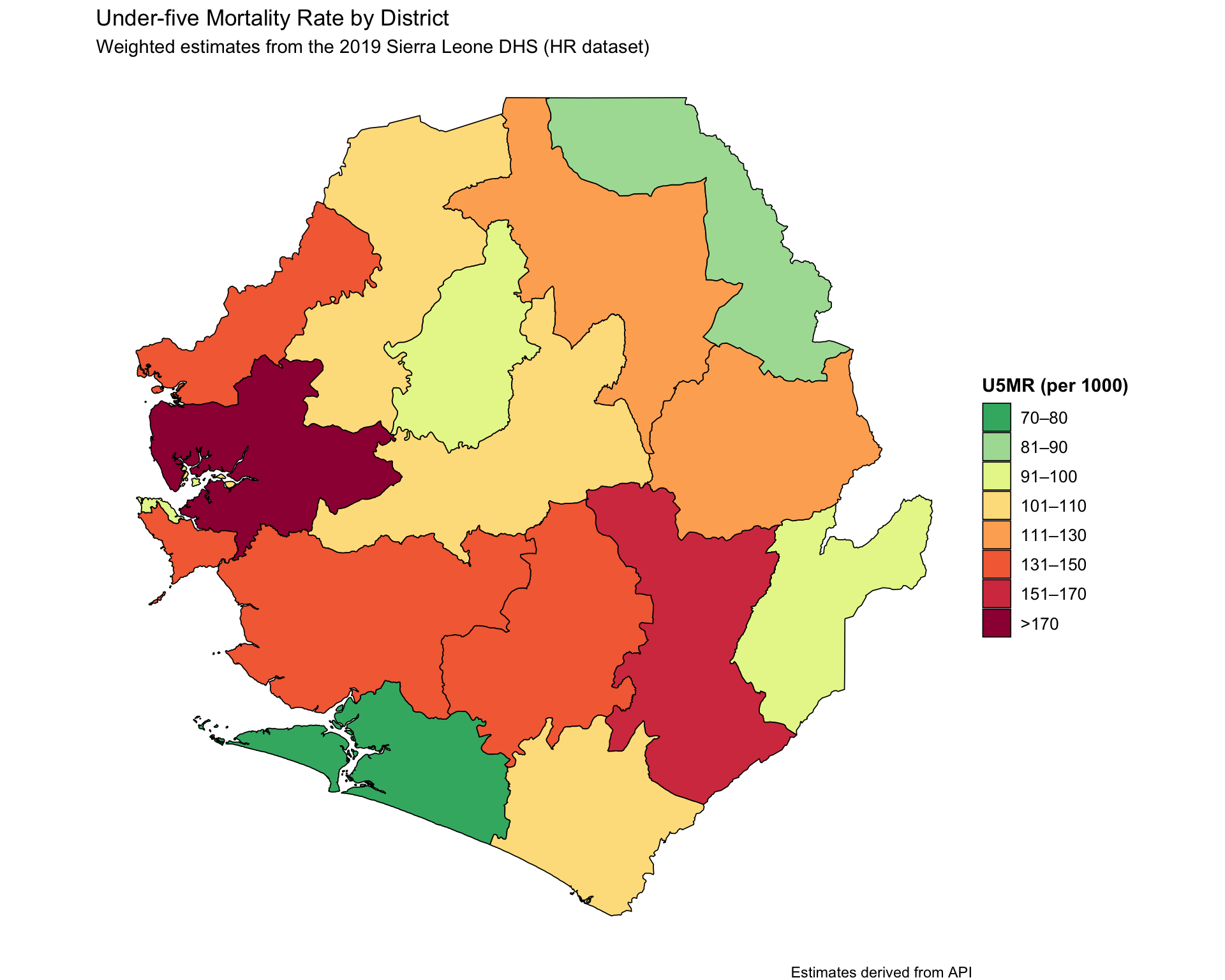
Step 1.4: Visualize Subnational Indicator Data

Once the indicator data has been downloaded and joined with a shapefile, we can create a map to explore geographic variation in both indicators. In the example below, we categorize the indicator into 10% bins and visualize it using ggplot2.

  • R
  • Python
Show full code
u5mr_final_api <- dhs_api_indi |>
  dplyr::mutate(
    prop_cat = cut(
      mean_u5mr,
      breaks = c(0, 80, 90, 100, 110, 130, 150, 170, Inf),
      labels = c(
        "70–80",
        "81–90",
        "91–100",
        "101–110",
        "111–130",
        "131–150",
        "151–170",
        ">170"
      ),
      include.lowest = TRUE,
      right = FALSE
    )
  )

# visualise the U5MR results
map_u5mr <- u5mr_final_api |>
  ggplot2::ggplot() +
  ggplot2::geom_sf(
    ggplot2::aes(fill = prop_cat, geometry = geometry),
    color = "black",
    size = 0.3,
    show.legend = TRUE
  ) +
  ggplot2::scale_fill_manual(
    name = "U5MR (per 1000)",
    values = c(
      ">170" = "#9E0142",
      "151–170" = "#D53E4F",
      "131–150" = "#F46D43",
      "111–130" = "#FDAE61",
      "101–110" = "#FEE08B",
      "91–100" = "#E6F598",
      "81–90" = "#ABDDA4",
      "70–80" = "#3CB371"
    ),
    drop = FALSE
  ) +
  ggplot2::labs(
    title = "Under-five Mortality Rate by District",
    subtitle = "Weighted estimates from the 2019 Sierra Leone DHS (HR dataset)",
    caption = "Estimates derived from API"
  ) +
  ggplot2::theme_void() +
  ggplot2::theme(
    legend.title = ggplot2::element_text(face = "bold"),
    legend.text = ggplot2::element_text(size = 10)
  )

map_u5mr

To adapt the code:

Modify only if relevant parameters were not created exactly as in earlier steps.

Now let us save these plots for future reference.

Save plot
# save u5mr plot
ggplot2::ggsave(
  plot = map_u5mr,
  filename = here::here("03_output/3a_figures/u5mr_sle_adm2.png"),
  width = 12, height = 9, dpi = 300
)

Step 1.5: Save Processed U5MR

After downloading and formatting the U5MR indicator data at the subnational level, we save it for use later on.

# Define save directory
save_path <- here::here("1.6_health_systems/1.6a_dhs")

# Save final joined U5MR data
rio::export(
  sle_dhs_shp2 |> sf::st_drop_geometry(),
  here::here(save_path, "processed", "final_u5mr_sle_adm2.csv")
)

# Save final joined U5MR data with spatial data
rio::export(
  sle_dhs_shp2,
  here::here(save_path, "processed", "final_u5mr_sle_adm2.rds")```

Option 2 (DHS Indicators Built from Raw Data)

Step 2.1: Load the Relevant DHS Data

  • R
  • Python
# import the KR (childrens) data
sle_dhs_kr <- readRDS(
  here::here("1.6_health_systems/1.6a_dhs/raw/SLKR7AFL.rds")
) |>
  # make location col
  dplyr::mutate(
    adm1 = haven::as_factor(v024) |>
      toupper(),
    adm2 = haven::as_factor(sdist) |>
      toupper(),
    location = paste0(adm1, ", ", adm2)
  )

To adapt the code:

  • Lines 3 and 8: Replace shapefile and KR file paths with those for your country’s DHS datasets (e.g., NGKR7AFL.rds for Nigeria).

If using standard DHS naming, no other changes should be needed.

Step 2.2: Calculate U5MR at District Level

  • R
  • Python
# calculate five-year under-five mortality rates
mort_sl <- sle_dhs_kr |>
  DHS.rates::chmort(
    JK = "Yes",                 # For getting confidence intervals
    Strata = "v022",            # Strata variable for complex survey design
    Cluster = "v021",           # Cluster (PSU) identifier
    Weight = "v005",            # Sampling weight
    Date_of_interview = "v008", # Date of interview (CMC format)
    Date_of_birth = "b3",       # Child’s date of birth (CMC format)
    Class = "location"          # Grouping variable (e.g., region, district)
  )

  mort_sl
Output

 The current function calculated Childhood Mortality Rates based on a reference period of 60 months 
 The reference period ended at the time of the interview, in 2019.58 OR May - Sep 2019 
 The average reference period is 2017.08 
     type                       Class      R    SE   N  WN DEFT  RSE    LCI
1    U5MR           SOUTHERN, PUJEHUN  91.46  1.54 266 180 1.30 0.02  88.43
2   U5MR1         NORTHERN, TONKOLILI 105.06 17.52 336 368 0.99 0.17  70.71
3   U5MR2            NORTHERN, FALABA  94.33  3.60 228 121 1.26 0.04  87.28
4   U5MR3 WESTERN, WESTERN AREA URBAN  87.28  3.11 302 495 1.19 0.04  81.18
5   U5MR4 WESTERN, WESTERN AREA RURAL 132.39  4.28 307 388 1.46 0.03 124.00
6   U5MR5           SOUTHERN, MOYAMBA 105.79  1.24 342 276 1.22 0.01 103.35
7   U5MR6               EASTERN, KONO 103.80  2.94 304 295 1.35 0.03  98.03
8   U5MR7       NORTH WESTERN, KAMBIA 115.55  3.95 332 318 1.22 0.03 107.81
9   U5MR8            SOUTHERN, BONTHE  82.48  3.09 284 191 1.12 0.04  76.42
10  U5MR9           EASTERN, KAILAHUN  81.59  2.02 254 226 1.22 0.02  77.63
11 U5MR10           NORTHERN, BOMBALI 103.89  3.86 322 316 1.10 0.04  96.33
12 U5MR11             EASTERN, KENEMA 129.75  4.35 420 509 1.01 0.03 121.23
13 U5MR12       NORTH WESTERN, KARENE 112.16  0.97 244 183 1.81 0.01 110.25
14 U5MR13         NORTHERN, KOINADUGU 117.78  6.39 251 146 1.35 0.05 105.25
15 U5MR14                SOUTHERN, BO 146.00  1.69 360 395 1.71 0.01 142.69
16 U5MR15    NORTH WESTERN, PORT LOKO 149.00  0.00 356 439 1.18 0.00 149.00
      UCI iterations
1   94.48         32
2  139.40         37
3  101.38         25
4   93.37         55
5  140.79         40
6  108.23         35
7  109.56         38
8  123.28         31
9   88.54         27
10  85.56         38
11 111.46         38
12 138.27         42
13 114.06         29
14 130.31         26
15 149.31         42
16 149.00         40

To adapt the code:

  • Lines 3: **Replace sle_dhs_kr with the relevant KR dataset for your country (e.g., NGKR7AFL.rds for Nigeria).

  • Line 10: To disaggregate by a different variable (e.g., “urban” or “b4” for sex), modify only the Class argument. Keep all other arguments unchanged.

If using standard DHS naming, no other changes should be needed.

Step 2.3: Prepare Subnational U5MR for plotting

In this step, we extract the U5MR estimates produced in Step 2 and link them to their corresponding geographic units (admin-1 and admin-2). This prepares the data for mapping, summary statistics, or subnational comparisons. We focus only on the U5MR rows and discard other mortality metrics (e.g., neonatal or infant mortality).

  • R
  • Python
# extract U5MR and join with location-level metadata
mort_sl2 <- mort_sl |>
  tibble::rownames_to_column(var = "type") |>          # convert rownames to a column
  dplyr::filter(stringr::str_detect(type, "U5MR")) |>  # keep only U5MR rows
  dplyr::left_join(
 # attach admin names from original dataset
    dplyr::distinct(sle_dhs_kr, location, adm1, adm2),
    by = c("Class" = "location")
  ) |>
  # keep only the relevant columns
  dplyr::select(
    adm1,
    adm2,
    mean_u5mr = R,
    low_u5mr = LCI,
    upp_u5mr = UCI
  )

mort_sl2
Output
            adm1               adm2 mean_u5mr low_u5mr upp_u5mr
1       SOUTHERN            PUJEHUN     91.46    88.43    94.48
2       NORTHERN          TONKOLILI    105.06    70.71   139.40
3       NORTHERN             FALABA     94.33    87.28   101.38
4        WESTERN WESTERN AREA URBAN     87.28    81.18    93.37
5        WESTERN WESTERN AREA RURAL    132.39   124.00   140.79
6       SOUTHERN            MOYAMBA    105.79   103.35   108.23
7        EASTERN               KONO    103.80    98.03   109.56
8  NORTH WESTERN             KAMBIA    115.55   107.81   123.28
9       SOUTHERN             BONTHE     82.48    76.42    88.54
10       EASTERN           KAILAHUN     81.59    77.63    85.56
11      NORTHERN            BOMBALI    103.89    96.33   111.46
12       EASTERN             KENEMA    129.75   121.23   138.27
13 NORTH WESTERN             KARENE    112.16   110.25   114.06
14      NORTHERN          KOINADUGU    117.78   105.25   130.31
15      SOUTHERN                 BO    146.00   142.69   149.31
16 NORTH WESTERN          PORT LOKO    149.00   149.00   149.00

To adapt the code:

  • Lines 3: **Replace sle_dhs_kr with the relevant KR dataset for your country (e.g., NGKR7AFL.rds for Nigeria).

  • Line 10: To disaggregate by a different variable (e.g., “urban” or “b4” for sex), modify only the Class argument. Keep all other arguments unchanged.

If using standard DHS naming, no other changes should be needed.

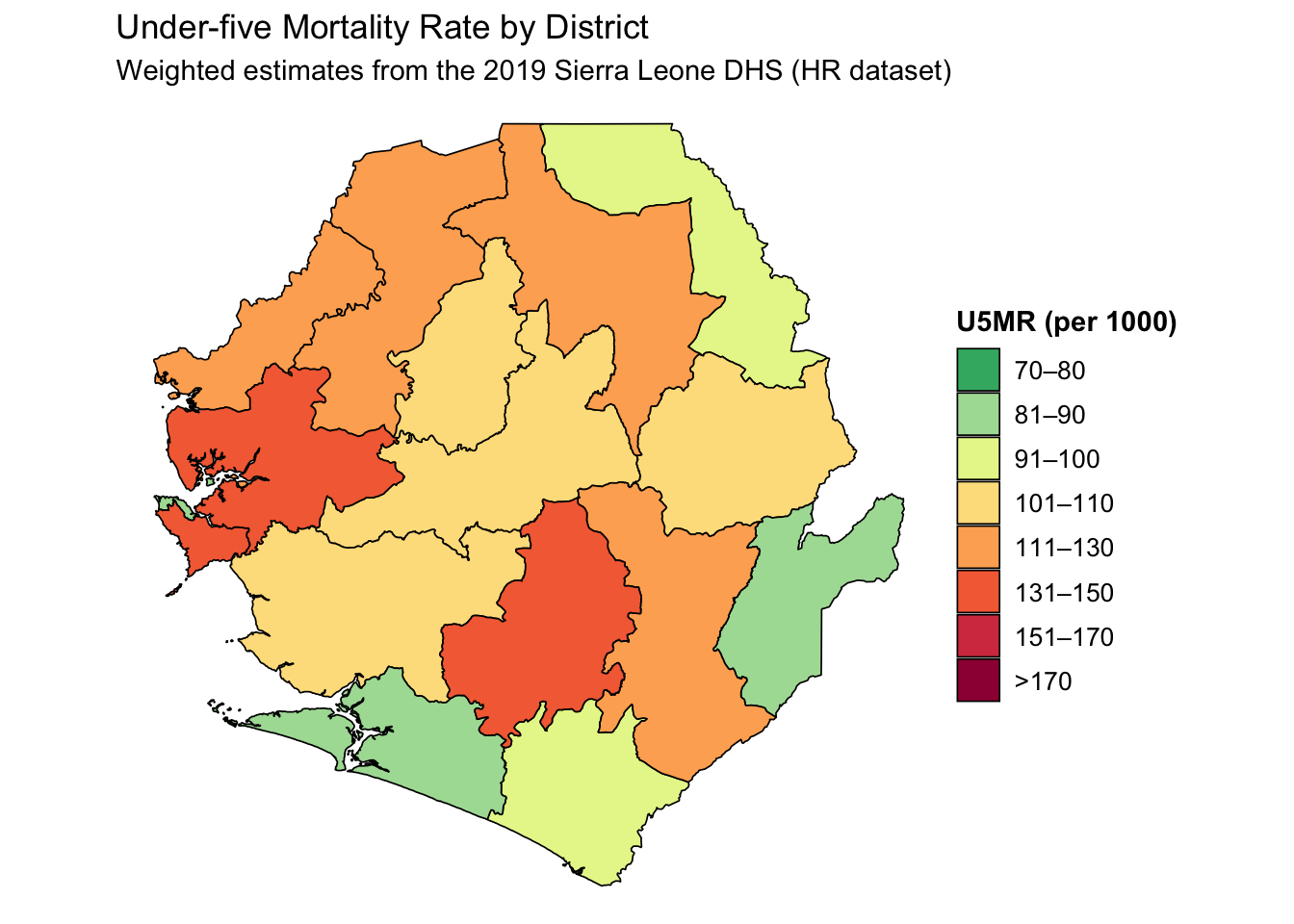
Example Interpretation: In Kailahun district in the Eastern region, the under-five mortality rate is estimated at 81.6 deaths per 1,000 live births. This estimate is statistically robust, with a 95% confidence interval ranging from 77.6 to 85.6 deaths, suggesting relatively lower childhood mortality in the district compared to many others in Sierra Leone.

Step 2.4: Plot U5MR at District Level

  • R
  • Python
Show full code
u5mr_final <- mort_sl2 |>
  dplyr::left_join(
    dplyr::select(sle_dhs_shp2, adm1, adm2),
    by = c("adm1", "adm2")
  ) |>
  dplyr::mutate(
    prop_cat = cut(
      mean_u5mr,
      breaks = c(0, 80, 90, 100, 110, 130, 150, 170, Inf),
      labels = c(
        "70–80",
        "81–90",
        "91–100",
        "101–110",
        "111–130",
        "131–150",
        "151–170",
        ">170"
      ),
      include.lowest = TRUE,
      right = FALSE
    )
  )

# visualise the U5MR results
map_u5mr <- u5mr_final |>
  ggplot2::ggplot() +
  ggplot2::geom_sf(
    ggplot2::aes(fill = prop_cat, geometry = geometry),
    color = "black",
    size = 0.3,
    show.legend = TRUE
  ) +
  ggplot2::scale_fill_manual(
    name = "U5MR (per 1000)",
    values = c(
      ">170" = "#9E0142",
      "151–170" = "#D53E4F",
      "131–150" = "#F46D43",
      "111–130" = "#FDAE61",
      "101–110" = "#FEE08B",
      "91–100" = "#E6F598",
      "81–90" = "#ABDDA4",
      "70–80" = "#3CB371"
    ),
    drop = FALSE
  ) +
  ggplot2::labs(
    title = "Under-five Mortality Rate by District",
    subtitle = "Weighted estimates from the 2019 Sierra Leone DHS (HR dataset)"
  ) +
  ggplot2::theme_void() +
  ggplot2::theme(
    legend.title = ggplot2::element_text(face = "bold"),
    legend.text = ggplot2::element_text(size = 10)
  )

map_u5mr
Output

To adapt the code:

Modify only if relevant parameters were not created exactly as in earlier steps.

Review with SNT Team

Once you’ve generated and saved the subnational U5MR estimates, review the results in consultation with the broader SNT team.

  • Do these mortality patterns align with known high-burden districts?
  • Are there areas where high U5MR suggests poor access to effective treatment or delays in seeking care?
  • Could any recent campaigns or local events explain outliers?

This step is essential to ground-truth the analysis and inform subsequent prioritization in the tailoring process.

Now let us save these plots for future reference.

Save plot
# save u5mr plot
ggplot2::ggsave(
  plot = map_u5mr,
  filename = here::here("03_output/3a_figures/u5mr_sle_adm2.png"),
  width = 12, height = 9, dpi = 300
)

Step 2.5: Save Processed U5MR

After calculating and formatting the U5MR data at the subnational level, we save the cleaned dataset for use in later steps such as visualization, tabulation, or integration with other indicators.

# Define save directory
save_path <- here::here("1.6_health_systems/1.6a_dhs")

# Save final joined U5MR data
rio::export(
  sle_dhs_shp2 |> sf::st_drop_geometry(),
  here::here(save_path, "processed", "final_u5mr_sle_adm2.csv")
)

# Save final joined U5MR data with spatial data
rio::export(
  sle_dhs_shp2,
  here::here(save_path, "processed", "final_u5mr_sle_adm2.rds"))

Summary

In this section, we demonstrate how to extract subnational U5MR using both Option 1 and Option 2. Option 1 uses the DHS API to pull pre-calculated U5MR values and associated confidence intervals directly; this is fast and convenient for quick summaries or comparisons across districts. However, it is limited in flexibility: you cannot redefine the calculation logic or disaggregate by custom variables. Option 2, by contrast, uses the raw DHS KR dataset and the DHS.rates::chmort() function to calculate U5MR directly, offering full control over disaggregation (e.g., by sex, urbanicity) and indicator assumptions. By combining both approaches, we ensure accessibility, reproducibility, and analytical depth.

Full code

  • R
  • Python
Show full code
################################### Option 1 ###################################

#===============================================================================
# Step 1.1: Set-Up and Download DHS data
#===============================================================================

# install or load required packages
pacman::p_load(
  here, # For handling relative file paths
  haven, # For reading DHS .dta files and labelled data
  dplyr, # For data wrangling
  stringr, # For filtering U5MR rows using regex
  tibble, # For rownames_to_column
  ggplot2, # For visualizing U5MR maps
  sf, # For working with shapefiles
  rio, # For saving outputs in .csv and .rds formats
  DHS.rates # For calculating under-five mortality rates
)

#' Check DHS Indicator List from API
#'
#' @param countryIds DHS country code(s), e.g., "EG"
#' @param indicatorIds Specific indicator ID(s)
#' @param surveyIds Survey ID(s)
#' @param surveyYear Exact year
#' @param surveyYearStart Start of year range
#' @param surveyYearEnd End of year range
#' @param surveyType DHS survey type (e.g., "DHS", "MIS")
#' @param surveyCharacteristicIds Filter by survey characteristic ID
#' @param tagIds Filter by tag ID
#' @param returnFields Fields to return (default: IndicatorId, Label, Definition)
#' @param perPage Max results per page (default = 500)
#' @param page Specific page to return (default = 1)
#' @param f Format (default = "json")
#'
#' @return A data.frame of indicators
#' @export
check_dhs_indicators <- function(
  countryIds = NULL,
  indicatorIds = NULL,
  surveyIds = NULL,
  surveyYear = NULL,
  surveyYearStart = NULL,
  surveyYearEnd = NULL,
  surveyType = NULL,
  surveyCharacteristicIds = NULL,
  tagIds = NULL,
  returnFields = c("IndicatorId", "Label", "Definition", "MeasurementType"),
  perPage = NULL,
  page = NULL,
  f = "json"
) {
  # Base URL
  base_url <- "https://api.dhsprogram.com/rest/dhs/indicators?"

  # Build query string
  params <- list(
    countryIds = countryIds,
    indicatorIds = indicatorIds,
    surveyIds = surveyIds,
    surveyYear = surveyYear,
    surveyYearStart = surveyYearStart,
    surveyYearEnd = surveyYearEnd,
    surveyType = surveyType,
    surveyCharacteristicIds = surveyCharacteristicIds,
    tagIds = tagIds,
    returnFields = paste(returnFields, collapse = ","),
    perPage = perPage,
    page = page,
    f = f
  )

  # Drop NULLs and encode
  query <- paste(
    purrr::compact(params) |>
      purrr::imap_chr(
        ~ paste0(.y, "=", URLencode(as.character(.x), reserved = TRUE))
      ),
    collapse = "&"
  )

  # Full URL
  full_url <- paste0(base_url, query)

  # Fetch with progress bar
  response <- httr::GET(full_url, httr::progress())
  jsonlite::fromJSON(httr::content(
    response,
    as = "text",
    encoding = "UTF-8"
  ))$Data
}

#' Query DHS API Directly via URL Parameters
#'
#' Builds and queries DHS API for indicator data using URL-based access
#' instead of rdhs package.
#'
#' @param countryIds Comma-separated DHS country code(s), e.g., "SL"
#' @param indicatorIds Comma-separated DHS indicator ID(s), e.g., "CM_ECMR_C_U5M"
#' @param surveyIds Optional comma-separated survey ID(s), e.g., "SL2016DHS"
#' @param surveyYear Optional exact survey year, e.g., "2016"
#' @param surveyYearStart Optional survey year range start
#' @param surveyYearEnd Optional survey year range end
#' @param breakdown One of: "national", "subnational", "background", "all"
#' @param f Format to return (default is "json")
#'
#' @return A data.frame containing the `Data` portion of the API response.
#' @export
download_dhs_indicators <- function(
  countryIds,
  indicatorIds,
  surveyIds = NULL,
  surveyYear = NULL,
  surveyYearStart = NULL,
  surveyYearEnd = NULL,
  breakdown = "subnational",
  f = "json"
) {
  # Base URL
  base_url <- "https://api.dhsprogram.com/rest/dhs/data?"

  # Assemble query string
  query <- paste0(
    "breakdown=",
    breakdown,
    "&indicatorIds=",
    indicatorIds,
    "&countryIds=",
    countryIds,
    if (!is.null(surveyIds)) paste0("&surveyIds=", surveyIds),
    if (!is.null(surveyYear)) paste0("&surveyYear=", surveyYear),
    if (!is.null(surveyYearStart)) paste0("&surveyYearStart=", surveyYearStart),
    if (!is.null(surveyYearEnd)) paste0("&surveyYearEnd=", surveyYearEnd),
    "&lang=en&f=",
    f
  )

  full_url <- paste0(base_url, query)

  cli::cli_alert_info("Downloading DHS data...")

  response <- httr::GET(full_url, httr::progress())

  if (httr::http_error(response)) {
    stop("API request failed: ", httr::status_code(response))
  }

  content_raw <- httr::content(response, as = "text", encoding = "UTF-8")
  data <- jsonlite::fromJSON(content_raw)$Data

  cli::cli_alert_success("Download complete: {nrow(data)} records retrieved.")
  return(data)
}

#===============================================================================
# Step 1.2: Download the Relevant Indicators
#===============================================================================

# get mean Under-five mortality rate at subnational level
u5mr_mean_dhs_ind <- download_dhs_indicators(
  countryIds = "SL",
  surveyYear = 2019,
  indicatorIds = "CM_ECMR_C_U5M",
  breakdown = "subnational"
) |>
  dplyr::mutate(
    dhs_indicator_id = "CM_ECMR_C_U5M",
    indicator = "Under-five mortality rate"
  ) |>
  dplyr::select(
    dhs_indicator_id,
    indicator,
    adm2_code = RegionId,
    mean_u5mr = Value
  )

# get lower interval Under-five mortality rate at subnational level
u5mr_low_dhs_ind <- download_dhs_indicators(
  countryIds = "SL",
  surveyYear = 2019,
  indicatorIds = "CM_ECMR_C_U5L",
  breakdown = "subnational"
) |>
  dplyr::mutate(
    dhs_indicator_id = "CM_ECMR_C_U5L",
    indicator = "Under-five mortality rate"
  ) |>
  dplyr::select(
    adm2_code = RegionId,
    low_u5mr = Value
  )

# get upper interval Under-five mortality rate at subnational level
u5mr_upp_dhs_ind <- download_dhs_indicators(
  countryIds = "SL",
  surveyYear = 2019,
  indicatorIds = "CM_ECMR_C_U5U",
  breakdown = "subnational"
) |>
  dplyr::mutate(
    dhs_indicator_id = "CM_ECMR_C_U5U",
    indicator = "Under-five mortality rate"
  ) |>
  dplyr::select(
    adm2_code = RegionId,
    upp_u5mr = Value
  )

#===============================================================================
# Step 1.3: Join Indicators with Shapefile
#===============================================================================

# get the DHS adm2 shapefile
sle_dhs_shp2 <- sf::read_sf(
  here::here(
    "01_foundational/1a_administrative_boundaries",
    "1ai_adm2",
    "sdr_subnational_boundaries_adm2.shp"
  )
) |>
  dplyr::select(
    adm1 = OTHREGNA,
    adm2 = DHSREGEN,
    adm2_code = REG_ID
  ) |>
  # make adm1 and adm2 to upper case
  dplyr::mutate(
    adm1 = toupper(adm1),
    adm2 = toupper(adm2)
  )

# join the mean, conficte intevals u5mr estimates
dhs_api_indi <- u5mr_mean_dhs_ind |>
  dplyr::left_join(u5mr_low_dhs_ind, by = "adm2_code") |>
  dplyr::left_join(u5mr_upp_dhs_ind, by = "adm2_code") |>
  # join adm2 dhs shapefile to data only keeping adm2 indicators
  dplyr::inner_join(sle_dhs_shp2, by = "adm2_code") |>
  # select only relevant columns
  dplyr::select(
    dhs_indicator_id,
    indicator,
    adm1,
    adm2,
    mean_u5mr,
    low_u5mr,
    upp_u5mr,
    geometry
  ) |>
  sf::st_as_sf()

# check indicators
sf::st_drop_geometry(dhs_api_indi)

#===============================================================================
# Step 1.4: Visualize Subnational Indicator Data
#===============================================================================

u5mr_final_api <- dhs_api_indi |>
  dplyr::mutate(
    prop_cat = cut(
      mean_u5mr,
      breaks = c(0, 80, 90, 100, 110, 130, 150, 170, Inf),
      labels = c(
        "70–80",
        "81–90",
        "91–100",
        "101–110",
        "111–130",
        "131–150",
        "151–170",
        ">170"
      ),
      include.lowest = TRUE,
      right = FALSE
    )
  )

# visualise the U5MR results
map_u5mr <- u5mr_final_api |>
  ggplot2::ggplot() +
  ggplot2::geom_sf(
    ggplot2::aes(fill = prop_cat, geometry = geometry),
    color = "black",
    size = 0.3,
    show.legend = TRUE
  ) +
  ggplot2::scale_fill_manual(
    name = "U5MR (per 1000)",
    values = c(
      ">170" = "#9E0142",
      "151–170" = "#D53E4F",
      "131–150" = "#F46D43",
      "111–130" = "#FDAE61",
      "101–110" = "#FEE08B",
      "91–100" = "#E6F598",
      "81–90" = "#ABDDA4",
      "70–80" = "#3CB371"
    ),
    drop = FALSE
  ) +
  ggplot2::labs(
    title = "Under-five Mortality Rate by District",
    subtitle = "Weighted estimates from the 2019 Sierra Leone DHS (HR dataset)",
    caption = "Estimates derived from API"
  ) +
  ggplot2::theme_void() +
  ggplot2::theme(
    legend.title = ggplot2::element_text(face = "bold"),
    legend.text = ggplot2::element_text(size = 10)
  )

################################### Option 2 ###################################

#===============================================================================
# Step 2.1: Load the Relevant DHS Data
#===============================================================================

# import the KR (childrens) data
sle_dhs_kr <- readRDS(
  here::here("1.6_health_systems/1.6a_dhs/raw/SLKR7AFL.rds")
) |>
  # make location col
  dplyr::mutate(
    adm1 = haven::as_factor(v024) |>
      toupper(),
    adm2 = haven::as_factor(sdist) |>
      toupper(),
    location = paste0(adm1, ", ", adm2)
  )

# get the DHS adm2 shapefile
sle_dhs_shp2 <- sf::read_sf(
  here::here(
    "01_foundational/1a_administrative_boundaries",
    "1ai_adm2",
    "sdr_subnational_boundaries_adm2.shp"
  )
) |>
  dplyr::select(
    adm1 = OTHREGNA,
    adm2 = DHSREGEN,
    adm2_code = REG_ID
  ) |>
  # make adm1 and adm2 to upper case
  dplyr::mutate(
    adm1 = toupper(adm1),
    adm2 = toupper(adm2)
  )

#===============================================================================
# Step 2,2: Calculate U5MR at District Level
#===============================================================================

# calculate five-year under-five mortality rates
mort_sl <- sle_dhs_kr |>
  DHS.rates::chmort(
    JK = "Yes", # For getting confidence intervals
    Strata = "v022", # Strata variable for complex survey design
    Cluster = "v021", # Cluster (PSU) identifier
    Weight = "v005", # Sampling weight
    Date_of_interview = "v008", # Date of interview (CMC format)
    Date_of_birth = "b3", # Child’s date of birth (CMC format)
    Class = "location" # Grouping variable (e.g., region, district)
  )

mort_sl

#===============================================================================
# Step 2.3:  Prepare Subnational U5MR for plotting
#===============================================================================

mort_sl2 <- mort_sl |>
  tibble::rownames_to_column(var = "type") |> # convert rownames to a column
  dplyr::filter(stringr::str_detect(type, "U5MR")) |> # keep only U5MR rows
  dplyr::left_join(
    # attach admin names from original dataset
    dplyr::distinct(sle_dhs_kr, location, adm1, adm2),
    by = c("Class" = "location")
  ) |>
  # keep only the relevant columns
  dplyr::select(
    adm1,
    adm2,
    mean_u5mr = R,
    low_u5mr = LCI,
    upp_u5mr = UCI
  )
mort_sl2

#===============================================================================
# Step 2.4:  Plot U5MR at District Level
#===============================================================================

u5mr_final <- mort_sl2 |>
  dplyr::left_join(
    dplyr::select(sle_dhs_shp2, adm1, adm2),
    by = c("adm1", "adm2")
  ) |>
  dplyr::mutate(
    prop_cat = cut(
      mean_u5mr,
      breaks = c(0, 80, 90, 100, 110, 130, 150, 170, Inf),
      labels = c(
        "70–80",
        "81–90",
        "91–100",
        "101–110",
        "111–130",
        "131–150",
        "151–170",
        ">170"
      ),
      include.lowest = TRUE,
      right = FALSE
    )
  )

# visualise the U5MR results
map_u5mr <- u5mr_final |>
  ggplot2::ggplot() +
  ggplot2::geom_sf(
    ggplot2::aes(fill = prop_cat, geometry = geometry),
    color = "black",
    size = 0.3,
    show.legend = TRUE
  ) +
  ggplot2::scale_fill_manual(
    name = "U5MR (per 1000)",
    values = c(
      ">170" = "#9E0142",
      "151–170" = "#D53E4F",
      "131–150" = "#F46D43",
      "111–130" = "#FDAE61",
      "101–110" = "#FEE08B",
      "91–100" = "#E6F598",
      "81–90" = "#ABDDA4",
      "70–80" = "#3CB371"
    ),
    drop = FALSE
  ) +
  ggplot2::labs(
    title = "Under-five Mortality Rate by District",
    subtitle = "Weighted estimates from the 2019 Sierra Leone DHS (HR dataset)"
  ) +
  ggplot2::theme_void() +
  ggplot2::theme(
    legend.title = ggplot2::element_text(face = "bold"),
    legend.text = ggplot2::element_text(size = 10)
  )

map_u5mr

# save u5mr plot
ggplot2::ggsave(
  plot = map_u5mr,
  filename = here::here("03_output/3a_figures/u5mr_sle_adm2.png"),
  width = 12,
  height = 9,
  dpi = 300
)

#===============================================================================
# Step 2.5: Save Processed U5MR
#===============================================================================

# Define save directory
save_path <- here::here("1.6_health_systems/1.6a_dhs")

# Save final joined U5MR data
rio::export(
  sle_dhs_shp2 |> sf::st_drop_geometry(),
  here::here(save_path, "processed", "final_u5mr_sle_adm2.csv")
)

# Save final joined U5MR data with spatial data
rio::export(
  sle_dhs_shp2,
  here::here(save_path, "processed", "final_u5mr_sle_adm2.rds")
)
#===============================================================================
# End of Script
#===============================================================================
 

©2025 Applied Health Analytics for Delivery and Innovation. All rights reserved