• English
  • Français
  1. 2. Data Assembly and Management
  2. 2.6 National Household Survey Data
  3. Treatment-seeking rates
  • Code library for subnational tailoring
    English version
  • 1. Getting Started
    • 1.1 About and Contact Information
    • 1.2 For Everyone
    • 1.3 For the SNT Team
    • 1.4 For Analysts
    • 1.5 Producing High-Quality Outputs
  • 2. Data Assembly and Management
    • 2.1 Working with Shapefiles
      • Spatial data overview
      • Basic shapefile use and visualization
      • Shapefile management and customization
      • Merging shapefiles with tabular data
    • 2.2 Health Facilities Data
      • Fuzzy matching of names across datasets
      • Health facility coordinates and point data
      • Determining active and inactive status
    • 2.3 Routine Surveillance Data
      • Routine data extraction
      • DHIS2 data preprocessing
      • Assessing missing data
      • Health facility reporting rate
      • Data coherency checks
      • Outlier detection methods
      • Imputing missing data and correcting outliers
      • Final database
    • 2.4 Stock Data
      • LMIS
    • 2.5 Population Data
      • National population data
      • WorldPop population raster
    • 2.6 National Household Survey Data
      • DHS data overview and preparation
      • Prevalence of malaria infection
      • All-cause child mortality
      • Treatment-seeking rates
      • ITN ownership, access, and usage
    • 2.7 Entomological Data
      • Entomological data
    • 2.8 Climate and Environmental Data
      • Climate and environment data extraction from raster
    • 2.9 Modeled Data
      • Generating spatial modeled estimates
      • Working with geospatial model estimates
      • Modeled estimates of malaria mortality and proxies
      • Modeled estimates of entomological indicators
  • 3. Stratification
    • 3.1 Epidemiological Stratification
      • Incidence overview and crude incidence
      • Incidence adjustment 1: incomplete testing
      • Incidence adjustment 2: incomplete reporting
      • Incidence adjustment 3: treatment-seeking
      • Incidence stratification
      • Prevalence and mortality stratification
      • Combined risk categorization
    • 3.2 Stratification of Determinants of Malaria Transmission
      • Seasonality
      • Access to care
  • 4. Review of Past Interventions
    • 4.1 Case Management
    • 4.2 Routine Interventions
    • 4.3 Campaign Interventions
    • 4.4 Other Interventions
  • 5. Targeting of Interventions
  • 6. Retrospective Analysis
  • 7. Urban Microstratification

On this page

  • Overview
  • Key information to take into account in the context of SNT
  • Step-by-Step
    • Step 1: Set Up Packages and Functions
      • Step 1.1: Install and Load Libraries
      • Step 1.2: Define Helper Functions
    • Step 2: Extract Children with Recent (Malaria) Fever
      • Step 2.1: Select the children under 5 with fever in the 2 weeks preceding the survey
      • Step 2.2: Select children with fever in the past 2 weeks who are also RDT-positive
    • Step 3: Assign Recent Fevers to Source of Treatment
    • Step 4: Estimate Treatment-Seeking Rates by Sector at Admin-1 Level
    • Step 5: Visualize Treatment-Seeking Rates by Sector
    • Step 6: Estimate Values for Years Without Surveys
      • Step 6.1: Use Data from the Most Recent Survey Until a New One Becomes Available
      • Step 6.2: Linear interpolation
    • Step 7: Save the Output
  • Summary
  • Full code
  1. 2. Data Assembly and Management
  2. 2.6 National Household Survey Data
  3. Treatment-seeking rates

Treatment-seeking rates

Beginner

Overview

Case management is a foundational intervention to reduce malaria morbidity and prevent malaria deaths. In the context of SNT, understanding care-seeking behavior and assessing the quality of care are critical for identifying districts where improvements are needed and for interpreting routine surveillance data.

Care-seeking rates can be derived from data from national surveys such as the Demographic and Health Surveys (DHS), Malaria Indicator Surveys (MIS), and Multiple Indicator Cluster Surveys (MICS). This page describes how to estimate treatment-seeking rates for malaria from DHS or MIS national household surveys.

Objectives
  • Understand how care-seeking rates can be estimated from national household surveys
  • Extract a denominator of recent malaria cases in children from survey data
  • Estimate treatment-seeking rates from recent malaria cases in children
  • Estimate treatment-seeking rates in years without surveys
  • Visualize treatment-seeking rates by admin unit and year

Key information to take into account in the context of SNT

General information on DHS surveys and how to access data is available on the DHS Overview page. When estimating treatment-seeking rates for SNT, we should consider the following points:

Where do I find household survey data on treatment-seeking?

While some types of survey data can be directly accessed via API, the API does not provide information on in which sector care was sought. Instead, you will need to work with downloaded DHS/MIS data files. Access survey data using the instructions on the DHS Program website or ask the SNT team for survey data files. Instructions for downloading via the rdhs package are also available on the DHS Overview page here.

At What administrative level should we estimate treatment-seeking?

On this page, we estimate treatment-seeking at the admin-1 level, as DHS and MIS are representative at the national and admin-1 level. This results in all districts within the same admin-1 receiving the same estimate. Estimates can be generated for smaller administrative units using Bayesian geospatial modeling (e.g., INLA).

How is treatment-seeking measured in household surveys?

In DHS/MIS surveys, questions relating to children’s health are included in the questionnaire for women. Mothers are questioned about their children under the age of 5:

  • Has your child had a fever at any time in the last two weeks?
  • (If yes) Have you sought advice or treatment for fever from any source?
  • (If yes) Where did you seek advice or treatment?

The treatment-seeking rate in a sector (public sector, private sector, or no care-seeking) is then defined as the proportion of children with recent fever who sought treatment in that sector. It is assumed that the treatment rate for recent fever and treatment rate for malaria fever is the same.

In MIS and some DHS, children under 5 are tested for malaria infection with a rapid diagnostic test (RDT). Some SNT teams have chosen to only consider children who had both a recent fever and a positive RDT at the time of survey when calculating treatment rate. This is because RDT-detected antigens remain in the blood for several weeks after treatment with antimalarials, and an RDT-postive child at time of survey was likely to have been also RDT-positive when they were febrile, making their fever more likely to have been caused by malaria.

To identify RDT-postive recently-febrile children, the individual child must be cross-referenced between the children file, which contains the RDT information, and the women’s file, which contains the recent fever and treatment-seeking information. This code library page contains code for both options (considering and not considerig the RDT result) on denominators. Consult your SNT team on which option to use.

How are the public and private sectors defined?

DHS/MIS uses specific codes to indicate various types of public and private sector sources of care, both medical and non-medical. The specific source each variable indicates is largely country-specific (see a general guide on pages 92–93 of the standard DHS recode PDF here). Consult individual survey recode files for country-specific information and verify with your SNT team that you are including and excluding the correct treatment source types in your definitions of public and private sectors.

Consult SNT team

Confirm which sources of care to include for the public and private sectors, as definitions may vary by country. For example, should pharmacies or traditional healers be included?

How should we handle years without survey data?

For SNT, we may need annual estimates of treatment-seeking. Because DHS/MIS surveys are not conducted every year, this page includes the following options for estimating treatment-seeking rates in non-survey year:

  • Use data from a given survey year until a new survey becomes available, or apply the most recent survey data available
  • Interpolate data linearly between survey years

Step-by-Step

This section covers the estimation of the proportion of malaria fevers that seek treatment in the public sector, private sector, or do not seek treatment. It will guide you through importing the data, selecting and computing new variables,estimating the treatment-seeking rates while accounting for the survey sampling plan, and finally, visualizing and saving the results for future use.

To skip the step-by-step explanation, Jump to the full code at the end of this page.

Step 1: Set Up Packages and Functions

We will install and load the necessary packages for this section. Then, we will define helper functions needed for the analysis.

To estimate treatment-seeking rates, we use DHS or MIS datasets—primarily the PR and KR files. This step assumes that the relevant datasets are already available, either through prior download from the DHS website or provided by the SNT team.

🔗 Not yet prepared your DHS data?

If you haven’t yet accessed or prepared the DHS datasets (e.g., PR, KR), we recommend starting with the DHS Data Preparation page, which provides a step-by-step guide for downloading, organizing, and understanding DHS files used in SNT workflows.

Step 1.1: Install and Load Libraries

We now load the packages we’ll need for working with survey data, installing any that are missing.

  • R
  • Python
Show the code
# Install pacman only if it's not already installed
if (!requireNamespace("pacman", quietly = TRUE)) {
  install.packages("pacman")
}

# install or load relevant packages
pacman::p_load(
  rdhs,      # for downloading dhs data
  tidyverse, # core tidy tools (includes dplyr, tidyr, readr, etc.)
  haven,     # read and write various data formats (stata)
  httr,      # download files from web (GET, write_disk)
  rio,       # importing data
  here,      # relative file pathways
  data.table,# is an excellent extension of the data.frame class
  fs,        # handle file paths
  purrr,     # iterate over lists (map, walk, etc.)
  rlang,     # for tidy evaluation and error messaging
  survey,    # analyzing data from complex surveys
  sf,        # Support for simple feature access, a standardized way
             # to encode and analyze spatial vector data
  tmap,      # drawing thematic maps
  knitr      # Make table
)

Step 1.2: Define Helper Functions

We start by defining helper functions that import data, create a complex survey design object, compute survey-weighted proportions, and estimate proportions.

The svydesign.fun function creates a complex survey design object from a DHS dataset by specifying the primary sampling unit (id), stratification (strate), and sampling weights (wt). This structure is required to ensure correct variance estimation when analyzing complex survey data with the survey package.

The result.prop function estimates the survey-weighted mean of a binary outcome (var), grouped by a second variable (var1). It returns means and 95% confidence intervals by group.

Finally, the estim_prop function wraps the entire workflow: it first creates a survey design object from the input dataset, and then computes survey-weighted proportions for a given indicator (col), stratified by specified grouping variables (such as region or year). This function helps streamline repetitive survey analysis tasks. It takes a dataframe, a column name for the indicator of interest, and grouping variables (like adm1 or year).

  • R
  • Python
Show the code
# Create a complex survey design object
 svydesign.fun <- function(filename){
## Create a Survey Design Object
  survey::svydesign(id = ~id,
            strata = ~strate, nest = T,
            weights = ~wt, data = filename)
 }

# Computes survey-weighted proportions
 result.prop <- function(var, var1, design) {
  p_est <- survey::svyby(formula = make.formula(var), by = make.formula(var1),
                       FUN = svymean, design, levels = 0.95, vartype = "ci",
                       na.rm = T, influence = TRUE)
 }

# Estimation functions
estim_prop <- function(df, col, by){
  svy_mal <- svydesign.fun(df)
  region_est <- result.prop(col, by, design = svy_mal)
}

To adapt the code:

  • Do not change anything in this code block.

Step 2: Extract Children with Recent (Malaria) Fever

Now that we have defined our helper functions, we will start by importing the dataset, then extracting the denominator for measuring treatment-seeking: the children with recent malaria fever. To estimate the care-seeking rates, we evaluate two options for determining the denominator. The first option includes all children who had fever in the two weeks preceding the survey, assuming all reported fevers are attributable to malaria. This approach ensures a larger sample size and applies to all survey types.

The second option narrows the denominator to children who reported fever and tested positive by RDT, focusing on fevers likely caused by malaria. While this method increases diagnostic specificity, it reduces the sample size since some recently-febrile children were not RDT-postive at time of survey. Furthermore, this approach is limited to surveys that include diagnostic testing.

We will show below how to execute each of these two options, then carry forward the first option for the rest of the code.

Consult SNT team

Discuss with the SNT team which denominator estimation option makes the most sense for the country context and availability of survey data, including diagnostic testing. Since one of the considerations may be sample size, we recommend you proceed through Steps 2.1 and 2.2 to first count the number of sampled children in each option and bring this information to the discussion.

Step 2.1: Select the children under 5 with fever in the 2 weeks preceding the survey

We begin by identifying the children under 5 who had a fever in the two weeks preceding the survey.

We read the KR file from the working directory, select the relevant variables, and create new admin-1 level variables to account for variations in naming across surveys. We assign statistical weights (wt) using the v005 variable (divided by one million), define the stratification (strate) and cluster identifiers (id), and create the ml_fever variable to flag children with fever (1) or without (0). Finally, we filter the dataset to include only living children (b5==1) under the age of five (age < 60 months).

As an output of this step, we generate a summary table showing the number of children with fever by region (admin-1), which will be used in later analysis and mapping.

  • R
  • Python
Show the code
# Import and process DHS KR files for 2013 and 2019
mis_kr_2016 <- readRDS(here::here("1.6_health_systems/1.6a_dhs/raw/SLKR73FL.rds")) |>
  haven::zap_labels() |> # remove labels to make merging easier
  dplyr::select(
    caseid, v001, v002, v003, v007, v012, v022, v021,
    v024, v101, v005, b5, b8, b19, h22, h32a:h32y
  )

dhs_kr_2019 <- readRDS(here::here("1.6_health_systems/1.6a_dhs/raw/SLKR7AFL.rds")) |>
  haven::zap_labels() |> # remove labels to make merging easier
  dplyr::select(
    caseid, v001, v002, v003, v007, v012, v022, v021,
    v024, v101, v005, b5, b8, b19, h22, h32a:h32y
  )

# Combine both survey rounds
dhs_kr <- dplyr::bind_rows(mis_kr_2016, dhs_kr_2019)

# Process each dataset in the list
dhs <- dhs_kr |>

  # Create helper variables: admin-1, weights, strata,
  # cluster ID, year, fever indicator
  dplyr::mutate(
    adm1 = ifelse(is.na(v024), v101, v024),
    wt = v005 / 1000000, strate = v022, id = v021,
    year = v007,
    ml_fever = ifelse(h22 == 1, 1, 0)) |>

  # Recode admin-1 region codes to consistent readable region names (year-dependent)
  dplyr::mutate(
    adm1 = dplyr::case_when(
      adm1 == 1 ~ "eastern",
      adm1 == 2 ~ "northern",
      adm1 == 3 & year == 2019 ~ "north western",
      adm1 == 3 & year == 2016 ~ "southern",
      adm1 == 4 & year == 2019 ~ "southern",
      adm1 == 4 & year == 2016 ~ "western",
      adm1 == 5 ~ "western",
      TRUE ~ NA_character_
    )) |>

  # Filter to include only living children under age 5 with valid fever responses
  dplyr::filter(
    b5 == 1 & b19 < 60 & h22 != 8)

# File with only children with fever
dhs_fever <- dhs |>
  dplyr::filter(ml_fever == 1)

# Filter to fever cases and summarize by admin-1
data_output = dhs |>
  dplyr::filter(ml_fever == 1) |>
  dplyr::group_by(adm1) |>
  dplyr::summarise(ml_fever = sum(ml_fever, na.rm = T))

# Display summary table with number of fevers by admin-1
knitr::kable(data_output, caption = "Number of fevers by admin-1 level")
Output
Number of fevers by admin-1 level
adm1 ml_fever
eastern 708
north western 277
northern 883
southern 923
western 324

To adapt the code:

  • Lines 4 & 9: Replace “SLKR61FL.rds” and “SLKR7AFL.rds” with your country’s .rds files (e.g. “NGKR7HFL.rds” for Nigeria 2018).

  • Lines 4 & 10: Keep haven::zap_labels() to avoid label conflicts when merging across years.

  • Lines 6–8 & 11–13: Ensure the selected variables (b5, b19, h22, h32a:h32y) are present and named consistently across years.

  • Lines 17–25: Update adm1 region mapping to reflect your country’s region codes and how they change across survey years.

  • Line 28: Confirm filtering criteria (b5 == 1, b19 < 60, h22 != 8) match the coding logic of your dataset.

In most cases, this script will run as-is for any DHS/MIS KR file with standard variable naming and regional coding.

Step 2.2: Select children with fever in the past 2 weeks who are also RDT-positive

We identify children under five who had both a recent fever and a positive RDT result by combining two sources of information.

First, we use the fever data extracted in Step 2.1, which includes children who had a fever in the two weeks preceding the survey.

Next, we extract RDT data from the PR file, which contains information on household members. We filter for children aged 6–59 months who were selected for the hemoglobin test, slept in the household the night before the survey, and tested positive by RDT.

We then merge the fever and RDT-positive datasets by household and survey identifiers to create a unified table.

The code below performs these steps and ends by summarizing and displaying the number of RDT-positive recently febrile children by admin-1 level.

  • R
  • Python
Show the code
# Import and process MIS PR files for 2013 and 2019
mis_pr_2016 <- readRDS(here::here("1.6_health_systems/1.6a_dhs/raw/SLPR73FL.rds")) |>
  haven::zap_labels() |> # remove labels to make merging easier
  dplyr::select(
    v001 = hv001, v002 = hv002, v007 = hv007, hv103,
    hv042, hc1, rdt = hml35)

dhs_pr_2019 <- readRDS(here::here("1.6_health_systems/1.6a_dhs/raw/SLPR7AFL.rds")) |>
  haven::zap_labels() |> # remove labels to make merging easier
  dplyr::select(
    v001 = hv001, v002 = hv002, v007 = hv007, hv103,
    hv042, hc1, rdt = hml35)

# Combine both survey rounds
dhs_pr <- dplyr::bind_rows(mis_pr_2016, mis_pr_2016)

# From the PR file, extract children under 5 who are eligible and RDT positive
data_pr <- dhs_pr |>
  dplyr::filter(
    hv042 == 1 & hv103 == 1 & hc1 %in% c(6:59) & rdt == 1) |>
  dplyr::select(-hv042, -hv103, -hc1)

# Merge fever data with RDT-positive data by cluster, household, and survey year
data_pr_kr <- dhs_fever |>
    dplyr::left_join(
      data_pr, by = c("v001", "v002", "v007"),
      relationship = "many-to-many") |>
    dplyr::filter(rdt == 1) |>
    dplyr::select(-dplyr::starts_with(".id"))

# Group by admin-1 and sum number of RDT-positive children
data_output_rdt = data_pr_kr |>
  dplyr::group_by(adm1) |>
  dplyr::summarise(rdt = sum(rdt, na.rm = T))

# Display the result in a formatted table
knitr::kable(data_output_rdt,
             caption = "Number of RDT-positive fevers by admin-1")
Output
Number of RDT-positive fevers by admin-1
adm1 rdt
eastern 356
northern 805
southern 542
western 113

To adapt the code:

  • Line 28: Delete the keep function if you are sure that all your surveys include information on RDT+

Step 3: Assign Recent Fevers to Source of Treatment

In this step, we apply Option 1 for the recent fever denominator (all recent fevers) to classify care-seeking among febrile children by identifying whether caregivers sought care or advice from public or private health sectors, or did not seek care. If your SNT team chose to use Option 2 (RDT-positive recent fevers only), refer to the section To adapt the code below for guidance on modifying the code for Option 2.

The code below calculates the number of care sources visited in each sector (public, private, or no care) to classify each child’s care-seeking. Because a child may access multiple sources within a sector, the counts can exceed one. To standardize this, the code converts each sector’s count to a binary indicator (1 if care was sought, 0 otherwise). If a child accessed both public and private care, the code classifies the child under the public sector.

It assigns each child’s care-seeking behavior to a sector (public or private) based on the guidelines from the DHS-8 Guide to DHS Statistics. To understand how each variable contributes to the public and private, you can refer to the official DHS Guide:

  • Type fever in the search bar
  • Click on Prevalence, Diagnosis, and Prompt Treatment of Children with Fever
  • Scroll down to view the variable definitions
Consult SNT team
  • Each country has specific characteristics, so consult the SNT team to confirm which sources should be included. For example, some surveys exclude traditional practitioners (h32t), pharmacies (h32k), stores (h32s), or other sources.

  • This code assumes that if a child sought care in multiple sectors (e.g., both private and public), we count the care as being in the public sector. This approach ensures that the sum of the percentages (public + private + no_treat) equals 1.Otherwise,the total may exceed 1. Verify this approach with your SNT team.

  • R
  • Python
Show the code
dhs_care_seeking <- dhs |>
  # Filter by key factors (child had a fever in last two weeks: h22)
  dplyr::filter(ml_fever == 1) |>

  # Assigning each child to public, private and no care-seeking
  dplyr::mutate(
    ml_fever_pub = rowSums(
      dplyr::across(
        c(
          h32a, h32b, h32c, h32d, h32e,
          h32f, h32g, h32h, h32i
        )), na.rm = TRUE),

    ml_fever_priv = rowSums(
      dplyr::across(
        c(
          h32j, h32k, h32l, h32m, h32n,
          h32o, h32p, h32q, h32r, h32s,
          h32t, h32u, h32v, h32w, h32x
        )), na.rm = TRUE),

    pub = ifelse(ml_fever_pub > 0, 1, 0),
    priv = ifelse(ml_fever_priv > 0, 1, 0),
    pub = ifelse(pub == 1 & priv == 1, 1, pub),
    no_treat = ifelse(h32y == 0, 0, 1)
  )

To adapt the code:

  • Line 1: If option 2 is chosen by the SNT team, replace the dataset dhs with data_pr_kr from Step 2.2

  • Line 10-11 and 17-19: Review the variable definitions in ml_fever_pub and ml_fever_priv on the DHS website. Remove any variables that don’t reflect your country’s classification of public or private care, and confirm the variable names match the survey

  • Line 22: Comment out or revise this line if your team decides not to count children who sought care in both sectors as public only

Step 4: Estimate Treatment-Seeking Rates by Sector at Admin-1 Level

We have created the indicators pub, priv and no_treat in Step 3 to classify care-seeking for each individual child. Now we will calculate the proportion of children who sought care in the private sector, in the public sector and those who did not seek care at all, at admin-1 level.

When working with survey data, remember that we need to apply weights to ensure the data accurately represent the population, especially when participants are selected with different probabilities as in cluster or stratified surveys.

Although several R functions can apply weights, most cannot account for the full complexity of the sampling design. For this reason, it is best to use the survey package, which is specifically designed to handle complex survey designs and weighting, while also supporting simpler weighting applications. Another package, srvyr, works with survey objects and is similar to dplyr for data arrays by extending dplyr’s verbs to handle complex sampling plans. In this example, we use the survey package.

The code below uses the table of individual children fever and their care-seeking outcomes from Step 3, stratified by admin1 and survey year, and calculates the proportion of children seeking care in each sector (public, private, or not at all). Using the estim_prop function we defined in Step 1.2, it applies survey weights and handles survey design to ensure valid estimates.

  • R
  • Python
Show the code
# Define indicators
vars <- c("pub", "priv", "no_treat")

# Handle single PSU strata
options(survey.lonely.psu = "adjust")

# Process each dataset in dhs file
data_fever_care <- dhs_care_seeking |>
  # Add a year column
  dplyr::mutate(year = v007) |>
  # Compute proportions for each indicator
  estim_prop(col = vars, by = c("adm1", "year")) |>
  # rename columns, and format
  dplyr::rename(adm1 = 1, year = 2) |>
  dplyr::select(adm1, year, pub, priv, no_treat) |>
  dplyr::mutate(
    pub = round(pub, 2),
    priv = round(priv, 2),
    no_treat = round(no_treat, 2),
    year = as.numeric(year)
  )

# Reset row name
rownames(data_fever_care) <- NULL

To adapt the code:

  • Line 8: If you choose option 2, modify dhs_care_seeking name to match the one created in Step 3

Step 5: Visualize Treatment-Seeking Rates by Sector

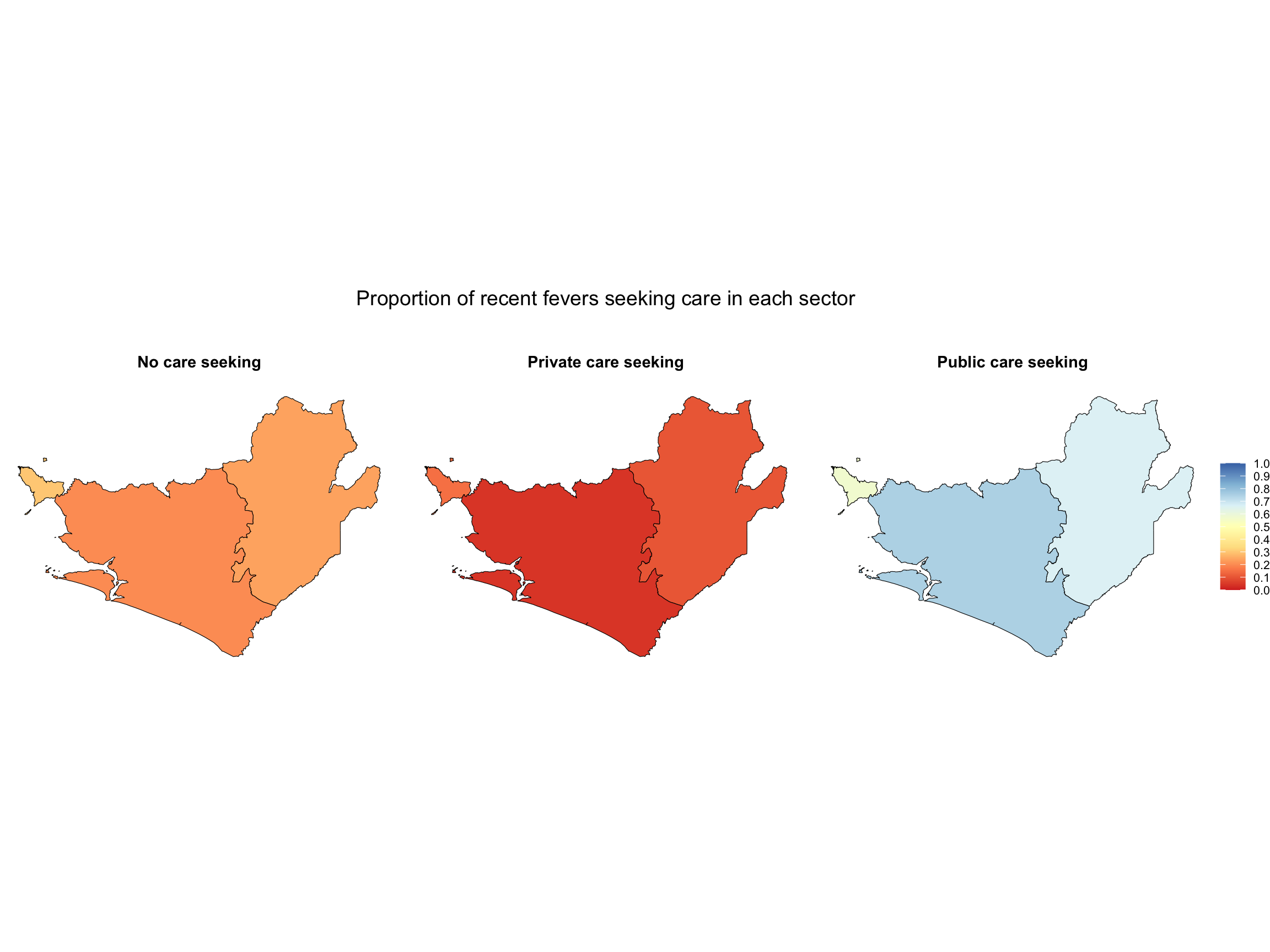
We are now ready to visualize treatment-seeking rates by sector. To start, we’ll import the shapefile for the corresponding administrative level (admin-1 in this case). For guidance on working with shapefiles, refer to the Shapefiles page.

  • R
  • Python

We will use ggplot2 to create visualizations. Another option is tmap.

Show the code
# Import the shapefile using st_read
shp <- readRDS(
  here::here("01_foundational/1a_administrative_boundaries",
             "1ai_adm3", "sle_adm1_shp.rds")
) |>  sf::st_as_sf()

# Pivot the table in long format to have all indicators in a single column
data_care_shp <- data_fever_care |>
   tidyr::pivot_longer(cols = c("pub", "priv", "no_treat"),
                     names_to = "Sectors",
                     values_to = "values") |>
  dplyr::mutate(
    Sectors = dplyr::recode(Sectors,
      "pub" = "Public care seeking",
      "priv" = "Private care seeking",
      "no_treat" = "No care seeking"
    )
  )

# Merge shapefile with care-seeking date
dhs_shp_region <- shp |>
  dplyr::left_join(data_care_shp, by = c("adm1"),
            relationship = "many-to-many")

# Create a map to viualize the indicators
g <- dhs_shp_region |>
  dplyr::filter(year == 2019) |>
  ggplot2::ggplot() +
  ggplot2::geom_sf(aes(fill = values), color = "black", size = 0.2) +
  ggplot2::facet_wrap(~ Sectors, nrow = 1) +
  ggplot2::scale_fill_distiller(
    palette = "RdYlBu",
    limits = c(0, 1),
    breaks = seq(0, 1, by = 0.1),
    direction = 1,
    na.value = "transparent",
    name = NULL
  ) +
  ggplot2::theme_void() +
  ggplot2::theme(
    legend.position = "right",
    legend.title = ggplot2::element_text(size = 10),
    legend.text = ggplot2::element_text(size = 8),
    panel.grid = ggplot2::element_blank(),
    strip.background = ggplot2::element_blank(),
    strip.text = ggplot2::element_text(
      face = "bold", size = 11, margin = ggplot2::margin(b = 10)),
    strip.placement = "outside",
    plot.title = ggplot2::element_text(hjust = 0.5, size = 14)
  ) +
  ggplot2::labs(title = "Proportion of recent fevers seeking care in each sector\n\n")

# plot
g

# Save to PNG
ggplot2::ggsave(
  filename = here::here("03_output/3a_figures",
             "prop_recent_fevers_seeking_care_in_each_sector.png"),
  plot = g, width = 10, height = 6, dpi = 300)
Output

To adapt the code:

  • Line 2: Replace this shapefile with your country’s shapefile and the chosen administrative level
  • Line 27: Select the year you wish to view
Validate with the SNT team

The SNT team needs to review the output maps to ensure that the care-seeking estimates align with local realities and programmatic knowledge. Even though the estimates are based on survey data, this method involves several approximations, for example:

  • The same care-seeking value is applied to all districts within an admin-1, which may mask important sub-regional variation in access to care.

  • DHS/MIS surveys may not capture all relevant sources of care (e.g., informal providers or faith-based facilities), and their classification may differ across surveys or countries.

  • Assumptions like counting a child who sought both public and private care only under the public sector affect the final proportions and need contextual review.

  • The definition of fever or malaria fever is uncertain and subject to bias.

These factors can combine to create outputs that are inconsistent with country experience and field knowledge. Given the uncertainties and approximations made during the calculations above, the SNT team may decide to modify the outputs of the treatment-seeking analysis:

  • For example, during the validation process, one country’s SNT team identified that the proportion of care-seeking in the private sector was too high. They asked the analysis team to reduce this value by dividing the private sector proportion by a factor of 2. The analysis team then regenerated the maps to reflect the adjustment and used the adjusted values in later SNT steps.

Step 6: Estimate Values for Years Without Surveys

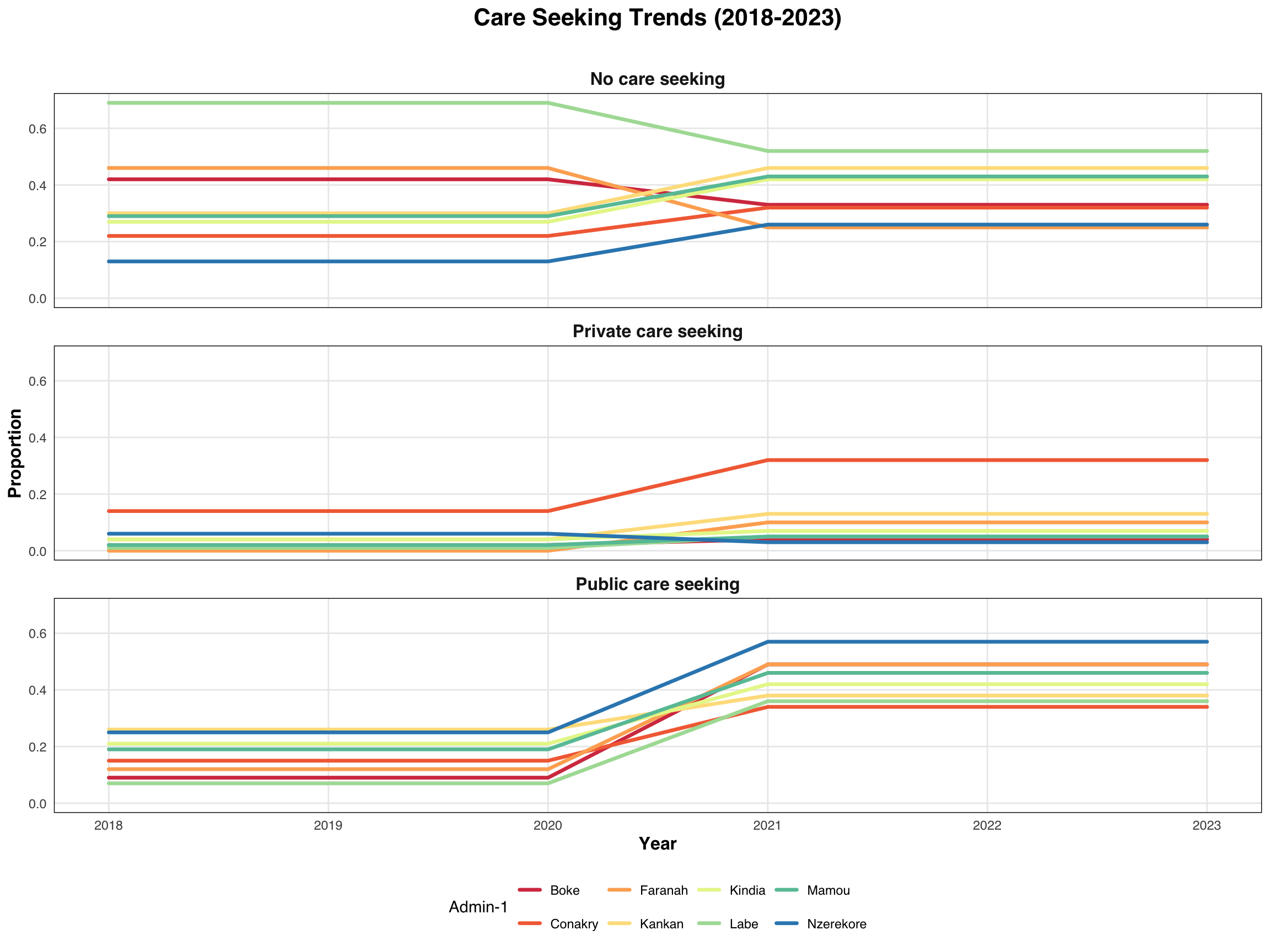
We calculated the proportion of children under five who had fever in the two weeks preceding each survey and who sought care in the public or private sectors, or did not seek any care, for the years with available survey data. To estimate values for years without surveys, we present two approaches:

  • Use data from a given survey year until a new survey becomes available, or apply the most recent survey data available
  • Linear interpolation: This method estimates values between two known data points by assuming a straight line between them

Other approaches are also possible. For example, it may be a good idea to use contextual knowledge of when policy changes occurred to inform when changes in treatment-seeking rate should also occur.

Since Sierra Leone changed its admin-1 units between survey years, we will instead use Guinea’s survey data from 2018 and 2021 in this example exercise. We will limit the analysis to children who had fever in the two weeks preceding the survey, without considering their RDT test result.

The dataset generated in Step 5, applied to Guinea’s surveys, is used as input in this step.

Consult SNT team

Ask the SNT team which method they prefer for estimating treatment-seeking rates in years without survey data. Each method has trade-offs. Using data from a given survey year until a new survey becomes available assumes treatment-seeking rates remain constant between surveys. The linear interpolation method assumes a gradual change over time rather than abrupt shifts. The SNT team should choose based on how they believe care-seeking behavior changed between survey years.

Step 6.1: Use Data from the Most Recent Survey Until a New One Becomes Available

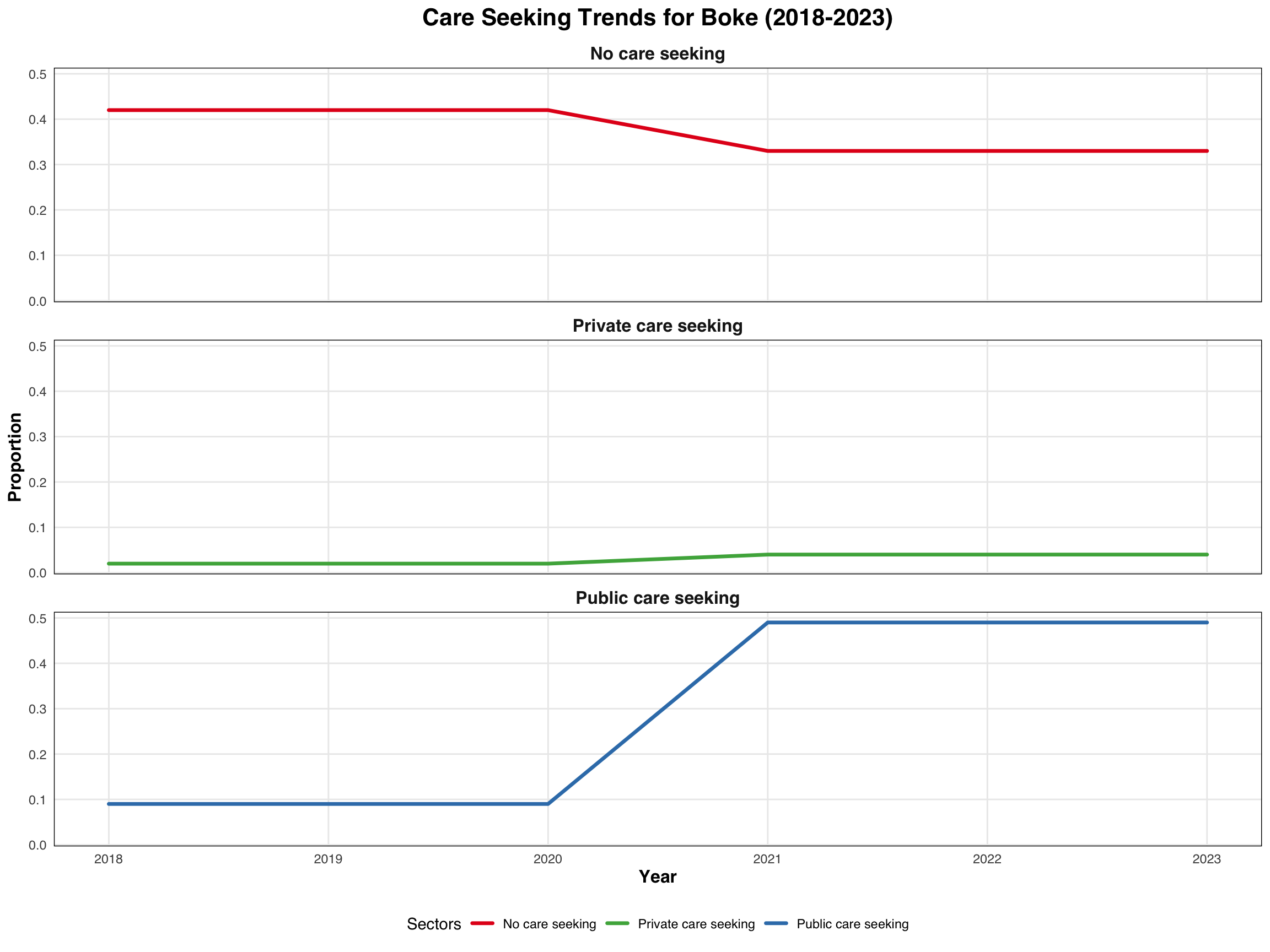
This code imports treatment-seeking data by admin-1 and year, fills in missing years (e.g., 2019, 2020, 2022, 2023) by carrying forward the most recent available survey values, reshapes the data into long format to organize indicators by sector, and generates line plots to visualize trends in the public sector, private sector, and no care-seeking both nationally and for a specific admin-1.

  • R
  • Python
Show the code
# Import Guinea treatment seeking rate file
data_inter <- read.csv(here::here("1.6_health_systems/misc/GN_treatment_seeking.csv"))

# Define the target years you want in the final dataset
target_years <- c(2018, 2019, 2020, 2021, 2022, 2023)

# Expand the dataset for all admin × year combinations
df_full <- expand.grid(
  adm1 = unique(data_inter$adm1),
  year = target_years
) |>
  dplyr::left_join(data_inter, by = c("adm1", "year")) |>
  dplyr::arrange(adm1, year)

# Fill missing values using last observation carried forward within each admin
df_filled <- df_full |>
  dplyr::group_by(adm1) |>
  tidyr::fill(pub, priv, no_treat, .direction = "down") |>
  dplyr::ungroup()

# Pivot the table in long format to have all indicators in a single column
medfever_dhs_fitted_all_long <- df_filled |>
  tidyr::pivot_longer(
    cols = c("pub", "priv", "no_treat"),
    names_to = "Sectors",
    values_to = "Proportion"
  ) |>
  dplyr::mutate(
    Sectors = dplyr::recode(Sectors,
      "pub" = "Public care seeking",
      "priv" = "Private care seeking",
      "no_treat" = "No care seeking"
    )
  )

# Visualizing indicators using ggplot2
p <- medfever_dhs_fitted_all_long |>
ggplot2::ggplot(
  ggplot2::aes(x = year, y = Proportion,
               group = adm1, color = factor(adm1))) +
  ggplot2::geom_line(linewidth = 1.2, lineend = "round") +
  ggplot2::scale_color_brewer(palette = "Spectral") +
  ggplot2::facet_wrap(~ Sectors, ncol = 1) +
  ggplot2::theme_minimal() +
  ggplot2::labs(title = "Care Seeking Trends (2018-2023)\n",
       x = "Year",
       y = "Proportion",
       color = "Admin-1") +
  ggplot2::theme(
    text = ggplot2::element_text(family = "sans"),
    plot.title = ggplot2::element_text(hjust = 0.5, face = "bold", size = 16),
    strip.text = ggplot2::element_text(face = "bold", size = 12),
    panel.grid.minor = ggplot2::element_blank(),
    panel.border = ggplot2::element_rect(color = "black", fill = NA, size = 0.5),
    axis.title = ggplot2::element_text(size = 12, face = "bold"),
    legend.position = "bottom"
  )
# Print output
p

# Visualizing indicators using ggplot2
p1 <- medfever_dhs_fitted_all_long |>
dplyr::filter(adm1 == "Boke") |>
ggplot2::ggplot(
  ggplot2::aes(x = year, y = Proportion, color = Sectors)) +
  ggplot2::geom_line(size = 1.2, lineend = "round") +
  ggplot2::scale_color_manual(values = c("No care seeking" = "#E41A1C",
                               "Private care seeking" = "#4DAF4A",
                               "Public care seeking" = "#377EB8")) +
  ggplot2::facet_wrap(~ Sectors, ncol = 1) +
  ggplot2::theme_minimal() +
  ggplot2::labs(title = "Care Seeking Trends for Boke (2018-2023)",
       x = "Year",
       y = "Proportion",
       color = "Sectors") +
  ggplot2::theme(
    text = ggplot2::element_text(family = "sans"),
    plot.title = ggplot2::element_text(hjust = 0.5, face = "bold", size = 16),
    strip.text = ggplot2::element_text(face = "bold", size = 12),
    panel.grid.minor = ggplot2::element_blank(),
    panel.border = ggplot2::element_rect(color = "black", fill = NA, size = 0.5),
    axis.title = ggplot2::element_text(size = 12, face = "bold"),
    legend.position = "bottom"
  )

# Print output
p1

# Save to PNG
ggplot2::ggsave(
  filename = here::here("03_output/3a_figures",
             "care_seeking_trends_2018-2023.png"),
  plot = p, width = 10, height = 6, dpi = 300)

# Save to PNG
ggplot2::ggsave(
  filename = here::here("03_output/3a_figures",
             "boke_care_seeking_trends_2018-2023.png"),
  plot = p1, width = 10, height = 6, dpi = 300)
Output

To adapt the code:

  • Line 2: Change the name of the file to be used
  • Line 5: Add or reduce years according to your years without surveys

Step 6.2: Linear interpolation

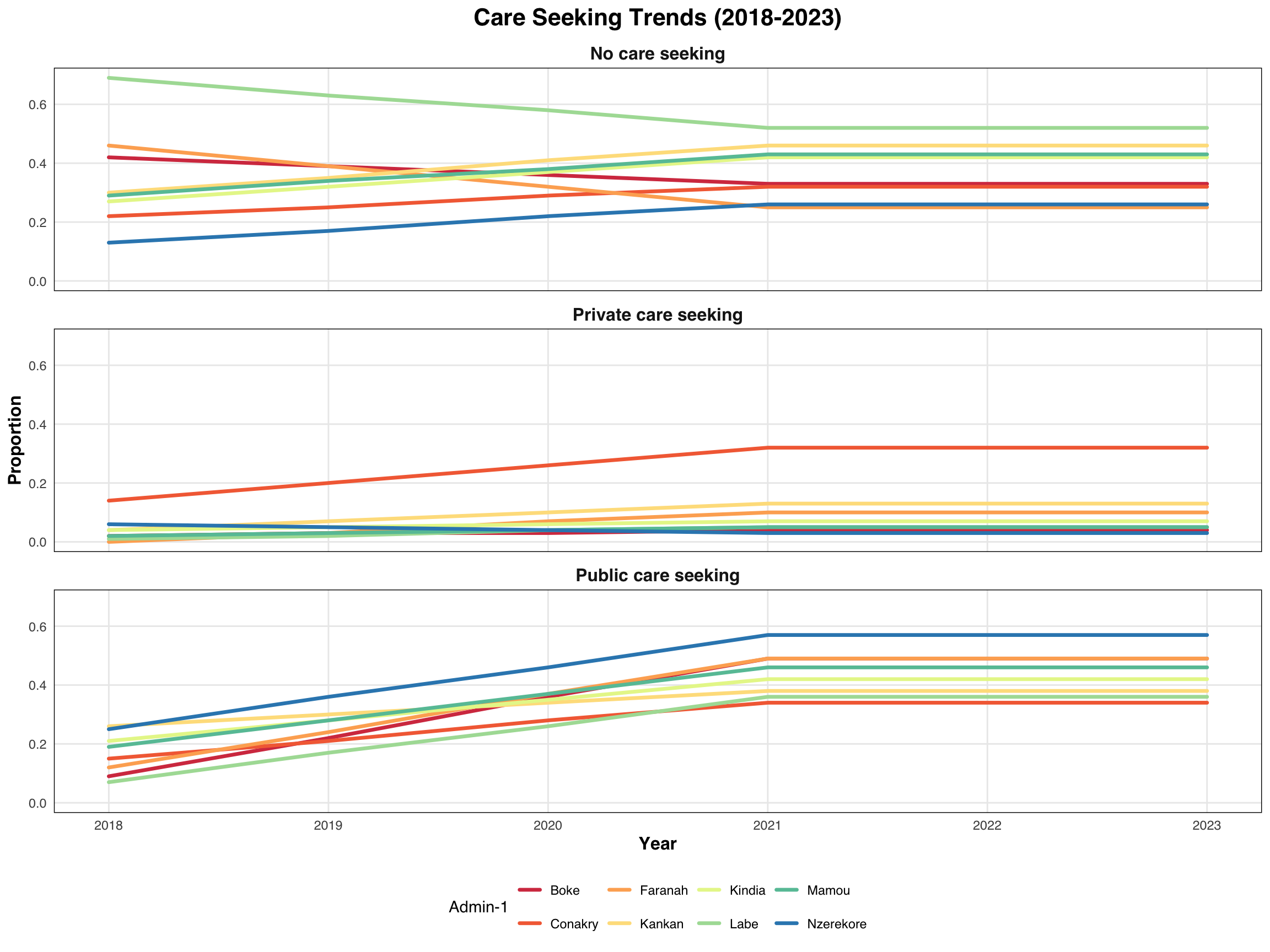
The approx() function performs linear interpolation, which means it fills in values between two known data points by drawing a straight line between them. This is useful when you want to estimate values for years without survey data, based only on the years where surveys were conducted.

For example, if a survey was done in 2018 and another in 2021, approx() can estimate the values for 2019 and 2020 by assuming that the change between 2018 and 2021 happened at a constant rate. However, it needs at least two survey points to do this. Otherwise, it can’t draw a line. Also, it won’t estimate values outside the survey years unless you explicitly allow extrapolation.

This approach is helpful when you want a simple and transparent way to fill in gaps without making assumptions about longer-term trends.

  • R
  • Python
Show the code
# Define target years for interpolation
target_years <- c(2019, 2020, 2022, 2023)

# Initialize an empty list to store interpolated results
interpolated_data <- list()

# Loop through each admin-1 (adm1)
for (reg in unique(data_inter$adm1)) {
  # Subset data for the current region
  reg_data <- data_inter[data_inter$adm1 == reg, ]

  # Interpolate each variable (pub, priv, no.treat) using approx()
  interp_pub <- approx(reg_data$year, reg_data$pub,
                       xout = target_years, rule = 2)$y

  interp_priv <- approx(reg_data$year, reg_data$priv,
                        xout = target_years, rule = 2)$y

  interp_notrt <- approx(reg_data$year, reg_data$no_treat,
                         xout = target_years, rule = 2)$y

  # Combine into a data frame for this region
  reg_result <- data.frame(
    adm1 = reg,
    year = target_years,
    pub = round(interp_pub, 2),
    priv = round(interp_priv, 2),
    no_treat = round(interp_notrt, 2)
  )

  # Append to the list
  interpolated_data[[reg]] <- reg_result
}

# Combine all regions into a single data frame
medfever_dhs_interp_finale <- dplyr::bind_rows(interpolated_data) |>
  # bind all years in one file
  dplyr::bind_rows(data_inter)

# Pivot the table in long format to have all indicators in a single column
medfever_dhs_inter_long <- medfever_dhs_interp_finale |>
   tidyr::pivot_longer(cols = c("pub", "priv", "no_treat"),
                     names_to = "Sectors",
                     values_to = "Proportion") |>
  dplyr::mutate(
    Sectors = dplyr::recode(Sectors,
      "pub" = "Public care seeking",
      "priv" = "Private care seeking",
      "no_treat" = "No care seeking"
    )
  )

# Visualizing indicators using ggplot2
p2 <- medfever_dhs_inter_long |>
 ggplot2::ggplot(
   ggplot2::aes(x = year, y = Proportion,
                group = adm1, color = factor(adm1))) +
  ggplot2::geom_line(size = 1.2, lineend = "round") +
  ggplot2::scale_color_brewer(palette = "Spectral") +
  ggplot2::facet_wrap(~ Sectors, ncol = 1) +
  ggplot2::theme_minimal() +
  ggplot2::labs(title = "Care Seeking Trends (2018-2023)",
       x = "Year",
       y = "Proportion",
       color = "Admin-1") +
  ggplot2::theme(
    text = ggplot2::element_text(family = "sans"),
    plot.title = ggplot2::element_text(hjust = 0.5, face = "bold", size = 16),
    strip.text = ggplot2::element_text(face = "bold", size = 12),
    panel.grid.minor = ggplot2::element_blank(),
    panel.border = ggplot2::element_rect(color = "black", fill = NA, size = 0.5),
    axis.title = ggplot2::element_text(size = 12, face = "bold"),
    legend.position = "bottom"
  )

# Print output
p2

# Save to PNG
ggplot2::ggsave(
  filename = here::here("03_output/3a_figures",
             "care_seeking_trends_2018-2023.png"),
  plot = p, width = 10, height = 6, dpi = 300)
Output

To adapt the code:

  • Line 2: Add or reduce years according to your years without surveys
  • Line 13,17,20: Delete rule=2 if you don’t include any lines beyond the survey points and don’t require extrapolation

Step 7: Save the Output

We have now estimated the three indicators at the admin-1 level and will save the files in the appropriate format for later use, such as for epidemiological stratification.

Make sure you check your save_path for the location of your output CSV file.

We chose to save all CSV outputs (no estimates for years between surveys, keeping the same value until the next survey, and linear interpolation) in this directory to include estimation files for years without surveys.

You may opt to save your CSV files earlier, depending on what is most convenient for your workflow.

  • R
  • Python
Show the code
# set up output path
save_path <- here::here("1.6_health_systems/1.6a_dhs/processed")

# save to csv
rio::export(data_fever_care,
            here::here(save_path, "care_seeking_data.csv"))

# save keep until next survey year to csv
rio::export(medfever_dhs_fitted_all_long,
            here::here(save_path, "medfever_dhs_linear.csv"))

# save linear interpolation to csv
rio::export(medfever_dhs_inter_long,
            here::here(save_path, "medfever_dhs_interp.csv"))

To adapt the code:

  • Line 2: Update the filename path to match your folder structure
  • Line 6 onwards: You can modify your output extension type, for example writexl::write_xlsx() for xlsx

Summary

We calculated treatment-seeking rates for children who sought care from public and private sector sources, as well as those who did not seek care. We performed this analysis under two options: children with reported fever in the two weeks preceding the survey, and children with reported fever who also tested positive via RDT. The SNT team is advised to select the preferred scenario for subsequent analysis.

We estimated values for non-survey years using two methodological approaches: use data from a given survey year until a new survey becomes available and linear interpolation. We recommend that the SNT team review and determine the most appropriate method for imputing these missing data points.

The full code, reduced for ease of reference, is provided at the bottom of this section. You can reuse it as is or modify it for your configuration by updating the file paths and survey type.

Full code

  • R
  • Python
Show the code
#===============================================================================
# Step 1: Set-Up and Download DHS data
#===============================================================================

# Install pacman only if it's not already installed
if (!requireNamespace("pacman", quietly = TRUE)) {
  install.packages("pacman")
}

# install or load relevant packages
pacman::p_load(
  rdhs,      # for downloading dhs data
  tidyverse, # core tidy tools (includes dplyr, tidyr, readr, etc.)
  haven,     # read and write various data formats (stata)
  httr,      # download files from web (GET, write_disk)
  rio,       # importing data
  here,      # relative file pathways
  data.table,# is an excellent extension of the data.frame class
  fs,        # handle file paths
  purrr,     # iterate over lists (map, walk, etc.)
  rlang,     # for tidy evaluation and error messaging
  survey,    # analyzing data from complex surveys
  sf,        # Support for simple feature access, a standardized way
  # to encode and analyze spatial vector data
  tmap,      # drawing thematic maps
  knitr      # Make table
)

# Create a complex survey design object
svydesign.fun <- function(filename){
  ## Create a Survey Design Object
  survey::svydesign(id = ~id,
                    strata = ~strate, nest = T,
                    weights = ~wt, data = filename)
}

# Computes survey-weighted proportions
result.prop <- function(var, var1, design) {
  p_est <- survey::svyby(formula = make.formula(var), by = make.formula(var1),
                         FUN = svymean, design, levels = 0.95, vartype = "ci",
                         na.rm = T, influence = TRUE)
}

# Estimation functions
estim_prop <- function(df, col, by){
  svy_mal <- svydesign.fun(df)
  region_est <- result.prop(col, by, design = svy_mal)
}

# Set DHS configuration
rdhs::set_rdhs_config(
  email = "my_email_address@gmail.com",
  project = "SNT for SL",
  config_path = "dhs.json",
  cache_path = here::here("1.6_health_systems/1.6a_dhs"),
  data_frame = "data.table::as.data.table",
  global = FALSE,
  password_prompt = TRUE,
  verbose_setup = TRUE,
  timeout = 120,
  verbose_download = TRUE
)

# Get the 2013 and 2019 SL DHS and MIS dataset filenames
data_filename <- rdhs::dhs_datasets(
  countryIds = "SL",
  surveyYear = c("2016", "2019"),
  fileType = c("KR", "PR"),
  surveyType = c("DHS", "MIS"),
  fileFormat = "FLAT"
) |>
  dplyr::group_by(DatasetType, CountryName, FileType) |>
  dplyr::distinct() |>
  dplyr::pull(FileName)

# Download the DHS datasets
rdhs::get_datasets(
  dataset_filenames = data_filename,
  download_option = "rds",
  output_dir_root = here::here("1.6_health_systems/1.6a_dhs/raw"),
  clear_cache = TRUE
)

#===============================================================================
# Step 2: Extract Children with Recent (Malaria) Fever
#===============================================================================

# Import and process DHS KR files for 2013 and 2019
mis_kr_2016 <- readRDS(
  here::here("1.6_health_systems/1.6a_dhs/raw/SLKR73FL.rds")) |>
  haven::zap_labels() |> # remove labels to make merging easier
  dplyr::select(
    caseid, v001, v002, v003, v007, v012, v022, v021,
    v024, v101, v005, b5, b8, b19, h22, h32a:h32y
  )

dhs_kr_2019 <- readRDS(
  here::here("1.6_health_systems/1.6a_dhs/raw/SLKR7AFL.rds")) |>
  haven::zap_labels() |> # remove labels to make merging easier
  dplyr::select(
    caseid, v001, v002, v003, v007, v012, v022, v021,
    v024, v101, v005, b5, b8, b19, h22, h32a:h32y
  )

# Combine both survey rounds
dhs_kr <- dplyr::bind_rows(mis_kr_2016, dhs_kr_2019)

# Process each dataset in the list
dhs <- dhs_kr |>

  # Create helper variables: admin-1, weights, strata,
  # cluster ID, year, fever indicator
  dplyr::mutate(
    adm1 = ifelse(is.na(v024), v101, v024),
    wt = v005 / 1000000, strate = v022, id = v021,
    year = v007,
    ml_fever = ifelse(h22 == 1, 1, 0)) |>

  # Recode admin-1 region codes to consistent readable region names (year-dependent)
  dplyr::mutate(
    adm1 = dplyr::case_when(
      adm1 == 1 ~ "eastern",
      adm1 == 2 ~ "northern",
      adm1 == 3 & year == 2019 ~ "north western",
      adm1 == 3 & year == 2016 ~ "southern",
      adm1 == 4 & year == 2019 ~ "southern",
      adm1 == 4 & year == 2016 ~ "western",
      adm1 == 5 ~ "western",
      TRUE ~ NA_character_
    )) |>

  # Filter to include only living children under age 5 with valid fever responses
  dplyr::filter(
    b5 == 1 & b19 < 60 & h22 != 8)

# File with only children with fever
dhs_fever <- dhs |>
  dplyr::filter(ml_fever == 1)

# Filter to fever cases and summarize by admin-1
data_output = dhs |>
  dplyr::filter(ml_fever == 1) |>
  dplyr::group_by(adm1) |>
  dplyr::summarise(ml_fever = sum(ml_fever, na.rm = T))

# Display summary table with number of fevers by admin-1
knitr::kable(data_output, caption = "Number of fevers by admin-1 level")

# Import and process MIS PR files for 2013 and 2019
mis_pr_2016 <- readRDS(here::here("1.6_health_systems/1.6a_dhs/raw/SLPR73FL.rds")) |>
  haven::zap_labels() |> # remove labels to make merging easier
  dplyr::select(
    v001 = hv001, v002 = hv002, v007 = hv007, hv103,
    hv042, hc1, rdt = hml35)

dhs_pr_2019 <- readRDS(here::here("1.6_health_systems/1.6a_dhs/raw/SLPR7AFL.rds")) |>
  haven::zap_labels() |> # remove labels to make merging easier
  dplyr::select(
    v001 = hv001, v002 = hv002, v007 = hv007, hv103,
    hv042, hc1, rdt = hml35)

# Combine both survey rounds
dhs_pr <- dplyr::bind_rows(mis_pr_2016, mis_pr_2016)

# From the PR file, extract children under 5 who are eligible and RDT positive
data_pr <- dhs_pr |>
  dplyr::filter(
    hv042 == 1 & hv103 == 1 & hc1 %in% c(6:59) & rdt == 1) |>
  dplyr::select(-hv042, -hv103, -hc1)

# Merge fever data with RDT-positive data by cluster, household, and survey year
data_pr_kr <- dhs_fever |>
  dplyr::left_join(
    data_pr, by = c("v001", "v002", "v007"),
    relationship = "many-to-many") |>
  dplyr::filter(rdt == 1) |>
  dplyr::select(-dplyr::starts_with(".id"))

# Group by admin-1 and sum number of RDT-positive children
data_output_rdt = data_pr_kr |>
  dplyr::group_by(adm1) |>
  dplyr::summarise(rdt = sum(rdt, na.rm = T))

# Display the result in a formatted table
knitr::kable(data_output_rdt,
             caption = "Number of RDT-positive fevers by admin-1")

#===============================================================================
# Step 3: Assign Recent Fevers to Source of Treatment
#===============================================================================

dhs_care_seeking <- dhs |>
  # Filter by key factors (child had a fever in last two weeks: h22)
  dplyr::filter(ml_fever == 1) |>

  # Assigning each child to public, private and no care-seeking
  dplyr::mutate(
    ml_fever_pub = rowSums(
      dplyr::across(
        c(
          h32a, h32b, h32c, h32d, h32e,
          h32f, h32g, h32h, h32i
        )), na.rm = TRUE),

    ml_fever_priv = rowSums(
      dplyr::across(
        c(
          h32j, h32k, h32l, h32m, h32n,
          h32o, h32p, h32q, h32r, h32s,
          h32t, h32u, h32v, h32w, h32x
        )), na.rm = TRUE),

    pub = ifelse(ml_fever_pub > 0, 1, 0),
    priv = ifelse(ml_fever_priv > 0, 1, 0),
    pub = ifelse(pub == 1 & priv == 1, 1, pub),
    no_treat = ifelse(h32y == 0, 0, 1)
  )

#===============================================================================
# Step 4: Estimate Treatment-Seeking Rates by Sector at Admin-1 Level
#===============================================================================

# Define indicators
vars <- c("pub", "priv", "no_treat")

# Handle single PSU strata
options(survey.lonely.psu = "adjust")

# Process each dataset in dhs file
data_fever_care <- dhs_care_seeking |>
  # Add a year column
  dplyr::mutate(year = v007) |>
  # Compute proportions for each indicator
  estim_prop(col = vars, by = c("adm1", "year")) |>
  # rename columns, and format
  dplyr::rename(adm1 = 1, year = 2) |>
  dplyr::select(adm1, year, pub, priv, no_treat) |>
  dplyr::mutate(
    pub = round(pub, 2),
    priv = round(priv, 2),
    no_treat = round(no_treat, 2),
    year = as.numeric(year)
  )

# Reset row name
rownames(data_fever_care) <- NULL


#===============================================================================
# Step 5: Visualize Treatment-Seeking Rates by Sector
#===============================================================================

# Import the shapefile using st_read
shp <- readRDS(
  here::here("01_foundational/1a_administrative_boundaries",
             "1ai_adm3", "sle_adm1_shp.rds")
) |>  sf::st_as_sf()

# Pivot the table in long format to have all indicators in a single column
data_care_shp <- data_fever_care |>
  tidyr::pivot_longer(cols = c("pub", "priv", "no_treat"),
                      names_to = "Sectors",
                      values_to = "values") |>
  dplyr::mutate(
    Sectors = dplyr::recode(Sectors,
                            "pub" = "Public care seeking",
                            "priv" = "Private care seeking",
                            "no_treat" = "No care seeking"
    )
  )

# Merge shapefile with care-seeking date
dhs_shp_region <- shp |>
  dplyr::left_join(data_care_shp, by = c("adm1"),
                   relationship = "many-to-many")

# Create a map to viualize the indicators
g <- dhs_shp_region |>
  dplyr::filter(year == 2019) |>
  ggplot2::ggplot() +
  ggplot2::geom_sf(aes(fill = values), color = "black", size = 0.2) +
  ggplot2::facet_wrap(~ Sectors, nrow = 1) +
  ggplot2::scale_fill_distiller(
    palette = "RdYlBu",
    limits = c(0, 1),
    breaks = seq(0, 1, by = 0.1),
    direction = 1,
    na.value = "transparent",
    name = NULL
  ) +
  ggplot2::theme_void() +
  ggplot2::theme(
    legend.position = "right",
    legend.title = ggplot2::element_text(size = 10),
    legend.text = ggplot2::element_text(size = 8),
    panel.grid = ggplot2::element_blank(),
    strip.background = ggplot2::element_blank(),
    strip.text = ggplot2::element_text(
      face = "bold", size = 11, margin = ggplot2::margin(b = 10)),
    strip.placement = "outside",
    plot.title = ggplot2::element_text(hjust = 0.5, size = 14)
  ) +
  ggplot2::labs(title = "Proportion of recent fevers seeking care in each sector\n\n")

# plot
g

# Save to PNG
ggplot2::ggsave(
  filename = here::here("03_output/3a_figures",
                        "prop_recent_fevers_seeking_care_in_each_sector.png"),
  plot = g, width = 10, height = 6, dpi = 300)


#===============================================================================
# Step 6: Estimate Values for Years Without Surveys
#===============================================================================

# Import Guinea treatment seeking rate file
data_inter <- read.csv(here::here("1.6_health_systems/misc/GN_treatment_seeking.csv"))

# Define the target years you want in the final dataset
target_years <- c(2018, 2019, 2020, 2021, 2022, 2023)

# Expand the dataset for all admin × year combinations
df_full <- expand.grid(
  adm1 = unique(data_inter$adm1),
  year = target_years
) |>
  dplyr::left_join(data_inter, by = c("adm1", "year")) |>
  dplyr::arrange(adm1, year)

# Fill missing values using last observation carried forward within each admin
df_filled <- df_full |>
  dplyr::group_by(adm1) |>
  tidyr::fill(pub, priv, no_treat, .direction = "down") |>
  dplyr::ungroup()

# Pivot the table in long format to have all indicators in a single column
medfever_dhs_fitted_all_long <- df_filled |>
  tidyr::pivot_longer(
    cols = c("pub", "priv", "no_treat"),
    names_to = "Sectors",
    values_to = "Proportion"
  ) |>
  dplyr::mutate(
    Sectors = dplyr::recode(Sectors,
                            "pub" = "Public care seeking",
                            "priv" = "Private care seeking",
                            "no_treat" = "No care seeking"
    )
  )

# Visualizing indicators using ggplot2
p <- medfever_dhs_fitted_all_long |>
  ggplot2::ggplot(
    ggplot2::aes(x = year, y = Proportion,
                 group = adm1, color = factor(adm1))) +
  ggplot2::geom_line(linewidth = 1.2, lineend = "round") +
  ggplot2::scale_color_brewer(palette = "Spectral") +
  ggplot2::facet_wrap(~ Sectors, ncol = 1) +
  ggplot2::theme_minimal() +
  ggplot2::labs(title = "Care Seeking Trends (2018-2023)\n",
                x = "Year",
                y = "Proportion",
                color = "Admin-1") +
  ggplot2::theme(
    text = ggplot2::element_text(family = "sans"),
    plot.title = ggplot2::element_text(hjust = 0.5, face = "bold", size = 16),
    strip.text = ggplot2::element_text(face = "bold", size = 12),
    panel.grid.minor = ggplot2::element_blank(),
    panel.border = ggplot2::element_rect(color = "black", fill = NA, size = 0.5),
    axis.title = ggplot2::element_text(size = 12, face = "bold"),
    legend.position = "bottom"
  )
# Print output
p

# Visualizing indicators using ggplot2
p1 <- medfever_dhs_fitted_all_long |>
  dplyr::filter(adm1 == "Boke") |>
  ggplot2::ggplot(
    ggplot2::aes(x = year, y = Proportion, color = Sectors)) +
  ggplot2::geom_line(size = 1.2, lineend = "round") +
  ggplot2::scale_color_manual(values = c("No care seeking" = "#E41A1C",
                                         "Private care seeking" = "#4DAF4A",
                                         "Public care seeking" = "#377EB8")) +
  ggplot2::facet_wrap(~ Sectors, ncol = 1) +
  ggplot2::theme_minimal() +
  ggplot2::labs(title = "Care Seeking Trends for Boke (2018-2023)",
                x = "Year",
                y = "Proportion",
                color = "Sectors") +
  ggplot2::theme(
    text = ggplot2::element_text(family = "sans"),
    plot.title = ggplot2::element_text(hjust = 0.5, face = "bold", size = 16),
    strip.text = ggplot2::element_text(face = "bold", size = 12),
    panel.grid.minor = ggplot2::element_blank(),
    panel.border = ggplot2::element_rect(color = "black", fill = NA, size = 0.5),
    axis.title = ggplot2::element_text(size = 12, face = "bold"),
    legend.position = "bottom"
  )

# Print output
p1

# Save to PNG
ggplot2::ggsave(
  filename = here::here("03_output/3a_figures",
                        "care_seeking_trends_2018-2023.png"),
  plot = p, width = 10, height = 6, dpi = 300)

# Save to PNG
ggplot2::ggsave(
  filename = here::here("03_output/3a_figures",
                        "boke_care_seeking_trends_2018-2023.png"),
  plot = p1, width = 10, height = 6, dpi = 300)

# Define target years for interpolation
target_years <- c(2019, 2020, 2022, 2023)

# Initialize an empty list to store interpolated results
interpolated_data <- list()

# Loop through each admin-1 (adm1)
for (reg in unique(data_inter$adm1)) {
  # Subset data for the current region
  reg_data <- data_inter[data_inter$adm1 == reg, ]

  # Interpolate each variable (pub, priv, no.treat) using approx()
  interp_pub <- approx(reg_data$year, reg_data$pub,
                       xout = target_years, rule = 2)$y

  interp_priv <- approx(reg_data$year, reg_data$priv,
                        xout = target_years, rule = 2)$y

  interp_notrt <- approx(reg_data$year, reg_data$no_treat,
                         xout = target_years, rule = 2)$y

  # Combine into a data frame for this region
  reg_result <- data.frame(
    adm1 = reg,
    year = target_years,
    pub = round(interp_pub, 2),
    priv = round(interp_priv, 2),
    no_treat = round(interp_notrt, 2)
  )

  # Append to the list
  interpolated_data[[reg]] <- reg_result
}

# Combine all regions into a single data frame
medfever_dhs_interp_finale <- dplyr::bind_rows(interpolated_data) |>
  # bind all years in one file
  dplyr::bind_rows(data_inter)

# Pivot the table in long format to have all indicators in a single column
medfever_dhs_inter_long <- medfever_dhs_interp_finale |>
  tidyr::pivot_longer(cols = c("pub", "priv", "no_treat"),
                      names_to = "Sectors",
                      values_to = "Proportion") |>
  dplyr::mutate(
    Sectors = dplyr::recode(Sectors,
                            "pub" = "Public care seeking",
                            "priv" = "Private care seeking",
                            "no_treat" = "No care seeking"
    )
  )

# Visualizing indicators using ggplot2
p2 <- medfever_dhs_inter_long |>
  ggplot2::ggplot(
    ggplot2::aes(x = year, y = Proportion,
                 group = adm1, color = factor(adm1))) +
  ggplot2::geom_line(size = 1.2, lineend = "round") +
  ggplot2::scale_color_brewer(palette = "Spectral") +
  ggplot2::facet_wrap(~ Sectors, ncol = 1) +
  ggplot2::theme_minimal() +
  ggplot2::labs(title = "Care Seeking Trends (2018-2023)",
                x = "Year",
                y = "Proportion",
                color = "Admin-1") +
  ggplot2::theme(
    text = ggplot2::element_text(family = "sans"),
    plot.title = ggplot2::element_text(hjust = 0.5, face = "bold", size = 16),
    strip.text = ggplot2::element_text(face = "bold", size = 12),
    panel.grid.minor = ggplot2::element_blank(),
    panel.border = ggplot2::element_rect(color = "black", fill = NA, size = 0.5),
    axis.title = ggplot2::element_text(size = 12, face = "bold"),
    legend.position = "bottom"
  )

# Print output
p2

# Save to PNG
ggplot2::ggsave(
  filename = here::here("03_output/3a_figures",
                        "care_seeking_trends_2018-2023.png"),
  plot = p, width = 10, height = 6, dpi = 300)

#===============================================================================
# Step 7: Save the Output
#===============================================================================

# set up output path
save_path <- here::here("1.6_health_systems/1.6a_dhs/processed")

# save to csv
rio::export(data_fever_care,
            here::here(save_path, "care_seeking_data.csv"))

# save to csv
rio::export(medfever_dhs_inter_long,
            here::here(save_path, "medfever_dhs_interp.csv"))

# save to csv
rio::export(medfever_dhs_fitted_all_long,
            here::here(save_path, "medfever_DHS_linear.csv"))
 

©2025 Applied Health Analytics for Delivery and Innovation. All rights reserved